Laptops

Best Laptops for Kids (2026): 6 Picks for School, Roblox, Minecraft and Fortnite

Boy using a laptop

For most kids, a Chromebook such as the Lenovo Chromebook Plus i 15 is the best laptop: it handles schoolwork, runs Roblox from the Google Play Store, and Google’s parental controls are built in. If your child wants Fortnite or more demanding PC games, get a Windows gaming laptop such as the Lenovo LOQ 15 with an RTX 5050. For older kids and teens who want a Mac, the MacBook Neo (Apple’s cheapest laptop) runs Roblox, but it falls below Minecraft: Java Edition’s new minimum, so for Minecraft on a Mac look at the MacBook Air (M5).

Check the Lenovo Chromebook Plus i 15 on Amazon →

How we put this together: this guide is based on the official system requirements from Roblox, Mojang and Epic Games, manufacturers’ specifications and published reviews (linked below). It is not based on hands-on testing by iTech Level. Prices are list or launch prices at the time of writing. See how we choose products.

Best laptops for kids compared

LaptopBest forRobloxMinecraftFortniteBuy
Lenovo Chromebook Plus i 15Most kids: school + RobloxPlays (Play Store); no StudioBedrock, if your model is supportedCloud gaming onlyCheck price
Acer Chromebook 315Cheapest for schoolPlays (Play Store); no StudioCheck your modelCloud gaming onlyCheck price
Lenovo Chromebook Duet 11 (8GB)Younger kids, tablet + keyboardPlays (Play Store); no StudioCheck your modelCloud gaming onlyCheck price
Acer Aspire Go 15Cheap Windows laptopPlays + StudioBedrock; Java not guaranteedLow settingsCheck price
Lenovo LOQ 15 (RTX 5050)Fortnite and PC gamingPlays + StudioYes (Java + Bedrock)Yes, medium settings+Check price
Apple MacBook NeoOlder kids who want a MacPlays + StudioBelow Java’s new minimumCheck firstCheck price

What does a laptop need for Roblox, Minecraft and Fortnite?

  • Roblox asks for very little: Windows 10 or 11 (64-bit), macOS 10.13 or later, or a Chromebook with the Google Play Store, plus about 1GB of memory and a 1.6 GHz processor. Almost any current laptop runs it (Roblox).
  • Minecraft on a Chromebook needs ChromeOS 114 or later and at least an Intel Celeron N4100 or Core i3-4150-class processor, with 8GB of memory recommended (Minecraft). Not every Chromebook is supported, so check that Minecraft can be installed from the Play Store on the exact model before buying it for that game. On Windows, the PC version includes both Java and Bedrock Editions. Bedrock needs only 4GB of memory, but on July 21, 2026, Mojang raised Java Edition’s requirements: at least 8GB of memory with a graphics card or 12GB with integrated graphics, a Vulkan 1.3 graphics chip, and an Apple M1 or newer on a Mac; 16GB and a 6GB graphics card are recommended (Minecraft).
  • Fortnite is the demanding one. Epic’s minimum for Windows is 8GB of memory and Intel HD 4000 or AMD Radeon Vega 8 graphics; the recommended spec is 16GB with a GTX 960-class graphics card (Epic Games). A laptop that only meets the minimum will run it at low settings.

Playing Roblox vs building in Roblox Studio

Playing Roblox needs almost nothing: Roblox says a laptop less than three years old with integrated graphics is enough for good performance. But many kids also want to make their own Roblox games, and that’s a different story. Roblox Studio, the free app used to build them, only runs on Windows and Mac. Its minimum is Windows 10 or macOS 10.14 with 3GB of memory, and Roblox recommends Windows 11 or macOS 14 or later, 8GB of memory and a screen of at least 1600×900 (Roblox Creator Hub). Chromebooks and tablets can play Roblox but can’t run Studio.

LaptopPlay RobloxBuild in Roblox StudioWhy
Lenovo Chromebook Plus i 15Yes (Play Store)NoStudio isn’t available for ChromeOS
Acer Chromebook 315Yes (Play Store)NoStudio isn’t available for ChromeOS
Lenovo Chromebook Duet 11Yes (Play Store)NoStudio isn’t available for ChromeOS
Acer Aspire Go 15YesYesWindows, 16GB and a 1920×1080 screen: above Roblox’s recommendation
Lenovo LOQ 15 (RTX 5050)Yes, at high settingsYes16GB, a 1080p screen and a real graphics card for big, detailed games
Apple MacBook NeoYesYesCurrent macOS, 8GB (Roblox’s recommendation) and a 2408×1506 screen

If your child is likely to start building, skip the Chromebooks and pick a Windows laptop or a Mac with at least 8GB of memory. Also check the screen: many of the cheapest Windows laptops still use 1366×768 panels, below the 1600×900 Roblox recommends for Studio, which makes its many panels cramped. A 1920×1080 screen or sharper is the safe choice.

The best laptops for kids in 2026

1. Lenovo Chromebook Plus i 15: best laptop for most kids

The Chromebook Plus i 15 was announced at CES 2026 (Notebookcheck). Its Intel Core i3-N355 and 8GB of memory are well above what Roblox needs, the 15.3-inch 1920×1200 screen is big enough for schoolwork, and Lenovo rates the battery at up to 11 hours. It also has a 5MP webcam with a privacy shutter, a fingerprint reader and HDMI. Chromebooks update automatically, and Google Family Link lets you manage apps and screen time.

Good to know: Chromebooks can’t run Windows games, and there’s no Fortnite app for ChromeOS; it can only be streamed through a cloud gaming service such as GeForce NOW. If those matter, skip to the Windows picks.

Check the Chromebook Plus i 15 on Amazon →

2. Acer Chromebook 315: cheapest laptop for school

For Google Docs, Classroom and Roblox, the Chromebook 315 is a sensible low-cost pick: a 15.6-inch Full HD touchscreen, an Intel N100, 8GB of memory and up to 12 hours of battery. Trusted Reviews names the 2026 model its best Chromebook for students.

Good to know: versions with only 64GB of storage fill up quickly once games are installed. Check the model year, memory and storage in the listing.

Check the Chromebook 315 on Amazon →

3. Lenovo Chromebook Duet 11: best for younger kids

For younger children, a tablet with a keyboard is easier to handle than a laptop (if you’d rather go with an iPad, see our best iPad to buy). The Duet 11 is a 10.95-inch 2K tablet with a detachable keyboard in the box and a MediaTek Kompanio 838 that Notebookcheck calls a “mobile energy-saving champion”. It launched with 8GB of memory and 128GB of storage, and runs Roblox from the Play Store.

Good to know: get the 8GB model; 9to5Google found 4GB isn’t enough. The small keyboard isn’t made for long typing sessions.

Check the Chromebook Duet 11 on Amazon →

4. Acer Aspire Go 15: best cheap Windows laptop for kids

If your child needs Windows, for school software, Roblox, Minecraft: Bedrock Edition or Fortnite at low settings, the Aspire Go 15 gives you an 8-core Ryzen 7 7730U, 16GB of memory, a 512GB SSD and a 15.6-inch Full HD screen. That’s double Fortnite’s minimum memory, and plenty of storage for Roblox, Minecraft and schoolwork.

Good to know: its integrated Radeon graphics aren’t made for gaming, so Fortnite will run at low settings at best. Mojang’s new Java Edition minimum names Intel integrated graphics but not AMD’s, so for Java with mods, the LOQ 15 below is the safer choice. At about 1.8 kg (3.9 lb), it’s heavy for a school bag.

Check the Aspire Go 15 on Amazon →

5. Lenovo LOQ 15 (RTX 5050): best for Fortnite and PC gaming

For a kid who’s serious about Fortnite, Minecraft shaders or newer PC games, a real graphics card makes the difference. The RTX 5050 version of the LOQ 15 usually pairs it with an Intel Core i5-13450HX, a 15.6-inch 1080p 144Hz screen, 16GB of memory and a 512GB SSD. It’s often discounted, and Tom’s Guide says it’s good for playing the latest games at medium settings.

Good to know: gaming laptops are heavy and their batteries don’t last long away from a socket. Many Amazon listings are third-party bundles with “upgraded” memory at a markup, so compare with the standard 16GB / 512GB version. More options are in our cheapest gaming laptops guide.

Check the LOQ 15 on Amazon →

6. Apple MacBook Neo: best for older kids who want a Mac

For teens, the MacBook Neo is Apple’s cheapest laptop, with a further discount for students. It has an A18 Pro chip, 8GB of memory, 256GB of storage and a 13-inch, 500-nit display in a 2.7 lb body (MacRumors), and it lasted 13.5 hours in TechRadar‘s battery test. Roblox supports macOS. Minecraft: Java Edition runs on Macs, but Mojang’s July 2026 minimum asks for an Apple M1 or newer and 12GB of memory with integrated graphics, so the Neo’s A18 Pro and 8GB fall short on paper: Mojang says the game should still launch below the minimum, but performance isn’t guaranteed (Minecraft). For Minecraft, the MacBook Air (M5) clears the minimum. Screen Time gives parents control over apps and time.

Good to know: Epic’s Fortnite requirements are for Windows, and 8GB of memory can’t be upgraded. See our MacBook Air 13 (M5) guide for how it compares with the Air.

Check the MacBook Neo on Amazon →

Parental controls: set these up first

  • Roblox: since June 2026, age-checked players aged 5 to 8 get Roblox Kids accounts with chat turned off by default, and 9 to 15-year-olds get Roblox Select accounts where chat unlocks gradually. Linked parents can change chat settings and allow or block specific games until 16, and set screen-time and spending limits until 13 (Roblox).
  • The laptop: use Google Family Link on a Chromebook, Microsoft Family Safety on Windows, or Screen Time on a Mac to manage apps, purchases and time limits.
  • Keep it in a shared space for younger kids, and set the account up as a child account rather than an adult one.

Black Friday tips for a kids’ laptop

Black Friday 2026 is November 27. The cheapest laptop listings often cut storage or memory, so check the specs, not just the price. Look for at least 8GB of memory (16GB on Windows), avoid 32GB or 64GB storage if your child will install games, and check the exact model name: a “LOQ 15” can have an RTX 5050 or RTX 5060, and an older Chromebook may not get Minecraft.

Waiting for a sale? See our best laptops to buy on Black Friday for the models most worth waiting for.

Our verdict

For most kids, the Lenovo Chromebook Plus i 15 is the best laptop: it’s fast enough for Roblox and schoolwork, safe and easy to manage. The Acer Chromebook 315 is the cheapest school option, the Chromebook Duet 11 suits younger children, the Acer Aspire Go 15 covers Windows on a budget, the Lenovo LOQ 15 is the pick for Fortnite and PC gaming, and the MacBook Neo is the Mac for older kids.

Frequently asked questions

What is the best laptop for kids?

For most kids, a Chromebook such as the Lenovo Chromebook Plus i 15 ($469.99): it handles schoolwork, runs Roblox from the Play Store and has Google’s parental controls built in. For Fortnite or PC games, choose a Windows gaming laptop like the Lenovo LOQ 15.

Can a Chromebook run Roblox?

Yes. Roblox runs on Chromebooks with the Google Play Store, and its requirements are very low. Minecraft: Bedrock Edition is also available for supported Chromebooks, but Fortnite has no ChromeOS app and can only be played through cloud gaming.

What laptop do I need for Fortnite?

A Windows laptop. Epic’s minimum is 8GB of memory with Intel HD 4000 or Radeon Vega 8 graphics, and it recommends 16GB with a GTX 960-class graphics card. A gaming laptop with an RTX 5050 or better runs it comfortably.

How much should I spend on a laptop for a kid?

Around $300 to $500 covers a good Chromebook for school and Roblox. A Windows laptop for Fortnite and PC games starts at around $800 on sale, and a MacBook Neo costs $699, or $599 with education pricing.

Can my child make Roblox games on a Chromebook?

No. Roblox Studio, the free app for building Roblox games, runs only on Windows and Mac. Roblox recommends Windows 11 or macOS 14 or later, 8GB of memory and a screen of at least 1600×900. Chromebooks can play Roblox from the Play Store but can’t run Studio.

Can I control what my child does on Roblox?

Yes. Roblox’s age-based accounts keep chat off by default for under-9s, and a linked parent account can change chat settings and block games until 16, and set screen-time and spending limits until 13.

Related guides

Best Laptops for Kids (2026): 6 Picks for School, Roblox, Minecraft and Fortnite Read More »

Best Laptops for College Students (2026): 7 Picks, Led by the MacBook Neo

Student studying at a library table with a laptop

The best laptop for most college students is the Apple MacBook Neo: Apple’s cheapest laptop, with full macOS and 13.5 hours of battery in TechRadar’s test. Choose the MacBook Air 13 (M5) if you edit photos or video. On Windows, the Dell XPS 13 (2026) is the lightweight pick, and the Lenovo IdeaPad Slim 3x lasted over 16 hours for well under $500 on sale. For Google Docs and Classroom, get a Chromebook, and if you game, a Lenovo LOQ 15 with an RTX 5060.

Waiting for a sale? See our best laptops to buy on Black Friday for the models most worth waiting for.

Would an iPad do? The base iPad (A16) is the value pick for streaming, browsing and schoolwork, though it lacks Apple Intelligence (see our best iPad to buy).

Check the Apple MacBook Neo on Amazon →

How we put this together: this guide is based on manufacturers’ specifications and published reviews and lab tests (linked below), as well as facts already checked for our other laptop guides. It is not based on hands-on testing by iTech Level. Prices are list or launch prices at the time of writing and change often. See how we choose products.

Best laptops for college students compared

LaptopBest forMemoryBatteryBuy
Apple MacBook NeoBest overall, best value Mac8GB13.5 hr (TechRadar test)Check price
Apple MacBook Air 13 (M5)Creative majors16GBApple: up to 18 hr videoCheck price
Dell XPS 13 (2026)Lightest Windows laptop8GB base, up to 32GB16 hr 17 min (TechRadar test)Check price
Lenovo IdeaPad Slim 3xBudget Windows16GB16 hr 29 min (Tom’s Guide test)Check price
Dell 14 Plus 2-in-1Windows 2-in-1 for notesUp to 32GB15+ hr (TechRadar)Check price
Lenovo Chromebook Plus 14Best Chromebook12–16GBLong (reviewers)Check price
Lenovo LOQ 15 Gen 10Students who game16GBShort (gaming laptop)Check price

What college students need in a laptop

  • Battery for a full day: aim for 10+ hours of real use so you’re not hunting for outlets between classes. Most picks here clear that in testing or manufacturer ratings; gaming laptops don’t.
  • Check your major’s software first: some engineering, architecture and science programs need Windows-only apps; Chromebooks can’t run desktop Windows software, and Arm-based Windows laptops like the IdeaPad Slim 3x may not run some older apps.
  • Memory: 8GB is fine for notes, browsing and Office; 16GB is better for heavy multitasking, coding and creative work.
  • Weight: you’ll carry it every day, so under about 3 pounds makes a difference.
  • Use education pricing: Apple takes $100 off the MacBook Neo and MacBook Air for students, and other brands run student discounts too.

The best laptops for college students in 2026

1. Apple MacBook Neo: best laptop for most college students

Launched in March 2026, the MacBook Neo is Apple’s cheapest laptop ever and the first Mac to use an iPhone chip, the A18 Pro. It has a 13-inch 2408×1506 display at 500 nits, 8GB of memory, 256GB of storage, a 1080p webcam, Wi-Fi 6E, two USB-C ports and a headphone jack, in a 2.7-pound body. It’s Apple’s cheapest laptop, with a further discount for students (MacRumors). TechRadar names it the best student laptop overall: it lasted 13.5 hours in its battery test and handled tabs, Zoom and Word “without a hitch”, with full macOS app compatibility.

Good to know: 8GB is the only memory option, so it’s weaker for creative work and not built for gaming. One of the two USB-C ports runs at slow USB 2 speeds, and Touch ID is only on the pricier 512GB model. TechRadar also notes it’s thicker than the MacBook Air.

Need more ports? A small hub fixes that: the Lemorele TC90 adds three USB-A (5Gbps) ports, SD and microSD slots, HDMI and a 100-watt USB-C charging input. Its HDMI runs 4K at 30Hz, which suits a 1080p monitor or a projector. We found no independent lab tests of it, so this is based on the maker’s specs.

Check the Lemorele TC90 hub at Lemorele →

Check the MacBook Neo on Amazon →

2. Apple MacBook Air 13 (M5): best for creative majors

If you’ll edit photos, video or music, or keep a laptop all four years, the MacBook Air is the step up. The M5 model starts with 16GB of memory and 512GB of storage, Apple rates it for up to 18 hours of video playback, it weighs 2.7 pounds, and it drives up to two external displays. Students get education pricing, and TechRadar picks it as the best laptop for creative students. See our MacBook Air 13 (M5) guide for full specs and reviews.

Good to know: it has no fan, so it slows down during long heavy exports, and there’s no HDMI or SD card slot.

Check the MacBook Air 13 (M5) on Amazon →

3. Dell XPS 13 (2026): best lightweight Windows laptop

The 2026 XPS 13 weighs about 1 kg (2.2 pounds) and is half an inch thick, and it lasted 16 hours 17 minutes in TechRadar‘s video test, which picks it as the best lightweight student laptop. It goes up to an Intel Core Ultra 7 355 and 32GB of memory.

Good to know: the base model’s 8GB of memory slowed down with heavy multitasking in TechRadar’s tests, and there are few ports. If you can, step up to 16GB.

Check the Dell XPS 13 (2026) on Amazon →

4. Lenovo IdeaPad Slim 3x: best Windows laptop on a budget

Tom’s Guide ranks the IdeaPad Slim 3x as the best laptop under $500, and it lasted 16 hours 29 minutes in Tom’s Guide’s review. It runs Windows 11 on a Qualcomm Snapdragon X with 16GB of memory and a 15.3-inch 1920×1200 touchscreen, weighing 3.4 pounds. It often sells well below its list price. See our best Lenovo laptops under $500 for more.

Good to know: its Arm chip may not run some older Windows software or specialist course apps, so check your program’s requirements. Reviewers call the screen and speakers underwhelming, and it’s not for gaming. Get the 512GB version if you can.

Check the IdeaPad Slim 3x on Amazon →

5. Dell 14 Plus 2-in-1: best 2-in-1 for taking notes

A 2-in-1 that folds into a tablet is handy for handwritten notes and studying with classmates. TechRadar picks the Dell 14 Plus 2-in-1 as the best Windows 2-in-1 for students, praising its solid everyday performance, light weight and 15+ hours of battery life. It goes up to an Intel Core Ultra 9 288V and 32GB of memory.

Good to know: TechRadar’s reviewer found the 14-inch 1200p touchscreen only “decent enough”, which matters more on a 2-in-1, and it’s not meant for gaming or video editing.

Check the Dell 14 Plus 2-in-1 on Amazon →

6. Lenovo Chromebook Plus 14: best Chromebook for college

If your classes run on Google Docs, Classroom and the web, a Chromebook is simple, secure and long-lasting. The Chromebook Plus 14 has a 14-inch OLED, a MediaTek Kompanio Ultra 910, 12GB or 16GB of memory and an aluminium build, and Tom’s Guide calls it the best Chromebook you can buy. For less, there’s the Chromebook Plus i 15. See our best Chromebooks guide, which also covers Google’s new Googlebooks.

Good to know: Chromebooks can’t run Windows software such as full desktop Office or many specialist course apps, so check your program’s requirements first.

Check the Chromebook Plus 14 on Amazon →

7. Lenovo LOQ 15 Gen 10: best for students who game

If you game in your dorm, a gaming laptop doubles as your study machine. The LOQ 15 Gen 10 with an RTX 5060, Ryzen 7 250, 16GB of DDR5 and a 512GB SSD is the best-balanced pick in our best gaming laptops under $1,200 guide, with enough GPU for current games at 1080p.

Good to know: gaming laptops are heavier and have much shorter battery life than the other picks here, so expect to carry the charger. Check the GPU wattage in the listing, or look the model up in our laptop GPU power database. For cheaper options, see our cheapest gaming laptops.

Check the Lenovo LOQ 15 on Amazon →

Mac, Windows or Chromebook for college?

  • Mac: the MacBook Neo has made macOS affordable, and Macs run the main apps most majors need (Office, Zoom, browsers, creative tools). Check first if your program requires Windows-only software.
  • Windows: the safest choice for engineering, architecture and other programs with Windows-only software, and the only option for most PC games.
  • Chromebook: the cheapest and simplest, ideal if your school runs on Google Workspace, but it can’t run desktop Windows or Mac apps.

Our verdict

The MacBook Neo is the best laptop for most college students: full macOS, a full day of battery and a $599 education price. Choose the MacBook Air 13 (M5) for creative work, the Dell XPS 13 (2026) for the lightest Windows laptop, the IdeaPad Slim 3x for a budget Windows laptop, the Dell 14 Plus 2-in-1 for note-taking, the Chromebook Plus 14 for Google-based classes, and the Lenovo LOQ 15 if you game.

Frequently asked questions

What is the best laptop for college students in 2026?

The Apple MacBook Neo for most students. It costs $699, or $599 with Apple’s education pricing, runs full macOS, and lasted 13.5 hours in TechRadar’s battery test. Students who edit photos or video should consider the MacBook Air 13 (M5), and Windows users the Dell XPS 13 (2026).

Is the MacBook Neo good for college?

Yes, for most majors. TechRadar names it the best student laptop overall for its battery life, everyday performance and full macOS app support. Its limits are 8GB of memory, which makes it weaker for creative work and gaming, and one slower USB-C port.

How much should a college student spend on a laptop?

Around $500–$700 covers most students: the MacBook Neo ($599 with education pricing), a discounted Lenovo IdeaPad Slim 3x or a Chromebook. Spend about $1,000 if you’ll do creative work (MacBook Air M5) or need a gaming laptop.

Is a Chromebook good for college?

Yes, if your classes run on Google Docs, Classroom and web apps. Chromebooks are cheaper and simple to use, but they can’t run desktop Windows software, so check your program’s requirements first.

How much RAM does a college laptop need?

8GB is enough for notes, browsing, Office and video calls. Choose 16GB for heavy multitasking, coding, data work or creative apps, and if you want the laptop to last all four years.

Related guides

Best Laptops for College Students (2026): 7 Picks, Led by the MacBook Neo Read More »

RTX 50 Laptop GPU Power (TGP) Database: 239 Configurations Compared (2026)

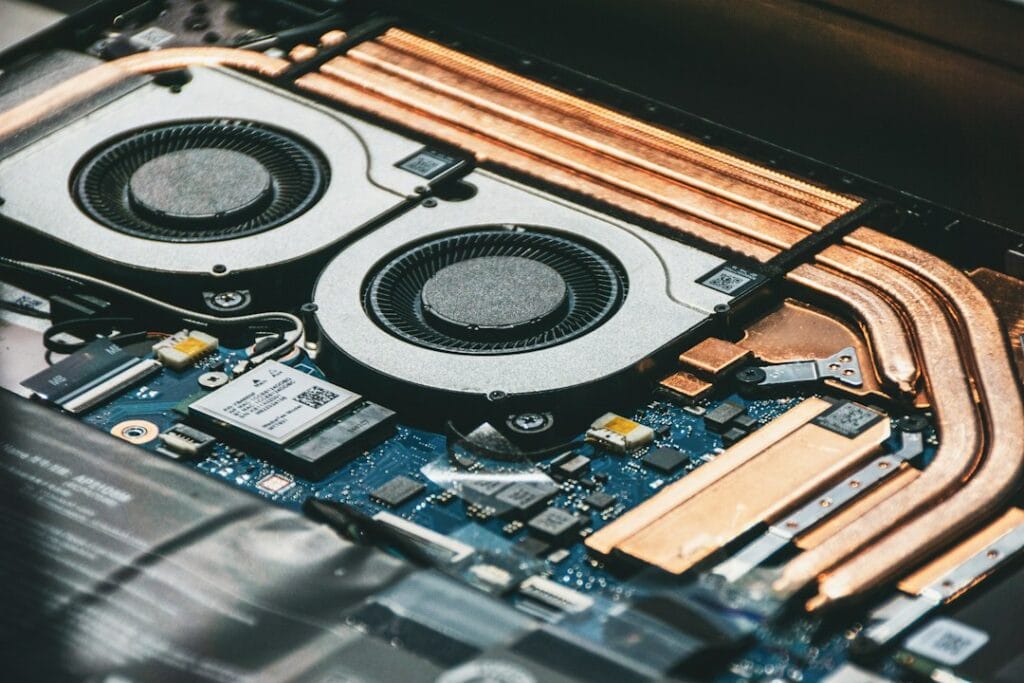
Close-up of computer cooling fans and heat pipes

Two laptops with the same RTX GPU can run it at very different power levels, and that changes performance. This database lists the maximum GPU power (TGP) for 239 RTX 50-series laptop configurations across 114 models from ASUS, Acer, Gigabyte, Lenovo, MSI and Razer, taken from the manufacturers’ own spec sheets. Most RTX 5060 and RTX 5070 laptops here are rated at up to 115 W, but thin models such as the ASUS Zephyrus G14 and Lenovo Yoga Pro 9 stop at 100 W, budget Acer Nitro V and Gigabyte models run the RTX 5070 at 75 to 95 W, and the RTX 5080 ranges from 115 W to 175 W depending on the laptop.

How we put this together: every figure comes from a manufacturer source (the official GPU power lists from ASUS and Acer, Lenovo’s PSREF spec sheets, and Razer’s, MSI’s and Gigabyte’s product pages), linked in each row. It is not based on hands-on testing by iTech Level. Last updated October 7, 2026. Dell and HP don’t publish GPU-only power figures, so they aren’t included; see the methodology and update log below. Free to reuse with a link to this page (CC BY 4.0); download the data as CSV.

What is TGP? TGP (total graphics power) is the power budget a laptop maker gives the graphics chip, in watts. The same GPU name, such as RTX 5070, can be set anywhere from about 60 W to 115 W in the laptops below, and more power usually means higher frame rates. “Max GPU power” includes Dynamic Boost, extra power borrowed from the processor.

On this page: Power range by GPU · The database · What the data shows · How much TGP matters · How to check before you buy · Methodology · FAQ

GPU power range by GPU

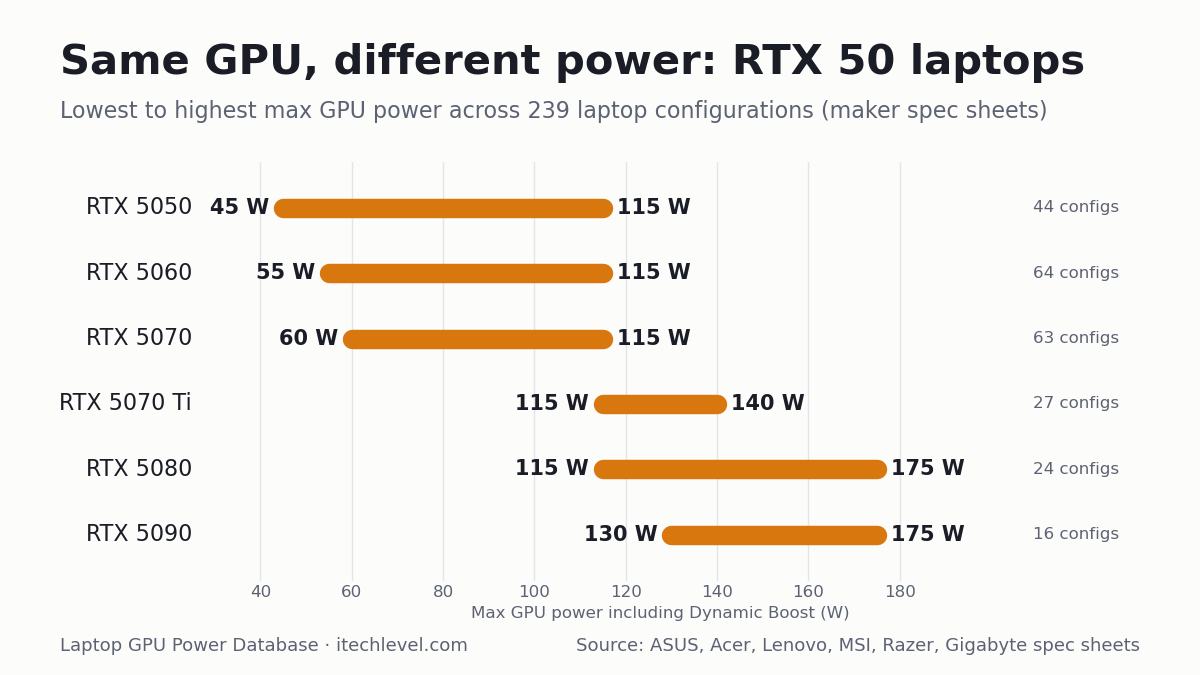
GPULowest max powerHighest max powerGapConfigurations
RTX 505045 W115 W70 W44
RTX 506055 W115 W60 W64
RTX 507060 W115 W55 W63
RTX 5070 Ti115 W140 W25 W28
RTX 5080115 W175 W60 W24
RTX 5090130 W175 W45 W16

Ranges cover the laptops in this database only; some laptops outside it may go lower. See our best RTX 5070 laptops for full-power picks.

Chart of RTX 50 laptop GPU power ranges: RTX 5050 45-115 W, RTX 5060 55-115 W, RTX 5070 60-115 W, RTX 5070 Ti 115-140 W, RTX 5080 115-175 W, RTX 5090 130-175 W
Lowest to highest maximum GPU power for each RTX 50 laptop GPU across the 239 configurations below. Free to reuse with a link to this page (CC BY 4.0).

The database

Filter by GPU or brand, search for a model, or click a column heading to sort. “Max GPU power” includes Dynamic Boost where the manufacturer states it. A figure marked * is one “up to” number the maker gives for the whole model, not for each GPU.

LaptopModel codeGPUVideo memoryMax GPU power ▾Base + Dynamic BoostSource
ASUS ROG Strix G16/G18 (2025)G615JH G615LG G614FH G614PH G814PHRTX 50508GB115 W100 W + 15 WASUS official TGP list
ASUS TUF Gaming A16 (2025)FA608JHRTX 50508GB115 W100 W + 15 WASUS official TGP list
ASUS TUF Gaming A18 (2025)FA808UHRTX 50508GB115 W100 W + 15 WASUS official TGP list
ASUS TUF Gaming F16 (2025)FX608-TBDRTX 50508GB115 W100 W + 15 WASUS official TGP list
Acer Nitro 16 AI (2025)AN16-61RTX 50508GB115 W100 W + 15 WAcer official GPU power list
Acer Nitro 16S AI (2025)AN16S-61RTX 50508GB115 W100 W + 15 WAcer official GPU power list
Acer Nitro 18 AI (2025)AN18-61RTX 50508GB115 W100 W + 15 WAcer official GPU power list
Acer Predator Helios Neo 16 (2026)PHN16-I31RTX 50508GB115 W100 W + 15 WAcer official GPU power list
Lenovo LOQ 15 Gen 11 (AMD, 2026)15AHP11RTX 50508GB115 W—Lenovo PSREF spec sheet
Lenovo LOQ 17 Gen 10 (Intel, 2025)17IRX10RTX 50508GB115 W—Lenovo PSREF spec sheet
Lenovo Legion 5 15 Gen 10 (AMD, 2025)15AHP10RTX 50508GB115 W—Lenovo PSREF spec sheet
Lenovo Legion 5 15 Gen 10 (Intel, 2025)15IAX10RTX 50508GB115 W—Lenovo PSREF spec sheet
Lenovo Legion 5 15 Gen 10 (Intel, 2025)15IRX10RTX 50508GB115 W—Lenovo PSREF spec sheet
Lenovo Legion Pro 5 16 Gen 10 (AMD, 2025)16ADR10RTX 50508GB115 W—Lenovo PSREF spec sheet
Lenovo Legion Pro 5 16 Gen 10 (Intel, 2025)16IRX10RTX 50508GB115 W—Lenovo PSREF spec sheet
MSI Katana 15 HXC14WXRTX 50508GB115 W—MSI spec page
ASUS TUF Gaming A14 (2025)FA401KH FA401UHRTX 50508GB110 W90 W + 15 WASUS official TGP list
ASUS ROG Zephyrus G14 (2025)GA403UHRTX 50508GB100 W75 W + 15 WASUS official TGP list
ASUS ROG Zephyrus G16 (2025)GA605KHRTX 50508GB100 W85 W + 15 WASUS official TGP list
Lenovo LOQ 15 Gen 10 (AMD, 2025)15AHP10RTX 50508GB100 W—Lenovo PSREF spec sheet
Lenovo LOQ 15 Gen 10 (Intel, 2025)15IRX10RTX 50508GB100 W—Lenovo PSREF spec sheet
Lenovo Yoga Pro 9 16 Gen 10 (Intel, 2025)16IAH10RTX 50508GB100 W—Lenovo PSREF spec sheet
MSI Cyborg 15 MAXC2WXRTX 50508GB100 W—MSI spec page
Acer Nitro V 16 (2025)ANV16-72RTX 50508GB95 W80 W + 15 WAcer official GPU power list
Acer Nitro V 16 AI (2025)ANV16-61/42RTX 50508GB95 W80 W + 15 WAcer official GPU power list
Acer Nitro V 17 AI (2025)ANV17-61/41RTX 50508GB95 W80 W + 15 WAcer official GPU power list
Acer Nitro V 16 AI (2026)ANV16-I51RTX 50508GB85 W70 W + 15 WAcer official GPU power list
Acer Nitro V 16 AI (2026)ANV16-A71RTX 50508GB85 W70 W + 15 WAcer official GPU power list
Acer Nitro V 16 AI (2026)ANV16-A31RTX 50508GB85 W70 W + 15 WAcer official GPU power list
Acer Nitro V 16S (2025)ANV16S-71RTX 50508GB85 W70 W + 15 WAcer official GPU power list
Acer Nitro V 16S AI (2025)ANV16S-61/41RTX 50508GB85 W70 W + 15 WAcer official GPU power list
GIGABYTE AERO X16EG64HRTX 50508GBup to 85 W*—Gigabyte product page
GIGABYTE AERO X16EG61HRTX 50508GBup to 85 W*—Gigabyte product page
GIGABYTE Gaming A16GA65HRTX 50508GBup to 85 W*—Gigabyte product page
GIGABYTE Gaming A16GA63HRTX 50508GBup to 85 W*—Gigabyte product page
GIGABYTE Gaming A16GA6HRTX 50508GBup to 85 W*—Gigabyte product page
GIGABYTE Gaming A18GA83HRTX 50508GBup to 85 W*—Gigabyte product page
Acer Nitro V 15 (2025)ANV15-52RTX 50508GB75 W60 W + 15 WAcer official GPU power list
Acer Nitro V 15 (2026)ANV15-A31RTX 50508GB75 W60 W + 15 WAcer official GPU power list
Acer Nitro V 16 (2026)ANV16-I31RTX 50508GB75 W60 W + 15 WAcer official GPU power list
MSI Cyborg 15C13WXRTX 50508GB70 W—MSI spec page
Acer Nitro V 14 AI (2025)AN14-62RTX 50508GB60 W50 W + 10 WAcer official GPU power list
MSI Cyborg 15B2RWRTX 50508GB45 W—MSI spec page
MSI Cyborg 17B2RWRTX 50508GB45 W—MSI spec page
ASUS ROG Strix G16/G18 (2025)G615LM G815LM G615JM G615JM G815JM G614FM G814FM G614PM G814PMRTX 50608GB115 W100 W + 15 WASUS official TGP list
ASUS TUF Gaming A16 (2025)FA608WM FA608PMRTX 50608GB115 W100 W + 15 WASUS official TGP list
ASUS TUF Gaming A18 (2025)FA808UMRTX 50608GB115 W100 W + 15 WASUS official TGP list
ASUS TUF Gaming F16 (2025)FX608LM FX608JPRTX 50608GB115 W100 W + 15 WASUS official TGP list
Acer Nitro 16 AI (2025)AN16-61RTX 50608GB115 W100 W + 15 WAcer official GPU power list
Acer Nitro 16S AI (2025)AN16S-61RTX 50608GB115 W100 W + 15 WAcer official GPU power list
Acer Nitro 18 AI (2025)AN18-61RTX 50608GB115 W100 W + 15 WAcer official GPU power list
Acer Predator Helios Neo 14 AI (2025)PHN14-71RTX 50608GB115 W100 W + 15 WAcer official GPU power list
Acer Predator Helios Neo 16 (2026)PHN16-I31RTX 50608GB115 W100 W + 15 WAcer official GPU power list
Acer Predator Helios Neo 16 AI (2025)PHN16-73RTX 50608GB115 W100 W + 15 WAcer official GPU power list
Acer Predator Helios Neo 16 AI (2026)PHN16-I71RTX 50608GB115 W100 W + 15 WAcer official GPU power list
Acer Predator Helios Neo 16S AI (2025)PHN16S-71RTX 50608GB115 W100 W + 15 WAcer official GPU power list
Acer Predator Helios Neo 16S AI (2026)PHN16S-I51RTX 50608GB115 W100 W + 15 WAcer official GPU power list
Acer Predator Helios Neo 18 AI (2025)PHN18-72RTX 50608GB115 W100 W + 15 WAcer official GPU power list
Acer Predator Helios Neo 18 AI (2026)PHN18-I71RTX 50608GB115 W100 W + 15 WAcer official GPU power list
GIGABYTE Gaming A16GA6EHRTX 50608GBup to 115 W*—Gigabyte product page
Lenovo LOQ 15 Gen 11 (AMD, 2026)15AHP11RTX 50608GB115 W—Lenovo PSREF spec sheet
Lenovo LOQ 17 Gen 10 (Intel, 2025)17IRX10RTX 50608GB115 W—Lenovo PSREF spec sheet
Lenovo Legion 5 15 Gen 10 (AMD, 2025)15AHP10RTX 50608GB115 W—Lenovo PSREF spec sheet
Lenovo Legion 5 15 Gen 10 (Intel, 2025)15IAX10RTX 50608GB115 W—Lenovo PSREF spec sheet
Lenovo Legion 5 15 Gen 10 (Intel, 2025)15IRX10RTX 50608GB115 W—Lenovo PSREF spec sheet
Lenovo Legion 5 15 Gen 11 (Intel, 2026)15IAX11RTX 50608GB115 W—Lenovo PSREF spec sheet
Lenovo Legion 7 16 Gen 10 (Intel, 2025)16IAX10RTX 50608GB115 W—Lenovo PSREF spec sheet
Lenovo Legion Pro 5 16 Gen 10 (AMD, 2025)16ADR10RTX 50608GB115 W—Lenovo PSREF spec sheet
Lenovo Legion Pro 5 16 Gen 10 (AMD, 2025)16AFR10RTX 50608GB115 W—Lenovo PSREF spec sheet
Lenovo Legion Pro 5 16 Gen 10 (Intel, 2025)16IAX10RTX 50608GB115 W—Lenovo PSREF spec sheet
Lenovo Legion Pro 5 16 Gen 10 (Intel, 2025)16IRX10RTX 50608GB115 W—Lenovo PSREF spec sheet
MSI Crosshair 16 HXE14WXRTX 50608GB115 W—MSI spec page
MSI Crosshair 16 Max HXE2WXRTX 50608GB115 W—MSI spec page
MSI Crosshair A16 HXE8WXRTX 50608GB115 W—MSI spec page
MSI Katana 15 HXC14WXRTX 50608GB115 W—MSI spec page
MSI Stealth 16 AI PlusB3WXRTX 50608GB115 W—MSI spec page
Razer Blade 14 (2025)—RTX 50608GBup to 115 W*—Razer product page
Razer Blade 16 (2026)—RTX 50608GBup to 115 W*—Razer product page
ASUS ROG Zephyrus G16 (2025)GU605CMRTX 50608GB110 W90 W + 15 WASUS official TGP list
ASUS TUF Gaming A14 (2025)FA401KM FA401UMRTX 50608GB110 W90 W + 15 WASUS official TGP list
ASUS ROG Zephyrus G16 (2025)GA605KMRTX 50608GB105 W90 W + 15 WASUS official TGP list
ASUS ROG Zephyrus G14 (2025)GA403WM GA403UMRTX 50608GB100 W75 W + 15 WASUS official TGP list
Lenovo LOQ 15 Gen 10 (AMD, 2025)15AHP10RTX 50608GB100 W—Lenovo PSREF spec sheet
Lenovo LOQ 15 Gen 10 (Intel, 2025)15IRX10RTX 50608GB100 W—Lenovo PSREF spec sheet
Lenovo Yoga Pro 9 16 Gen 10 (Intel, 2025)16IAH10RTX 50608GB100 W—Lenovo PSREF spec sheet
MSI Cyborg 15 MAXC2WXRTX 50608GB100 W—MSI spec page
Acer Nitro V 16 (2025)ANV16-72RTX 50608GB95 W80 W + 15 WAcer official GPU power list
Acer Nitro V 16 AI (2025)ANV16-61/42RTX 50608GB95 W80 W + 15 WAcer official GPU power list
Acer Nitro V 17 AI (2025)ANV17-61/41RTX 50608GB95 W80 W + 15 WAcer official GPU power list
Acer Nitro V 16 AI (2026)ANV16-I51RTX 50608GB85 W70 W + 15 WAcer official GPU power list
Acer Nitro V 16 AI (2026)ANV16-A71RTX 50608GB85 W70 W + 15 WAcer official GPU power list
Acer Nitro V 16 AI (2026)ANV16-A31RTX 50608GB85 W70 W + 15 WAcer official GPU power list
Acer Nitro V 16S (2025)ANV16S-71RTX 50608GB85 W70 W + 15 WAcer official GPU power list
Acer Nitro V 16S AI (2025)ANV16S-61/41RTX 50608GB85 W70 W + 15 WAcer official GPU power list
Acer Nitro V 16S AI (2026)ANV16S-I51RTX 50608GB85 W70 W + 15 WAcer official GPU power list
GIGABYTE AERO X16EG64HRTX 50608GBup to 85 W*—Gigabyte product page
GIGABYTE AERO X16EG61HRTX 50608GBup to 85 W*—Gigabyte product page
GIGABYTE Gaming A16GA65HRTX 50608GBup to 85 W*—Gigabyte product page
GIGABYTE Gaming A16GA63HRTX 50608GBup to 85 W*—Gigabyte product page
GIGABYTE Gaming A16GA6HRTX 50608GBup to 85 W*—Gigabyte product page
GIGABYTE Gaming A18GA83HRTX 50608GBup to 85 W*—Gigabyte product page
Acer Nitro V 15 (2025)ANV15-52RTX 50608GB75 W60 W + 15 WAcer official GPU power list
Acer Nitro V 15 (2026)ANV15-A31RTX 50608GB75 W60 W + 15 WAcer official GPU power list
Acer Nitro V 16 (2026)ANV16-I31RTX 50608GB75 W60 W + 15 WAcer official GPU power list
MSI Cyborg 15C2WXRTX 50608GB70 W—MSI spec page
Acer Nitro V 14 AI (2025)AN14-62RTX 50608GB60 W50 W + 10 WAcer official GPU power list
MSI Cyborg 15B2RWRTX 50608GB55 W—MSI spec page
MSI Cyborg 17B2RWRTX 50608GB55 W—MSI spec page
ASUS ROG Strix G16/G18 (2025)G615LP G615JP G815LP G614FP G814FP G814PPRTX 50708GB or 12GB115 W100 W + 15 WASUS official TGP list
ASUS TUF Gaming A16 (2025)FA608UP FA608PPRTX 50708GB or 12GB115 W100 W + 15 WASUS official TGP list
ASUS TUF Gaming A18 (2025)FA808UPRTX 50708GB or 12GB115 W100 W + 15 WASUS official TGP list
ASUS TUF Gaming F16 (2025)FX608LP FX608JPRTX 50708GB or 12GB115 W100 W + 15 WASUS official TGP list
Acer Nitro 16 (2026)AN16-A91RTX 50708GB or 12GB115 W100 W + 15 WAcer official GPU power list
Acer Nitro 16 AI (2025)AN16-61RTX 50708GB or 12GB115 W100 W + 15 WAcer official GPU power list
Acer Nitro 16S AI (2025)AN16S-61RTX 50708GB or 12GB115 W100 W + 15 WAcer official GPU power list
Acer Nitro 18 AI (2025)AN18-61RTX 50708GB or 12GB115 W100 W + 15 WAcer official GPU power list
Acer Predator Helios Neo 14 AI (2025)PHN14-71RTX 50708GB or 12GB115 W100 W + 15 WAcer official GPU power list
Acer Predator Helios Neo 16 (2026)PHN16-I31RTX 50708GB or 12GB115 W100 W + 15 WAcer official GPU power list
Acer Predator Helios Neo 16 AI (2025)PHN16-73RTX 50708GB or 12GB115 W100 W + 15 WAcer official GPU power list
Acer Predator Helios Neo 16 AI (2026)PHN16-I71RTX 50708GB or 12GB115 W100 W + 15 WAcer official GPU power list
Acer Predator Helios Neo 16S AI (2025)PHN16S-71RTX 50708GB or 12GB115 W100 W + 15 WAcer official GPU power list
Acer Predator Helios Neo 16S AI (2026)PHN16S-I71RTX 50708GB or 12GB115 W100 W + 15 WAcer official GPU power list
Acer Predator Helios Neo 16S AI (2026)PHN16S-I51RTX 50708GB or 12GB115 W100 W + 15 WAcer official GPU power list
Acer Predator Helios Neo 18 AI (2025)PHN18-72RTX 50708GB or 12GB115 W100 W + 15 WAcer official GPU power list
Acer Predator Helios Neo 18 AI (2026)PHN18-I71RTX 50708GB or 12GB115 W100 W + 15 WAcer official GPU power list
AORUS Elite 16AE6HRTX 50708GB115 W—Gigabyte spec page
GIGABYTE Gaming A16GA6EHRTX 50708GBup to 115 W*—Gigabyte product page
Lenovo LOQ 15 Gen 10 (Intel, 2025)15IRX10RTX 50708GB or 12GB115 W—Lenovo PSREF spec sheet
Lenovo LOQ 15 Gen 11 (AMD, 2026)15AHP11RTX 50708GB115 W—Lenovo PSREF spec sheet
Lenovo LOQ 17 Gen 10 (Intel, 2025)17IRX10RTX 50708GB or 12GB115 W—Lenovo PSREF spec sheet
Lenovo Legion 5 15 Gen 10 (Intel, 2025)15IAX10RTX 50708GB115 W—Lenovo PSREF spec sheet
Lenovo Legion 5 15 Gen 10 (Intel, 2025)15IRX10RTX 50708GB115 W—Lenovo PSREF spec sheet
Lenovo Legion 5 15 Gen 11 (Intel, 2026)15IAX11RTX 507012GB115 W—Lenovo PSREF spec sheet
Lenovo Legion 7 16 Gen 10 (Intel, 2025)16IAX10RTX 50708GB or 12GB115 W—Lenovo PSREF spec sheet
Lenovo Legion Pro 5 16 Gen 10 (AMD, 2025)16ADR10RTX 50708GB or 12GB115 W—Lenovo PSREF spec sheet
Lenovo Legion Pro 5 16 Gen 10 (AMD, 2025)16AFR10RTX 50708GB or 12GB115 W—Lenovo PSREF spec sheet
Lenovo Legion Pro 5 16 Gen 10 (Intel, 2025)16IAX10RTX 50708GB or 12GB115 W—Lenovo PSREF spec sheet
Lenovo Legion Pro 5 16 Gen 10 (Intel, 2025)16IRX10RTX 50708GB or 12GB115 W—Lenovo PSREF spec sheet
MSI Crosshair 16 HXE14WXRTX 50708GB115 W—MSI spec page
MSI Crosshair 16 Max HXE2WXRTX 50708GB115 W—MSI spec page
MSI Crosshair A16 HXE8WXRTX 50708GB115 W—MSI spec page
MSI Crosshair A16 HX MLG EditionE8WXRTX 50708GB115 W—MSI spec page
MSI Katana 15 HXC14WXRTX 50708GB115 W—MSI spec page
MSI Raider 16 HXB2WXRTX 50708GB115 W—MSI spec page
MSI Stealth 16 AI PlusB3WXRTX 50708GB115 W—MSI spec page
Razer Blade 14 (2025)—RTX 50708GBup to 115 W*—Razer product page
Razer Blade 16 (2026)—RTX 50708GB or 12GBup to 115 W*—Razer product page
ASUS ROG Zephyrus G16 (2025)GU605CPRTX 50708GB or 12GB110 W90 W + 15 WASUS official TGP list
Acer Predator Triton 14 AI (2025)PT14-52TRTX 50708GB or 12GB110 W95 W + 15 WAcer official GPU power list
ASUS ROG Zephyrus G16 (2025)GA605KPRTX 50708GB or 12GB105 W90 W + 15 WASUS official TGP list
ASUS ROG Zephyrus G14 (2025)GA403WP GA403UPRTX 50708GB or 12GB100 W75 W + 15 WASUS official TGP list
Lenovo Yoga Pro 9 16 Gen 10 (Intel, 2025)16IAH10RTX 50708GB100 W—Lenovo PSREF spec sheet
MSI Cyborg 15 MAXC2WXRTX 50708GB100 W—MSI spec page
Acer Nitro V 16 (2025)ANV16-72RTX 50708GB or 12GB95 W80 W + 15 WAcer official GPU power list
Acer Nitro V 16 AI (2025)ANV16-61/42RTX 50708GB or 12GB95 W80 W + 15 WAcer official GPU power list
Acer Nitro V 17 AI (2025)ANV17-61/41RTX 50708GB or 12GB95 W80 W + 15 WAcer official GPU power list
Acer Nitro V 16 AI (2026)ANV16-I51RTX 50708GB or 12GB85 W70 W + 15 WAcer official GPU power list
Acer Nitro V 16 AI (2026)ANV16-A71RTX 50708GB or 12GB85 W70 W + 15 WAcer official GPU power list
Acer Nitro V 16 AI (2026)ANV16-A31RTX 50708GB or 12GB85 W70 W + 15 WAcer official GPU power list
Acer Nitro V 16S (2025)ANV16S-71RTX 50708GB or 12GB85 W70 W + 15 WAcer official GPU power list
Acer Nitro V 16S AI (2025)ANV16S-61/41RTX 50708GB or 12GB85 W70 W + 15 WAcer official GPU power list
Acer Nitro V 16S AI (2026)ANV16S-I51RTX 50708GB or 12GB85 W70 W + 15 WAcer official GPU power list
GIGABYTE AERO X16EG64HRTX 50708GBup to 85 W*—Gigabyte product page
GIGABYTE AERO X16EG61HRTX 50708GBup to 85 W*—Gigabyte product page
GIGABYTE Gaming A16GA63HRTX 50708GBup to 85 W*—Gigabyte product page
GIGABYTE Gaming A16GA6HRTX 50708GBup to 85 W*—Gigabyte product page
GIGABYTE Gaming A18GA83HRTX 50708GBup to 85 W*—Gigabyte product page
Acer Nitro V 15 (2026)ANV15-A31RTX 50708GB or 12GB75 W60 W + 15 WAcer official GPU power list
Acer Nitro V 16 (2026)ANV16-I31RTX 50708GB or 12GB75 W60 W + 15 WAcer official GPU power list
MSI Cyborg 15B2RWRTX 50708GB60 W—MSI spec page
MSI Cyborg 17B2RWRTX 50708GB60 W—MSI spec page
ASUS ROG Strix G16/G18 (2025)G615LR G815LR G614FR G614PRRTX 5070 Ti12GB140 W115 W + 25 WASUS official TGP list
ASUS ROG Strix SCAR 16/18 (2025)G635LR G835LRRTX 5070 Ti12GB140 W115 W + 25 WASUS official TGP list
Acer Nitro 16 (2026)AN16-A91RTX 5070 Ti12GB140 W115 W + 25 WAcer official GPU power list
Acer Predator Helios 16 AI (2025)PH16-73RTX 5070 Ti12GB140 W115 W + 25 WAcer official GPU power list
Acer Predator Helios Neo 16 AI (2025)PHN16-73RTX 5070 Ti12GB140 W115 W + 25 WAcer official GPU power list
Acer Predator Helios Neo 16 AI (2026)PHN16-I71RTX 5070 Ti12GB140 W115 W + 25 WAcer official GPU power list
Acer Predator Helios Neo 18 AI (2025)PHN18-72RTX 5070 Ti12GB140 W115 W + 25 WAcer official GPU power list
Acer Predator Helios Neo 18 AI (2026)PHN18-I71RTX 5070 Ti12GB140 W115 W + 25 WAcer official GPU power list
AORUS Master 16AM6JRTX 5070 Ti12GB140 W—Gigabyte spec page
AORUS Master 16AM6HRTX 5070 Ti12GB140 W—Gigabyte spec page
Lenovo Legion Pro 5 16 Gen 10 (Intel, 2025)16IAX10HRTX 5070 Ti12GB140 W—Lenovo PSREF spec sheet
Lenovo Legion Pro 7 16 Gen 10 (AMD, 2025)16AFR10HRTX 5070 Ti12GB140 W—Lenovo PSREF spec sheet
Lenovo Legion Pro 7 16 Gen 10 (Intel, 2025)16IAX10HRTX 5070 Ti12GB140 W—Lenovo PSREF spec sheet
MSI Raider 16 HXB2WXRTX 5070 Ti12GB140 W—MSI spec page
MSI Raider 16 Max HXB2WXRTX 5070 Ti12GB140 W—MSI spec page
MSI Raider 18 HXA2WXRTX 5070 Ti12GB140 W—MSI spec page
MSI Stealth 18 HXA2WXRTX 5070 Ti12GB140 W—MSI spec page
ASUS ROG Zephyrus G16 (2025)GU605CRRTX 5070 Ti12GB125 W95 W + 20 WASUS official TGP list
MSI Stealth 16 AI PlusB3WXRTX 5070 Ti12GB125 W—MSI spec page
ASUS ROG Zephyrus G14 (2025)GA403WRRTX 5070 Ti12GB120 W85 W + 25 WASUS official TGP list
Acer Nitro 16 AI (2025)AN16-61RTX 5070 Ti12GB115 W100 W + 15 WAcer official GPU power list
Acer Nitro 16S AI (2025)AN16S-61RTX 5070 Ti12GB115 W100 W + 15 WAcer official GPU power list
Acer Nitro 18 AI (2025)AN18-61RTX 5070 Ti12GB115 W100 W + 15 WAcer official GPU power list
Acer Predator Helios Neo 16S AI (2025)PHN16S-71RTX 5070 Ti12GB115 W100 W + 15 WAcer official GPU power list
Acer Predator Helios Neo 16S AI (2026)PHN16S-I71RTX 5070 Ti12GB115 W100 W + 15 WAcer official GPU power list
GIGABYTE Gaming A16 PROGA6DHRTX 5070 Ti12GBup to 115 W*—Gigabyte product page
GIGABYTE Gaming A18 PROGA8JRTX 5070 Ti12GBup to 115 W*—Gigabyte product page
Razer Blade 18 (2026)—RTX 5070 Ti12GBNot stated—Razer product page
ASUS ROG Strix G16/G18 (2025)G615LW G815LWRTX 508016GB175 W150 W + 25 WASUS official TGP list
ASUS ROG Strix SCAR 16/18 (2025)G635LW G835LWRTX 508016GB175 W150 W + 25 WASUS official TGP list
Acer Predator Helios 18 AI (2025)PH18-73RTX 508016GB175 W150 W + 25 WAcer official GPU power list
Acer Predator Helios 18 AI (2026)PH18-I71RTX 508016GB175 W150 W + 25 WAcer official GPU power list
Acer Predator Helios Neo 16 AI (2026)PHN16-I71RTX 508016GB175 W150 W + 25 WAcer official GPU power list
Acer Predator Helios Neo 18 AI (2026)PHN18-I71RTX 508016GB175 W150 W + 25 WAcer official GPU power list
AORUS Master 16AM6JRTX 508016GB175 W—Gigabyte spec page
AORUS Master 16AM6HRTX 508016GB175 W—Gigabyte spec page
AORUS Master 18AM8HRTX 508016GB175 W—Gigabyte spec page
Lenovo Legion Pro 7 16 Gen 10 (AMD, 2025)16AFR10HRTX 508016GB175 W—Lenovo PSREF spec sheet
Lenovo Legion Pro 7 16 Gen 10 (Intel, 2025)16IAX10HRTX 508016GB175 W—Lenovo PSREF spec sheet
MSI Raider 16 HXB2WXRTX 508016GB175 W—MSI spec page
MSI Raider 16 Max HXB2WXRTX 508016GB175 W—MSI spec page
MSI Raider 18 HXA2WXRTX 508016GB175 W—MSI spec page
MSI Raider 18 Max HXA2WXRTX 508016GB175 W—MSI spec page
MSI Raider A16 HXB8WXRTX 508016GB175 W—MSI spec page
Razer Blade 16 (2026)—RTX 508016GBup to 165 W*—Razer product page
MSI Stealth 18 HXA2WXRTX 508016GB150 W—MSI spec page
ASUS ROG Zephyrus G16 (2025)GU605CWRTX 508016GB130 W100 W + 20 WASUS official TGP list
MSI Stealth 16 AI PlusB3WXRTX 508016GB125 W—MSI spec page
ASUS ROG Zephyrus G14 (2025)GA403WWRTX 508016GB120 W85 W + 25 WASUS official TGP list
Acer Predator Helios Neo 16S AI (2026)PHN16S-I71RTX 508016GB115 W100 W + 15 WAcer official GPU power list
GIGABYTE Gaming A16 PROGA6DHRTX 508016GBup to 115 W*—Gigabyte product page
GIGABYTE Gaming A18 PROGA8JRTX 508016GBup to 115 W*—Gigabyte product page
ASUS ROG Strix SCAR 16/18 (2025)G635LX G835LXRTX 509024GB175 W150 W + 25 WASUS official TGP list
Acer Predator Helios 16 AI (2025)PH16-73RTX 509024GB175 W150 W + 25 WAcer official GPU power list
Acer Predator Helios 18 AI (2025)PH18-73RTX 509024GB175 W150 W + 25 WAcer official GPU power list
Acer Predator Helios 18 AI (2026)PH18-I71RTX 509024GB175 W150 W + 25 WAcer official GPU power list
AORUS Master 16AM6JRTX 509024GB175 W—Gigabyte spec page
AORUS Master 16AM6HRTX 509024GB175 W—Gigabyte spec page
AORUS Master 18AM8HRTX 509024GB175 W—Gigabyte spec page
Lenovo Legion Pro 7 16 Gen 10 (Intel, 2025)16IAX10HRTX 509024GB175 W—Lenovo PSREF spec sheet
MSI Raider 16 Max HXB2WXRTX 509024GB175 W—MSI spec page
MSI Raider 18 HXA2WXRTX 509024GB175 W—MSI spec page
MSI Titan 18 HXA2WXRTX 509024GB175 W—MSI spec page
MSI Titan 18 HX Dragon Edition Draco EpicA2WXRTX 509024GB175 W—MSI spec page
Razer Blade 18 (2026)—RTX 509024GBup to 175 W*—Razer product page
Razer Blade 16 (2026)—RTX 509024GBup to 165 W*—Razer product page
MSI Stealth 18 HXA2WXRTX 509024GB150 W—MSI spec page
ASUS ROG Zephyrus G16 (2025)GU605CXRTX 509024GB130 W100 W + 20 WASUS official TGP list

Download the full database (CSV): free to reuse with a link to this page (CC BY 4.0).

What the data shows

Key numbers (October 2026)

  • 103 of 238 RTX 50 laptop configurations (43%) run their GPU below the top wattage the same GPU gets in another laptop.
  • The same GPU name can differ by up to 70 W: RTX 5050 45–115 W, RTX 5060 55–115 W, RTX 5070 60–115 W, RTX 5080 115–175 W.
  • 61 of 171 RTX 5050, 5060 and 5070 configurations are rated under 100 W.
  • Average share of the top wattage, by brand: Razer 98%, Lenovo 98%, ASUS 94%, MSI 88%, Acer 87%, Gigabyte 83%.

Based on the 238 of 239 listed configurations with a stated wattage, from 6 brands; each figure comes from the maker’s own spec sheet or GPU power list (see Methodology).

  • Thin laptops trade power for size. The 14-inch ASUS Zephyrus G14 runs the RTX 5070 at up to 100 W, against 115 W in the cheaper ASUS TUF Gaming A16 and F16. Acer’s 14-inch Nitro V 14 AI runs its RTX 5050 and RTX 5060 at 60 W.
  • Budget laptops split in two. ASUS’s TUF Gaming A16, F16 and A18 and Lenovo’s LOQ 17 run the RTX 5050, 5060 and 5070 at up to 115 W, the same as pricier models. Acer’s Nitro V range runs them at 60 to 95 W, and Gigabyte rates most of its Gaming A16 and A18 models and the AERO X16 at up to 85 W. MSI’s Cyborg range has the widest spread: the Cyborg 15 and 17 B2RW run the RTX 5050, 5060 and 5070 at just 45, 55 and 60 W, the lowest figures in the database, the Cyborg 15 C13WX and C2WX at 70 W, and the Cyborg 15 MAX at 100 W. All 18 RTX 5070 configurations below 100 W in the database are Acer Nitro V, Gigabyte or MSI Cyborg models.
  • Newer isn’t always more powerful. Acer’s 2026 Nitro V models are rated lower than the 2025 ones: the RTX 5070 in the Nitro V 16 drops from 95 W (ANV16-72) to 75 W (ANV16-I31), and in the Nitro V 16 AI from 95 W to 85 W.
  • Check the exact model code. Lenovo’s 2025 LOQ 15 (15IRX10 and 15AHP10) runs the RTX 5050 and 5060 at 100 W, though the Intel 15IRX10’s RTX 5070 option gets 115 W, while the 2026 LOQ 15AHP11 runs all three at 115 W.
  • Creator laptops are tuned for quiet. Lenovo’s Yoga Pro 9 caps the RTX 5050, 5060 and 5070 at 100 W.
  • The RTX 5080 varies most. Sixteen configurations run it at up to 175 W, including MSI’s Raider and Titan models, the AORUS Master 16 and the Acer Predator Helios Neo 16 AI. MSI’s thinner Stealth 18 HX gets 150 W, its Stealth 16 AI+ 125 W, the Zephyrus G14 120 W, and Acer’s slim Predator Helios Neo 16S AI and Gigabyte’s Gaming A16 PRO and A18 PRO 115 W: a 60 W gap for the same GPU name.
  • Same chip, more memory. Lenovo lists 8GB and 12GB versions of the RTX 5070 in several Legion and LOQ models, both at 115 W. Nvidia added the 12GB RTX 5070 laptop GPU in April 2026 (Notebookcheck).

Watch: same GPU, different power, in 5 minutes

Prefer video? Our 5-minute walkthrough shows what these numbers mean in practice, using the database as it stood on October 8, 2026 (239 configurations). The table above is the up-to-date version.

Video by iTech Level. Watch on YouTube.

New spec check every week: subscribe on YouTube.

What is TGP, and how much does it matter?

TGP (total graphics power) is the power budget a laptop maker gives the graphics chip. Nvidia lets makers set it within a range for each GPU and add Dynamic Boost, which shifts extra power from the processor to the GPU when the processor isn’t busy. For example, the RTX 5070 laptop GPU can be configured up to 100 W plus Dynamic Boost, and the RTX 5070 Ti between 60 and 115 W plus up to 25 W of Dynamic Boost (Notebookcheck).

More power generally means higher frame rates, especially at 1440p, but the gain shrinks as you go up, and cooling matters too. A 10–15 W difference is modest; a heavily limited GPU is a bigger deal. In Notebookcheck’s first tests, an 85 W RTX 5070 was only slightly ahead of the previous RTX 4070 laptop GPU. Lower power isn’t all bad: it usually means a quieter, cooler and lighter laptop.

How to check a laptop’s GPU power before you buy

  • Look up the exact model code (for example 16IRX10 or GA403UP), not just the series name. Different versions of the same laptop can have different power limits.
  • Use the manufacturer’s spec sheet: ASUS and Acer publish complete GPU power lists, and Lenovo’s PSREF sheets are just as detailed; Razer, MSI and Gigabyte list it on product pages. Dell doesn’t publish it, and HP lists only total platform power (CPU and GPU combined), which isn’t the same thing.
  • Retail listings rarely show it. If a listing doesn’t mention TGP or “maximum graphics power”, check the model code here or on the maker’s site.
  • On a laptop you own, the NVIDIA Control Panel’s System Information panel shows the GPU’s maximum graphics power.

Methodology and update log

  • Sources: ASUS’s “complete list of GeForce GPU power specifications for 2025 ROG and TUF Gaming laptops”; Acer’s “Predator and Nitro Gaming Laptop GPU Power Specifications” (2025 and 2026 models); Lenovo PSREF spec sheets for 2025–2026 Legion, LOQ and Yoga Pro models; Razer, MSI and Gigabyte US product and spec pages. Each row links to its source.
  • What “max GPU power” means: the highest GPU power the maker states, including Dynamic Boost. ASUS also publishes base TGP and Dynamic Boost separately, shown in their own column. Where ASUS lists different figures for Turbo and Manual modes, we use the higher, Manual-mode figure. Acer’s figures are with Turbo Mode on, and Acer also lists base TGP and Dynamic Boost.
  • Model-wide figures (*): for some Gigabyte laptops the only official figure is one “up to X W Max TGP” for the whole model. We show it for each GPU option and mark it with *; the lower GPU options may run below it.
  • Video memory: taken from the source where stated; otherwise Nvidia’s standard for that GPU. The RTX 5070 exists with 8GB or 12GB.
  • Not stated: where a maker gives one figure for a group of GPUs that can’t apply to all of them (Razer Blade 18’s RTX 5070 Ti), we leave it blank rather than guess.
  • Coverage: MSI states GPU power on the US spec pages of 17 of its 38 current RTX 50 models. For the Cyborg 15 and 17 B2RW, sold in the US, the figures come from MSI’s global spec pages, since the US pages list none. The rest show only the GPU (or total CPU+GPU power), so they aren’t included. ASUS hasn’t published a 2026 list yet. Dell/Alienware and HP aren’t included because they don’t publish GPU-only power figures (we checked Dell’s owner’s manuals and store pages, and HP’s spec sheets and product pages).
  • October 4, 2026: first version: 207 configurations across 98 models from ASUS, Acer, Lenovo, Gigabyte/AORUS, Razer and MSI.
  • October 5, 2026: added MSI’s US lineup (35 configurations from 17 models, including the Cyborg, Crosshair, Raider, Stealth and Titan ranges), for 233 configurations across 112 models.
  • October 6, 2026: added MSI’s Cyborg 15 and Cyborg 17 B2RW (+6 configurations), which run the RTX 5060 at 55 W, for 239 configurations across 114 models.
  • October 7, 2026: added a CSV download (CC BY 4.0), a sort menu, a shorter mobile view and a TGP definition. No data changes.

Spotted an error or a missing laptop? Let us know, ideally with a link to the manufacturer’s spec sheet.

Cite or reuse this data

The database is free to use under CC BY 4.0: quote it, chart it or build on it, with a link to this page. Suggested citation: “Laptop GPU power database, iTech Level, October 2026, https://itechlevel.com/laptop-gpu-power-database/”. Download the full table as CSV. Journalists and creators: if you need a specific cut of the data, ask us.

Frequently asked questions

What is TGP on a gaming laptop?

TGP (total graphics power) is how much power the laptop maker lets the graphics chip use. The same GPU name, such as RTX 5070, can run at different power levels in different laptops, and more power usually means higher frame rates.

Which laptops run the RTX 5070 at full power?

In our database, most RTX 5070 laptops from Lenovo (Legion and LOQ), the ASUS TUF and ROG Strix models, the Razer Blade 14 and 16, Acer's Predator Helios Neo and Nitro 16 models, and the AORUS Elite 16 are rated at up to 115 W including Dynamic Boost. The ASUS Zephyrus G14 and Lenovo Yoga Pro 9 are rated at up to 100 W, Acer's Nitro V and several Gigabyte models at 75 to 95 W, and MSI's Cyborg 15 and 17 B2RW at just 60 W.

Is a lower-wattage GPU much slower?

It depends on the gap. A 10 to 15 W difference is modest, while a heavily limited GPU, such as an 85 W RTX 5070 in some budget laptops, can be noticeably slower than a full-power one, especially at higher resolutions. Lower power also means less heat and noise.

What is Dynamic Boost?

Dynamic Boost lets the laptop shift extra power from the processor to the GPU when the processor isn't busy, typically 15 to 25 W. Maximum figures in our table include it where the manufacturer states it.

How can I check my laptop's GPU power?

Before buying, check the manufacturer's spec sheet or this database. On an NVIDIA laptop you own, the System Information panel in the NVIDIA Control Panel lists the GPU's maximum graphics power.

What is the RTX 5060 laptop TGP?

It depends on the laptop: NVIDIA lets each maker set it. Across the 64 RTX 5060 configurations in our database, maximum GPU power ranges from 55 W to 115 W, including Dynamic Boost where the maker states it. 115 W is the highest any RTX 5060 laptop in the table is rated for.

What is the RTX 5070 laptop TGP?

Across the 63 RTX 5070 configurations in our database, maximum GPU power ranges from 60 W to 115 W, including Dynamic Boost where the maker states it. Most Lenovo, ASUS TUF and ROG Strix, Razer and Acer Predator models run it at 115 W.

What is the RTX 5050 laptop TGP?

Across the 44 RTX 5050 configurations in our database, maximum GPU power ranges from 45 W to 115 W, including Dynamic Boost where the maker states it. That 70 W gap is the widest of any RTX 50 laptop GPU, so check the exact model before you buy.

Related guides

RTX 50 Laptop GPU Power (TGP) Database: 239 Configurations Compared (2026) Read More »

Best Chromebooks and Googlebooks (2026): 7 Chromebooks and All 5 Googlebooks Compared

Lenovo laptop on a desk

The best Chromebook for most people is the Lenovo Chromebook Plus 14: a 14-inch OLED screen, a fast and efficient MediaTek Kompanio Ultra chip and an aluminium build, and Tom’s Guide calls it “the best Chromebook you can buy right now”. For a thinner laptop with a bigger OLED, look at the Samsung Galaxy Chromebook Plus. On a budget, the Lenovo Chromebook Plus i 15 and Acer Chromebook 315 cover school and web work. Google’s new Googlebooks went on sale in October 2026, and Chromebooks are still worth buying: Google will keep updating ChromeOS until mid-2034.

Heading to college? Our best laptops for college students weighs Chromebooks against the MacBook Neo.

Check the Lenovo Chromebook Plus 14 on Amazon →

How we put this together: this guide is based on manufacturers’ specifications, Google’s support statements and published reviews (linked below). It is not based on hands-on testing by iTech Level. Prices are list or launch prices at the time of writing and change often. See how we choose products.

Best Chromebooks compared

ChromebookBest forScreenChip / memoryBuy
Lenovo Chromebook Plus 14Best overall14″ 1920×1200 OLEDMediaTek Kompanio Ultra 910, 12–16GBCheck price
Samsung Galaxy Chromebook PlusThinnest, biggest OLED15.6″ AMOLEDIntel Core 5 120UCheck price
Acer Chromebook Plus Spin 514 (2026)Best premium 2-in-114″ 3K IPS touch, 60HzMediaTek Kompanio Ultra 910, 12GBCheck price
Lenovo Chromebook Plus i 15Big screen on a budget15.3″ 1920×1200, 400 nitsIntel Core i3-N355, 8GBCheck price
Lenovo Chromebook Plus 2-in-1Budget convertible (on sale)Touch and penIntel Core 3 N355, 8GBCheck price
Lenovo Chromebook Duet 11 (2024)Tablet with a keyboard10.95″ 2KMediaTek Kompanio 838, 4–8GBCheck price
Acer Chromebook 315Cheapest for school15.6″ Full HD touchIntel N100, 8GBCheck price

Chromebook or Googlebook?

Google launched Googlebooks in the US on October 4, 2026. They run Googlebook OS, a new Android-based operating system that combines ChromeOS and Android, and come from Acer, ASUS, Dell, HP and Lenovo, starting near $900. Every launch model has at least 16GB of memory, a touchscreen and an AI chip, and Google says they’re built to work closely with Android phones (Android Authority). Our Googlebook buying guide compares all five launch models.

Chromebooks aren’t going away. Google says the Chromebooks you buy today will keep getting updates through their supported lifetime, and ChromeOS will get regular updates and security patches through mid-2034. It also says “many” of its newest Chromebooks, which a later note describes as newer commercial models, will be able to move to Googlebook OS, and that qualifying Chromebooks whose 10-year support runs past 2034 will get a transition path. It hasn’t yet published which models qualify (9to5Google).

  • Buy a Chromebook if you want a capable laptop for the web, Google Docs and school for well under $900. Most Chromebooks cost far less than the cheapest Googlebook.
  • Consider a Googlebook if you’re spending $900 or more, use an Android phone, and want the newest hardware and Google’s newest software.
  • Don’t buy a Chromebook expecting Googlebook OS. Google has only said “many” of its newest models will be eligible, and a later note refers to newer commercial (business) Chromebooks. Until it publishes the list, judge a Chromebook on what it does today.

The best Chromebooks in 2026

1. Lenovo Chromebook Plus 14: best Chromebook

The Chromebook Plus 14 was the first Chromebook with a built-in AI chip (NPU), in its MediaTek Kompanio Ultra 910. It pairs that with a 14-inch 1920×1200 OLED, 12GB or 16GB of memory, Wi-Fi 7 and a fanless aluminium body weighing 2.58 pounds. Tom’s Guide calls it “simply put, the best Chromebook you can buy right now”, praising the premium build, “mesmerizing” OLED, speakers and battery life, and PCWorld found it surprisingly strong for a fanless Chromebook.

Good to know: Tom’s Guide notes it’s pricey for a Chromebook, especially the touchscreen version with 16GB and 256GB, and PCWorld found the function keys hard to read. There are no HDMI ports, just two USB-C and one USB-A.

Check the Chromebook Plus 14 on Amazon →

2. Samsung Galaxy Chromebook Plus: thinnest, with the biggest OLED

Samsung’s Chromebook looks more like a MacBook than any other here: 11.8 mm thin and 1.17 kg, with a 15.6-inch AMOLED screen. Trusted Reviews, which names it the best Chromebook overall, found its Intel Core 5 120U fast in everyday use and measured 15 hours 25 minutes of battery life, which it says is up to two days of real use.

Good to know: Trusted Reviews found the speakers a little thin. It’s one of the more expensive Chromebooks, so compare its price with the Chromebook Plus 14 before buying.

Check the Galaxy Chromebook Plus on Amazon →

3. Acer Chromebook Plus Spin 514 (2026): best premium 2-in-1

The 2026 Spin 514 uses the same Kompanio Ultra 910 chip as the Chromebook Plus 14, with 12GB of memory, and adds a 360-degree hinge so it folds into a tablet. Trusted Reviews praises its 14-inch 3K screen, keyboard and solid performance, and its battery lasted over 13 hours in testing.

Good to know: it’s expensive for a Chromebook, the screen is only 60Hz, and there’s no HDMI port, so you’ll need a USB-C adapter for an external monitor.

Check the Chromebook Plus Spin 514 on Amazon →

A plain USB-C to HDMI adapter is all you need: Lemorele’s L19B supports up to 4K at 60Hz and works with Chromebooks, according to Lemorele.

Check the Lemorele L19B adapter at Lemorele →

4. Lenovo Chromebook Plus i 15: best big-screen Chromebook under $500

Announced at CES 2026, the Chromebook Plus i 15 starts under $500 (Notebookcheck). It pairs an Intel Core i3-N355 with 8GB of memory and a 15.3-inch 1920×1200 screen rated at 400 nits, with an optional 120Hz touchscreen. Lenovo rates its 65Wh battery at up to 11 hours, and you get a number pad, a fingerprint reader, a 5MP webcam with a privacy shutter, HDMI and a microSD slot.

Good to know: it’s the pick for Google Docs, Classroom and web apps on a big screen. If you need Windows software, see our best Lenovo laptops under $500, which compares it with Windows options.

Check the Chromebook Plus i 15 on Amazon →

5. Lenovo Chromebook Plus 2-in-1: best budget convertible, on sale

At list price this 2-in-1 is hard to recommend, but Chrome Unboxed reports it has dropped well under $500 several times. On sale it’s a well-made convertible with a rigid chassis, what the review calls a fantastic keyboard and trackpad, a responsive touch and pen screen, plenty of ports and a fingerprint reader.

Good to know: the Intel Core 3 N355 is “only fine”, it comes with 8GB of memory and 128GB of storage, it has a fan, and real-world battery life is about 7 hours.

Check the Chromebook Plus 2-in-1 on Amazon →

6. Lenovo Chromebook Duet 11 (2024): best Chromebook tablet

The Duet 11 is a 10.95-inch 2K tablet with a detachable keyboard in the box, powered by a MediaTek Kompanio 838. Notebookcheck calls it a “mobile energy-saving champion”. It launched with 4GB of memory, or 8GB and 128GB.

Good to know: get the 8GB model. 9to5Google’s review is titled “Ruined by RAM” because 4GB isn’t enough for a modern Chromebook. The small keyboard isn’t made for long typing sessions.

Check the Chromebook Duet 11 on Amazon →

7. Acer Chromebook 315: cheapest Chromebook for school

If most of the work happens in a browser, Google Docs or Classroom, the Chromebook 315 is a sensible low-cost pick: a 15.6-inch Full HD touchscreen, an Intel N100, 8GB of memory and up to 12 hours of battery. Trusted Reviews names the 2026 Chromebook 315 its best Chromebook for students.

Buying for a child? Chromebooks have Google’s parental controls built in; our best laptops for kids compares them with gaming laptops for Fortnite.

Good to know: configurations with only 64GB of storage fill up quickly, and like every Chromebook it can’t run Windows apps or most PC games. Check the exact model year and memory in the listing.

Check the Acer Chromebook 315 on Amazon →

The 5 Googlebooks: which to buy

Googlebooks are the new laptops running Google’s Android-based Googlebook OS (see Chromebook or Googlebook? above). All five launch models, side by side:

GooglebookBest forScreenChipWeight
ASUS Googlebook 14Lightest, best screen14″ 3K OLED, anti-glareIntel Core Ultra 5/7 (Panther Lake)2.2 lb
Acer Googlebook 14Best value, only 2-in-114″ 2.8K OLED, 500 nitsIntel Core Ultra 5/7 (Panther Lake)Thin and light
Dell XPS GooglebookCompact, Snapdragon13.4″ 2.5K, 500 nitsSnapdragon X Elite2.2 lb
Lenovo Googlebook 15Biggest screen15.3″ 2.8K OLEDIntel Core Ultra 5 (Panther Lake)2.8 lb
HP Googlebook 14Snapdragon with OLED14″ 2.8K OLED, 500 nitsSnapdragon X Elite2.74 lb

Specs from Google, Android Authority and Tom’s Guide. Check the current price and configuration before you buy.

ASUS Googlebook 14: the standout

Tom’s Guide, which went hands-on with all five, picked the ASUS as the standout, saying it was “astonished by how light this 2.2-pound laptop feels”. It’s 0.43 inches thin, with a magnesium-aluminium chassis, a 14-inch 3K OLED touchscreen with anti-glare treatment (ASUS quotes up to 1,000 nits peak HDR brightness), six speakers and a large haptic touchpad. The base model has an Intel Core Ultra 5, 16GB of memory and 256GB of storage, and ASUS claims up to 18 hours from its 70Wh battery.

Good to know: it’s one of the two most expensive Googlebooks, and 256GB of storage is modest at that price. Battery claims are ASUS’s own until lab reviews arrive.

Acer Googlebook 14: best value, and the only 2-in-1

The Acer is the cheapest Googlebook and the only convertible at launch, so it folds into a tablet. It has a 14-inch 2.8K OLED touchscreen (500 nits), an Intel Core Ultra 5 or 7 (Panther Lake), 16GB of memory, at least 256GB of storage, an aluminium-and-magnesium chassis and a 71Wh battery (Android Authority). Tom’s Guide calls it the one to get for a premium laptop that doubles as a tablet for under $1,000.

Good to know: the base model’s 256GB of storage fills up faster than you’d think with offline video and Android apps. If you mostly need a laptop for the web and Google Docs, a Chromebook costs far less (see below).

Dell XPS Googlebook: the compact pick

The Dell is the smallest Googlebook, with a 13.4-inch 2.5K touchscreen (500 nits) in a machined aluminium body that weighs 2.2 pounds. It uses a Qualcomm Snapdragon X Elite with 16GB or 32GB of memory and starts with 512GB of storage, double the other base models. It adds face unlock and a haptic touchpad. Android Headlines went hands-on with all five and called Dell “the clear winner”.

Good to know: Launch coverage listed different prices, so check which configuration you’re getting. The Snapdragon X Elite launched in 2024, so it’s an older chip than the Intel Panther Lake in the Acer, ASUS and Lenovo, though Arm chips are usually efficient.

Lenovo Googlebook 15: the big-screen pick

The Lenovo has the largest screen at launch, a 15.3-inch 2.8K OLED touchscreen, with Dolby Atmos audio, which suits video and side-by-side work. It has an Intel Core Ultra 5 (Panther Lake), 16GB of memory, 256GB of storage, a magnesium-alloy and carbon-fibre chassis, face unlock and a fingerprint reader. Tom’s Guide describes its boxier design as reminiscent of a MacBook Pro.

Good to know: at 2.8 pounds it’s the heaviest Googlebook, though still light for a 15-inch laptop.

HP Googlebook 14: Snapdragon with an OLED

HP pairs a Qualcomm Snapdragon X Elite with a 14-inch 2.8K OLED touchscreen (500 nits), 16GB or 32GB of memory and 256GB of storage, in an all-aluminium body. It has both a fingerprint reader and face unlock, and Tom’s Guide liked its lattice-less keyboard, saying the keys have excellent travel.

Good to know: at 2.74 pounds, it costs as much as the lighter ASUS. Choose it if you prefer a Snapdragon chip with an OLED screen in a 14-inch size.

Are Chromebooks good for gaming?

Only through cloud gaming. Chromebooks can’t install PC games, and the one way they could, Google and Valve’s Steam for Chromebook beta, ended on January 1, 2026; games installed through it stopped working (Tom’s Hardware). What’s left works well, though:

  • Cloud gaming (the best option): NVIDIA GeForce NOW and Xbox Cloud Gaming run games on remote servers and stream them to the Chromebook, so the laptop’s own chip barely matters. GeForce NOW plays games you own on Steam and other stores; its Ultimate tier streams at up to 2560×1600 and 120 FPS on Chromebooks. NVIDIA asks for 35 Mbps for that, a 5 GHz Wi-Fi or wired connection, and under 80 ms of latency to its servers (NVIDIA). Xbox Cloud Gaming needs a Game Pass plan that includes cloud play.
  • Android games: most Chromebooks run games from the Google Play Store, and the faster Chromebook Plus models above handle them easily. Some phone games don’t fit a laptop screen or keyboard well.
  • What you can’t play: Windows PC games installed from Steam, Epic or other stores, unless the game is also available on a cloud service.

For cloud gaming, the screen and Wi-Fi matter more than the processor: a Chromebook Plus with a sharp screen and a recent Wi-Fi chip is a good fit. If you want to install and play PC games, buy a Windows gaming laptop instead; see our cheapest gaming laptops worth buying.

What to look for in a Chromebook

  • Chromebook Plus: Google’s badge for Chromebooks that meet higher minimum specs and get Google’s AI features. Every pick here except the Duet 11 and Chromebook 315 is a Chromebook Plus.
  • 8GB of memory or more: 4GB isn’t enough for modern ChromeOS, as 9to5Google found with the 4GB Duet 11.
  • Update date: every Chromebook has an auto-update expiration date. Newer models get updates for longer, so avoid old stock sold cheaply.
  • Know the limits: Chromebooks run web apps, Android apps and Linux apps, but not Windows software such as full desktop Office or most PC games.

Our verdict

The Lenovo Chromebook Plus 14 is the best Chromebook for most people, with an OLED screen, strong performance and long battery life. Choose the Samsung Galaxy Chromebook Plus for the thinnest design and biggest OLED, the Acer Chromebook Plus Spin 514 for a premium 2-in-1, the Chromebook Plus i 15 for a big screen under $500, the Chromebook Plus 2-in-1 on sale, the Duet 11 as a tablet, and the Acer Chromebook 315 for the lowest price. If you’d rather have the newest platform, the ASUS Googlebook 14 is the standout Googlebook and the Acer Googlebook 14 the best value.

Frequently asked questions

What is the best Chromebook in 2026?

The Lenovo Chromebook Plus 14 for most people. It has a 14-inch OLED screen, a MediaTek Kompanio Ultra 910 chip with a built-in AI processor, up to 16GB of memory and an aluminium build. Tom’s Guide calls it the best Chromebook you can buy.

Is it still worth buying a Chromebook now that Googlebooks are out?

Yes, if you want a capable laptop for well under $900. Google says current Chromebooks keep getting updates through their supported lifetime, and ChromeOS will get regular updates and security patches through mid-2034. Googlebooks cost more and are aimed at the premium end of the market.

Will my Chromebook get Googlebook OS?

Possibly, if it’s a newer model. Google says many of its newest Chromebooks will be eligible to move to Googlebook OS, but it hasn’t published the list of qualifying models yet. Older Chromebooks will keep running ChromeOS with updates through their supported lifetime.

How long do Chromebooks get updates?

Each Chromebook has an auto-update expiration date, and newer models get updates for longer. Google says ChromeOS will receive regular updates and security patches through mid-2034, and qualifying devices whose support runs past 2034 will be offered a move to Googlebook OS.

Should I get a Chromebook or a Windows laptop?

Get a Chromebook if you mostly use a browser, Google Docs and web apps: they’re simple, secure and usually cheaper. Get a Windows laptop if you need desktop software such as full Microsoft Office, specialist school or work apps, or PC games.

Can you play games on a Chromebook?

Yes, through cloud gaming services such as NVIDIA GeForce NOW and Xbox Cloud Gaming, and Android games from the Play Store. Chromebooks can’t install PC games: the Steam for Chromebook beta ended on January 1, 2026.

Which Googlebook is the best?

Early hands-on coverage from Tom’s Guide picks the ASUS Googlebook 14 as the standout for its 2.2-pound design and anti-glare OLED. The Acer Googlebook 14 is the best value and the only 2-in-1. Full lab reviews are still to come.

How much does a Googlebook cost?

The Acer Googlebook 14 is the cheapest, starting near $900, and the ASUS and HP Googlebook 14 cost the most. Check the current price and configuration before you buy.

Related guides

Best Chromebooks and Googlebooks (2026): 7 Chromebooks and All 5 Googlebooks Compared Read More »

Best Business Laptops for Work (2026): ThinkPad, EliteBook, Dell Pro and MacBook Picks

Laptop beside a coffee mug on a desk

For most professionals, the best business laptop (and the best laptop for work overall) is the Lenovo ThinkPad X1 Carbon Gen 14: 2.15 pounds, a 2.8K OLED option, the best keyboard in its class and a chassis that’s unusually easy to repair. If battery life matters most, the Dell Pro 7 14 lasted over 26 hours in StorageReview’s lab. For a small business on a budget, the ThinkPad E14 Gen 7 with an Intel Core Ultra 5 (today’s equivalent of a Core i5) is the pick. If you work on a Mac, get the MacBook Air 13 (M5).

Check the Lenovo ThinkPad X1 Carbon Gen 14 on Amazon →

How we put this together: this guide is based on manufacturers’ specifications and published lab tests and reviews (linked below), especially StorageReview’s business laptop leaderboard. It is not based on hands-on testing by iTech Level. Business laptops come in many configurations, so prices vary widely. See how we choose products.

Best business laptops compared

LaptopBest forWeightBattery (lab test)Buy
Lenovo ThinkPad X1 Carbon Gen 14Best overall2.15 lb24 hr video (The Gadgeteer); 5–7 hr real-worldCheck price
HP EliteBook X G2iFastest thin-and-light2.4 lb17 hr 13 min (OLED)Check price
Dell Pro 7 14 (Intel)Longest battery2.80 lb26 hr 18 minCheck price
HP EliteBook X G1i / X Flip G1iBest 2-in-1, long batteryThin and light23 hr 31 min / 24 hr 34 minCheck price
Lenovo ThinkPad E14 Gen 7 (Intel)Best budgetAbout 1.4 kg (3.1 lb)Not in StorageReview’s testCheck price
Apple MacBook Air 13 (M5)Best for Mac users2.7 lbApple: up to 18 hr videoCheck price

Battery figures are StorageReview’s PCMark 10 Modern Office results unless noted. Prices are as reviewed or launch prices; business laptops are often cheaper when configured directly with the manufacturer.

What makes a laptop a business laptop?

Makers also call them commercial or corporate laptops: the ThinkPad, EliteBook, Dell Pro and Latitude lines are sold to companies, but anyone can buy them on Amazon or from the maker’s store. Compared with a consumer laptop, a business laptop adds:

  • Manageability: Intel vPro or AMD PRO processors let an IT team manage, update and lock laptops remotely. Small businesses without IT staff can usually skip it.
  • Security: fingerprint and IR face login, TPM chips, privacy shutters and firmware protection such as HP Wolf Security or Dell SafeBIOS.
  • Durability and repair: MIL-STD 810H testing, spill-resistant keyboards, and parts you can replace, such as the X1 Carbon Gen 14’s battery and USB-C ports.
  • Keyboards and ports: ThinkPads and EliteBooks keep better keyboards, more ports and options like 5G (WWAN) that consumer laptops drop.
  • “Best i5 laptop for business”? Intel has renamed its chips. The modern equivalent of a Core i5 is a Core Ultra 5 (or Core 5). It’s plenty for email, Office, browsing and video calls. Choose a Core Ultra 7 for heavy spreadsheets, coding or photo work.

The best business laptops in 2026

1. Lenovo ThinkPad X1 Carbon Gen 14: best business laptop

The 2026 X1 Carbon is a redesign. Its new “Space Frame” construction let Lenovo double-side the motherboard and fit a 70 percent larger fan, so the 2.15-pound laptop can run its Intel Panther Lake chip at up to 30 W. The top panel comes off without screws, the USB-C ports and keyboard are replaceable, and iFixit scored it 9 out of 10 for repairability. The Gadgeteer, which gave it an Editor’s Choice award, calls its keyboard “the best typing experience in a business laptop right now”, and Lenovo restored the right Ctrl key. The optional 14-inch 2.8K OLED runs at 120Hz with an anti-glare finish. The 58Wh battery is customer-replaceable too: The Gadgeteer’s video test ran 24 hours, though it saw 5 to 7 hours in mixed real-world use with the OLED bright.

Good to know: it’s expensive, especially in the Core Ultra 7 355 / 32GB / OLED configuration The Gadgeteer reviewed (Notebookcheck). The OLED is hard to read in direct sun, and the haptic touchpad is an extra-cost option. The previous Gen 13 is still sold and usually cheaper.

Check the ThinkPad X1 Carbon on Amazon →

2. HP EliteBook X G2i: fastest thin-and-light

In StorageReview’s lab, the EliteBook X G2i posted the highest PCMark 10 productivity score on its business leaderboard (9,209), lasted 17 hours 13 minutes on battery and weighed just 2.4 pounds. It pairs an Intel Core Ultra 7 366H with a 14-inch 3K 120Hz OLED, and HP’s Wolf Security covers the business side. StorageReview names it the best executive thin-and-light.

Good to know: the bright 500-nit OLED costs battery life. HP’s own figures suggest about 31 hours of video playback with the 300-nit OLED against about 23 hours with the 500-nit panel StorageReview tested.

Check the EliteBook X G2i on Amazon →

3. Dell Pro 7 14 (Intel): longest battery life

StorageReview’s overall pick lasted 26 hours 18 minutes in its battery test, enough for two or three workdays between charges, and posted a PCMark 10 score of 8,438 in Dell’s thinnest Pro chassis (2.80 pounds). It has Intel vPro, Dell SafeBIOS and durability testing beyond MIL-STD requirements (StorageReview).

Good to know: StorageReview notes it trades sustained CPU performance for portability, so heavy compiling or rendering belongs on a bigger machine. Its 64GB test unit was expensive, so configure only what you need. The Dell Pro 5 14 (Intel) lasted even longer, 26 hours 48 minutes, and has replaceable memory.

Check the Dell Pro 7 14 on Amazon →

4. HP EliteBook X G1i and X Flip G1i: best 2-in-1

The EliteBook X Flip G1i is the longest-lasting convertible StorageReview has tested, at 24 hours 34 minutes, and the clamshell X G1i is close behind at 23 hours 31 minutes. Their Intel Core Ultra 7 258V (Lunar Lake) chips are quick for everyday work at very low power and qualify for Copilot+ features, and HP includes a three-year Wolf Pro Security license (StorageReview).

Good to know: the Flip was one of the more affordable premium picks here at review time. Lunar Lake’s memory is built into the chip, so choose enough RAM when you buy.

Check the EliteBook X Flip G1i on Amazon →

5. Lenovo ThinkPad E14 Gen 7 (Intel): best budget business laptop

The ThinkPad E14 is Lenovo’s affordable office laptop, with the ThinkPad keyboard and TrackPoint, good maintenance access and modern Intel chips. Notebookcheck says the Intel versions are the ones to buy: the cheapest Core Ultra 5 210H model can be upgraded to a 400-nit, 120Hz screen for about €60, for around €750 in total (Notebookcheck). A Core Ultra 5 is the modern equivalent of the Core i5 many small businesses ask for.

Good to know: avoid the AMD versions. Notebookcheck found they use older Zen 4 chips and only offer a dim 300-nit 1080p screen with low color gamut. US prices vary by configuration, so compare Lenovo’s site with Amazon listings.

Check the ThinkPad E14 Gen 7 on Amazon →

6. Apple MacBook Air 13 (M5): best for Mac users

If your business runs on a Mac, the 13-inch MacBook Air with M5 is the easy choice. It weighs 2.7 pounds, Apple rates it for up to 18 hours of video streaming, and it now starts with 16GB of memory and 512GB of storage. It’s silent because it has no fan, and it drives up to two external displays. See our MacBook Air 13 (M5) guide for the specs and reviews.

Good to know: with no fan, it slows down under long heavy workloads, and there’s no HDMI or SD card slot. It doesn’t have the IT management features of vPro laptops, though Apple Business Manager covers device management for Mac fleets.

Check the MacBook Air 13 (M5) on Amazon →

Also worth a look

  • Apple MacBook Neo: the cheapest Mac, with an A18 Pro chip, 8GB of memory and 256GB of storage. Fine for email, documents and video calls, but the memory can’t be upgraded, so the MacBook Air is the better long-term business laptop.
  • Dell Pro 14 Premium (2026): a magnesium flagship with a tandem OLED, 2.55 pounds and 16 hours 30 minutes in StorageReview’s test.
  • HP EliteBook 6 G1q: the Snapdragon (Arm) option, with 19 hours 35 minutes of battery at 3.17 pounds. Check that your apps run on Arm Windows first.
  • Dell Pro 5 16 (AMD): a 16-inch desk-first laptop with a number pad and the strongest sustained CPU performance on StorageReview’s board.

All three are on StorageReview’s business laptop leaderboard.

On a tight budget: refurbished business laptops

Business laptops come off company leases in large numbers, so refurbished ones are a cheap way to get a Latitude, EliteBook or ThinkPad build and keyboard. Discount Electronics, a US refurbisher, sells models such as the Dell Latitude 5540 (Core i5-1350P, 16GB DDR5) and the HP EliteBook 840 G8 (Core i5-1145G7, 16GB) after a 41-point inspection, with a one-year warranty. They’re a generation or more behind the picks above, so check the processor generation, battery health and cosmetic grade before you buy.

See refurbished business laptops at Discount Electronics →

Buying tip: compare Amazon with the manufacturer

Business laptops come in dozens of configurations, and many Amazon listings for them are from third-party sellers. Before you buy, compare the exact processor, memory, screen and warranty with the same model on Lenovo’s, HP’s or Dell’s own site, where business models are often cheaper and can be configured exactly. Previous-generation models, such as the X1 Carbon Gen 13, are usually the best deals, especially around Black Friday (November 27, 2026).

Waiting for a sale? See our best laptops to buy on Black Friday for the models most worth waiting for.

Our verdict

The ThinkPad X1 Carbon Gen 14 is the best business laptop for most professionals: extremely light, easy to repair, with a superb keyboard and OLED option. Choose the HP EliteBook X G2i for the fastest thin-and-light, the Dell Pro 7 14 if battery life matters most, the EliteBook X Flip G1i for a 2-in-1, the ThinkPad E14 Gen 7 on a small-business budget, and the MacBook Air 13 (M5) if you work on a Mac.

Frequently asked questions

What is the best laptop for work?

For most office work, a business laptop such as the Lenovo ThinkPad X1 Carbon Gen 14: light, with an excellent keyboard, long battery life and IT management features. On a budget, the ThinkPad E14 Gen 7 is the pick, and if you work on a Mac, the MacBook Air 13 (M5) is the easy choice.

What laptop should a business student buy?

Business courses mostly need Office, Excel, a browser and video calls, so battery life, a good keyboard and 16GB of memory matter more than a fast processor. A MacBook Air 13 (M5) or a 16GB Windows laptop such as the ThinkPad E14 Gen 7 works well. Check whether your program requires Windows-only software before buying a Mac. See our best laptops for college students for more options.

What is the best business laptop in 2026?

The Lenovo ThinkPad X1 Carbon Gen 14 for most professionals: it weighs 2.15 pounds, has an optional 2.8K OLED, a class-leading keyboard and a repair-friendly design. In lab tests, the Dell Pro 7 14 lasted over 26 hours on battery and the HP EliteBook X G2i was the fastest thin-and-light.

What is the best i5 laptop for business?

Intel now calls its i5-class chips Core Ultra 5 or Core 5. The Lenovo ThinkPad E14 Gen 7 with an Intel Core Ultra 5 is a good budget pick; Notebookcheck recommends adding its 400-nit, 120Hz screen, which costs about €60 more. A Core Ultra 5 handles Office, email, browsing and video calls easily.

Is a MacBook good for business?

Yes, if your software runs on macOS. The MacBook Air 13 (M5) starts with 16GB of memory, is rated for up to 18 hours of video playback and is silent. The MacBook Neo works for light office work, but its 8GB of memory can’t be upgraded. It lacks vPro-style management, but Apple Business Manager handles device management for Mac fleets.

Do I need vPro on a business laptop?

Only if an IT team manages your laptops remotely. Intel vPro and AMD PRO add remote management and extra security features. A freelancer or small business without IT staff can save money with a non-vPro model.

Should I buy a business laptop on Amazon or from the manufacturer?

Compare both. Many Amazon listings for business laptops are from third-party sellers, and the same model is often cheaper, or easier to configure, on Lenovo’s, HP’s or Dell’s site. Check the exact processor, memory, screen and warranty before buying.

Related guides

Best Business Laptops for Work (2026): ThinkPad, EliteBook, Dell Pro and MacBook Picks Read More »

Photo by Thomas Park on Unsplash · Photo by Ashutosh Gupta on Unsplash · Photo by maks_d on Unsplash · Photo by Kind and Curious on Unsplash · Photo by Alex Knight on Unsplash