iTech Level is reader-supported: we may earn a commission when you buy through our links, at no extra cost to you. As an Amazon Associate, iTech Level earns from qualifying purchases. Affiliate disclosure
Two laptops with the same RTX GPU can run it at very different power levels, and that changes performance. This database lists the maximum GPU power (TGP) for 239 RTX 50-series laptop configurations across 114 models from ASUS, Acer, Gigabyte, Lenovo, MSI and Razer, taken from the manufacturers’ own spec sheets. Most RTX 5060 and RTX 5070 laptops here are rated at up to 115 W, but thin models such as the ASUS Zephyrus G14 and Lenovo Yoga Pro 9 stop at 100 W, budget Acer Nitro V and Gigabyte models run the RTX 5070 at 75 to 95 W, and the RTX 5080 ranges from 115 W to 175 W depending on the laptop.
How we put this together: every figure comes from a manufacturer source (the official GPU power lists from ASUS and Acer, Lenovo’s PSREF spec sheets, and Razer’s, MSI’s and Gigabyte’s product pages), linked in each row. It is not based on hands-on testing by iTech Level. Last updated October 7, 2026. Dell and HP don’t publish GPU-only power figures, so they aren’t included; see the methodology and update log below. Free to reuse with a link to this page (CC BY 4.0); download the data as CSV.
What is TGP? TGP (total graphics power) is the power budget a laptop maker gives the graphics chip, in watts. The same GPU name, such as RTX 5070, can be set anywhere from about 60 W to 115 W in the laptops below, and more power usually means higher frame rates. “Max GPU power” includes Dynamic Boost, extra power borrowed from the processor.
On this page: Power range by GPU · The database · What the data shows · How much TGP matters · How to check before you buy · Methodology · FAQ
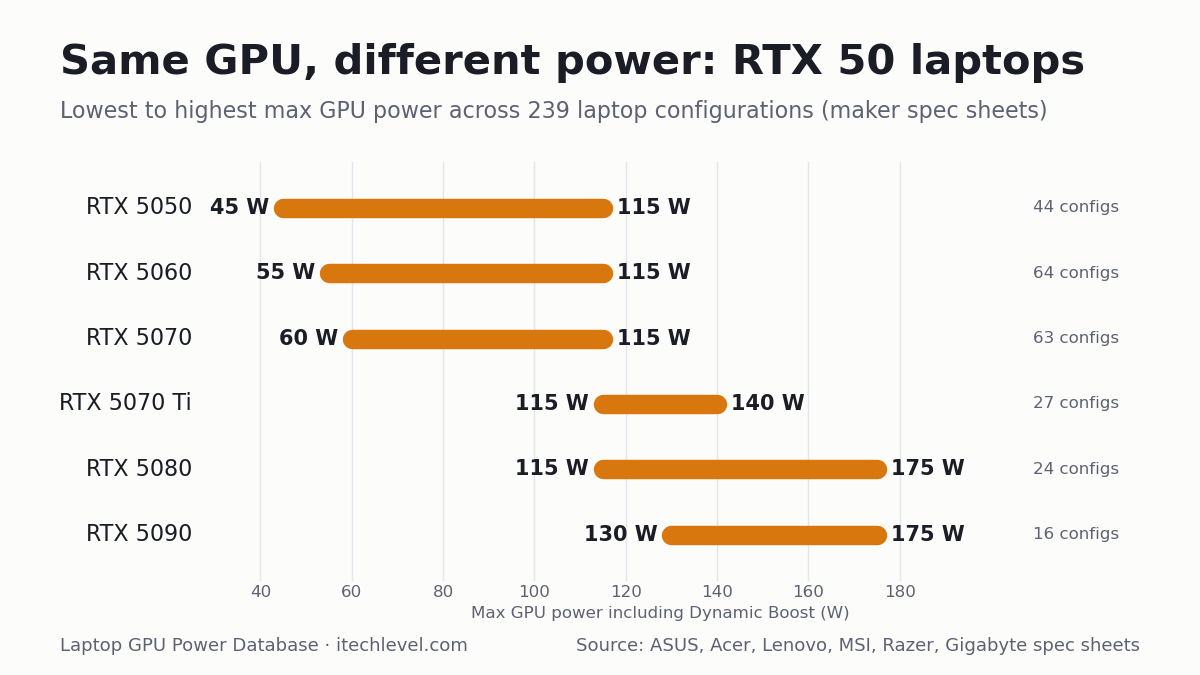
GPU power range by GPU
| GPU | Lowest max power | Highest max power | Gap | Configurations |
|---|---|---|---|---|
| RTX 5050 | 45 W | 115 W | 70 W | 44 |
| RTX 5060 | 55 W | 115 W | 60 W | 64 |
| RTX 5070 | 60 W | 115 W | 55 W | 63 |
| RTX 5070 Ti | 115 W | 140 W | 25 W | 28 |
| RTX 5080 | 115 W | 175 W | 60 W | 24 |
| RTX 5090 | 130 W | 175 W | 45 W | 16 |
Ranges cover the laptops in this database only; some laptops outside it may go lower. See our best RTX 5070 laptops for full-power picks.
The database
Filter by GPU or brand, search for a model, or click a column heading to sort. “Max GPU power” includes Dynamic Boost where the manufacturer states it. A figure marked * is one “up to” number the maker gives for the whole model, not for each GPU.
| Laptop | Model code | GPU | Video memory | Max GPU power ▾ | Base + Dynamic Boost | Source |
|---|---|---|---|---|---|---|
| ASUS ROG Strix G16/G18 (2025) | G615JH G615LG G614FH G614PH G814PH | RTX 5050 | 8GB | 115 W | 100 W + 15 W | ASUS official TGP list |
| ASUS TUF Gaming A16 (2025) | FA608JH | RTX 5050 | 8GB | 115 W | 100 W + 15 W | ASUS official TGP list |
| ASUS TUF Gaming A18 (2025) | FA808UH | RTX 5050 | 8GB | 115 W | 100 W + 15 W | ASUS official TGP list |
| ASUS TUF Gaming F16 (2025) | FX608-TBD | RTX 5050 | 8GB | 115 W | 100 W + 15 W | ASUS official TGP list |
| Acer Nitro 16 AI (2025) | AN16-61 | RTX 5050 | 8GB | 115 W | 100 W + 15 W | Acer official GPU power list |
| Acer Nitro 16S AI (2025) | AN16S-61 | RTX 5050 | 8GB | 115 W | 100 W + 15 W | Acer official GPU power list |
| Acer Nitro 18 AI (2025) | AN18-61 | RTX 5050 | 8GB | 115 W | 100 W + 15 W | Acer official GPU power list |
| Acer Predator Helios Neo 16 (2026) | PHN16-I31 | RTX 5050 | 8GB | 115 W | 100 W + 15 W | Acer official GPU power list |
| Lenovo LOQ 15 Gen 11 (AMD, 2026) | 15AHP11 | RTX 5050 | 8GB | 115 W | — | Lenovo PSREF spec sheet |
| Lenovo LOQ 17 Gen 10 (Intel, 2025) | 17IRX10 | RTX 5050 | 8GB | 115 W | — | Lenovo PSREF spec sheet |
| Lenovo Legion 5 15 Gen 10 (AMD, 2025) | 15AHP10 | RTX 5050 | 8GB | 115 W | — | Lenovo PSREF spec sheet |
| Lenovo Legion 5 15 Gen 10 (Intel, 2025) | 15IAX10 | RTX 5050 | 8GB | 115 W | — | Lenovo PSREF spec sheet |
| Lenovo Legion 5 15 Gen 10 (Intel, 2025) | 15IRX10 | RTX 5050 | 8GB | 115 W | — | Lenovo PSREF spec sheet |
| Lenovo Legion Pro 5 16 Gen 10 (AMD, 2025) | 16ADR10 | RTX 5050 | 8GB | 115 W | — | Lenovo PSREF spec sheet |
| Lenovo Legion Pro 5 16 Gen 10 (Intel, 2025) | 16IRX10 | RTX 5050 | 8GB | 115 W | — | Lenovo PSREF spec sheet |
| MSI Katana 15 HX | C14WX | RTX 5050 | 8GB | 115 W | — | MSI spec page |
| ASUS TUF Gaming A14 (2025) | FA401KH FA401UH | RTX 5050 | 8GB | 110 W | 90 W + 15 W | ASUS official TGP list |
| ASUS ROG Zephyrus G14 (2025) | GA403UH | RTX 5050 | 8GB | 100 W | 75 W + 15 W | ASUS official TGP list |
| ASUS ROG Zephyrus G16 (2025) | GA605KH | RTX 5050 | 8GB | 100 W | 85 W + 15 W | ASUS official TGP list |
| Lenovo LOQ 15 Gen 10 (AMD, 2025) | 15AHP10 | RTX 5050 | 8GB | 100 W | — | Lenovo PSREF spec sheet |
| Lenovo LOQ 15 Gen 10 (Intel, 2025) | 15IRX10 | RTX 5050 | 8GB | 100 W | — | Lenovo PSREF spec sheet |
| Lenovo Yoga Pro 9 16 Gen 10 (Intel, 2025) | 16IAH10 | RTX 5050 | 8GB | 100 W | — | Lenovo PSREF spec sheet |
| MSI Cyborg 15 MAX | C2WX | RTX 5050 | 8GB | 100 W | — | MSI spec page |
| Acer Nitro V 16 (2025) | ANV16-72 | RTX 5050 | 8GB | 95 W | 80 W + 15 W | Acer official GPU power list |
| Acer Nitro V 16 AI (2025) | ANV16-61/42 | RTX 5050 | 8GB | 95 W | 80 W + 15 W | Acer official GPU power list |
| Acer Nitro V 17 AI (2025) | ANV17-61/41 | RTX 5050 | 8GB | 95 W | 80 W + 15 W | Acer official GPU power list |
| Acer Nitro V 16 AI (2026) | ANV16-I51 | RTX 5050 | 8GB | 85 W | 70 W + 15 W | Acer official GPU power list |
| Acer Nitro V 16 AI (2026) | ANV16-A71 | RTX 5050 | 8GB | 85 W | 70 W + 15 W | Acer official GPU power list |
| Acer Nitro V 16 AI (2026) | ANV16-A31 | RTX 5050 | 8GB | 85 W | 70 W + 15 W | Acer official GPU power list |
| Acer Nitro V 16S (2025) | ANV16S-71 | RTX 5050 | 8GB | 85 W | 70 W + 15 W | Acer official GPU power list |
| Acer Nitro V 16S AI (2025) | ANV16S-61/41 | RTX 5050 | 8GB | 85 W | 70 W + 15 W | Acer official GPU power list |
| GIGABYTE AERO X16 | EG64H | RTX 5050 | 8GB | up to 85 W* | — | Gigabyte product page |
| GIGABYTE AERO X16 | EG61H | RTX 5050 | 8GB | up to 85 W* | — | Gigabyte product page |
| GIGABYTE Gaming A16 | GA65H | RTX 5050 | 8GB | up to 85 W* | — | Gigabyte product page |
| GIGABYTE Gaming A16 | GA63H | RTX 5050 | 8GB | up to 85 W* | — | Gigabyte product page |
| GIGABYTE Gaming A16 | GA6H | RTX 5050 | 8GB | up to 85 W* | — | Gigabyte product page |
| GIGABYTE Gaming A18 | GA83H | RTX 5050 | 8GB | up to 85 W* | — | Gigabyte product page |
| Acer Nitro V 15 (2025) | ANV15-52 | RTX 5050 | 8GB | 75 W | 60 W + 15 W | Acer official GPU power list |
| Acer Nitro V 15 (2026) | ANV15-A31 | RTX 5050 | 8GB | 75 W | 60 W + 15 W | Acer official GPU power list |
| Acer Nitro V 16 (2026) | ANV16-I31 | RTX 5050 | 8GB | 75 W | 60 W + 15 W | Acer official GPU power list |
| MSI Cyborg 15 | C13WX | RTX 5050 | 8GB | 70 W | — | MSI spec page |
| Acer Nitro V 14 AI (2025) | AN14-62 | RTX 5050 | 8GB | 60 W | 50 W + 10 W | Acer official GPU power list |
| MSI Cyborg 15 | B2RW | RTX 5050 | 8GB | 45 W | — | MSI spec page |
| MSI Cyborg 17 | B2RW | RTX 5050 | 8GB | 45 W | — | MSI spec page |
| ASUS ROG Strix G16/G18 (2025) | G615LM G815LM G615JM G615JM G815JM G614FM G814FM G614PM G814PM | RTX 5060 | 8GB | 115 W | 100 W + 15 W | ASUS official TGP list |
| ASUS TUF Gaming A16 (2025) | FA608WM FA608PM | RTX 5060 | 8GB | 115 W | 100 W + 15 W | ASUS official TGP list |
| ASUS TUF Gaming A18 (2025) | FA808UM | RTX 5060 | 8GB | 115 W | 100 W + 15 W | ASUS official TGP list |
| ASUS TUF Gaming F16 (2025) | FX608LM FX608JP | RTX 5060 | 8GB | 115 W | 100 W + 15 W | ASUS official TGP list |
| Acer Nitro 16 AI (2025) | AN16-61 | RTX 5060 | 8GB | 115 W | 100 W + 15 W | Acer official GPU power list |
| Acer Nitro 16S AI (2025) | AN16S-61 | RTX 5060 | 8GB | 115 W | 100 W + 15 W | Acer official GPU power list |
| Acer Nitro 18 AI (2025) | AN18-61 | RTX 5060 | 8GB | 115 W | 100 W + 15 W | Acer official GPU power list |
| Acer Predator Helios Neo 14 AI (2025) | PHN14-71 | RTX 5060 | 8GB | 115 W | 100 W + 15 W | Acer official GPU power list |
| Acer Predator Helios Neo 16 (2026) | PHN16-I31 | RTX 5060 | 8GB | 115 W | 100 W + 15 W | Acer official GPU power list |
| Acer Predator Helios Neo 16 AI (2025) | PHN16-73 | RTX 5060 | 8GB | 115 W | 100 W + 15 W | Acer official GPU power list |
| Acer Predator Helios Neo 16 AI (2026) | PHN16-I71 | RTX 5060 | 8GB | 115 W | 100 W + 15 W | Acer official GPU power list |
| Acer Predator Helios Neo 16S AI (2025) | PHN16S-71 | RTX 5060 | 8GB | 115 W | 100 W + 15 W | Acer official GPU power list |
| Acer Predator Helios Neo 16S AI (2026) | PHN16S-I51 | RTX 5060 | 8GB | 115 W | 100 W + 15 W | Acer official GPU power list |
| Acer Predator Helios Neo 18 AI (2025) | PHN18-72 | RTX 5060 | 8GB | 115 W | 100 W + 15 W | Acer official GPU power list |
| Acer Predator Helios Neo 18 AI (2026) | PHN18-I71 | RTX 5060 | 8GB | 115 W | 100 W + 15 W | Acer official GPU power list |
| GIGABYTE Gaming A16 | GA6EH | RTX 5060 | 8GB | up to 115 W* | — | Gigabyte product page |
| Lenovo LOQ 15 Gen 11 (AMD, 2026) | 15AHP11 | RTX 5060 | 8GB | 115 W | — | Lenovo PSREF spec sheet |
| Lenovo LOQ 17 Gen 10 (Intel, 2025) | 17IRX10 | RTX 5060 | 8GB | 115 W | — | Lenovo PSREF spec sheet |
| Lenovo Legion 5 15 Gen 10 (AMD, 2025) | 15AHP10 | RTX 5060 | 8GB | 115 W | — | Lenovo PSREF spec sheet |
| Lenovo Legion 5 15 Gen 10 (Intel, 2025) | 15IAX10 | RTX 5060 | 8GB | 115 W | — | Lenovo PSREF spec sheet |
| Lenovo Legion 5 15 Gen 10 (Intel, 2025) | 15IRX10 | RTX 5060 | 8GB | 115 W | — | Lenovo PSREF spec sheet |
| Lenovo Legion 5 15 Gen 11 (Intel, 2026) | 15IAX11 | RTX 5060 | 8GB | 115 W | — | Lenovo PSREF spec sheet |
| Lenovo Legion 7 16 Gen 10 (Intel, 2025) | 16IAX10 | RTX 5060 | 8GB | 115 W | — | Lenovo PSREF spec sheet |
| Lenovo Legion Pro 5 16 Gen 10 (AMD, 2025) | 16ADR10 | RTX 5060 | 8GB | 115 W | — | Lenovo PSREF spec sheet |
| Lenovo Legion Pro 5 16 Gen 10 (AMD, 2025) | 16AFR10 | RTX 5060 | 8GB | 115 W | — | Lenovo PSREF spec sheet |
| Lenovo Legion Pro 5 16 Gen 10 (Intel, 2025) | 16IAX10 | RTX 5060 | 8GB | 115 W | — | Lenovo PSREF spec sheet |
| Lenovo Legion Pro 5 16 Gen 10 (Intel, 2025) | 16IRX10 | RTX 5060 | 8GB | 115 W | — | Lenovo PSREF spec sheet |
| MSI Crosshair 16 HX | E14WX | RTX 5060 | 8GB | 115 W | — | MSI spec page |
| MSI Crosshair 16 Max HX | E2WX | RTX 5060 | 8GB | 115 W | — | MSI spec page |
| MSI Crosshair A16 HX | E8WX | RTX 5060 | 8GB | 115 W | — | MSI spec page |
| MSI Katana 15 HX | C14WX | RTX 5060 | 8GB | 115 W | — | MSI spec page |
| MSI Stealth 16 AI Plus | B3WX | RTX 5060 | 8GB | 115 W | — | MSI spec page |
| Razer Blade 14 (2025) | — | RTX 5060 | 8GB | up to 115 W* | — | Razer product page |
| Razer Blade 16 (2026) | — | RTX 5060 | 8GB | up to 115 W* | — | Razer product page |
| ASUS ROG Zephyrus G16 (2025) | GU605CM | RTX 5060 | 8GB | 110 W | 90 W + 15 W | ASUS official TGP list |
| ASUS TUF Gaming A14 (2025) | FA401KM FA401UM | RTX 5060 | 8GB | 110 W | 90 W + 15 W | ASUS official TGP list |
| ASUS ROG Zephyrus G16 (2025) | GA605KM | RTX 5060 | 8GB | 105 W | 90 W + 15 W | ASUS official TGP list |
| ASUS ROG Zephyrus G14 (2025) | GA403WM GA403UM | RTX 5060 | 8GB | 100 W | 75 W + 15 W | ASUS official TGP list |
| Lenovo LOQ 15 Gen 10 (AMD, 2025) | 15AHP10 | RTX 5060 | 8GB | 100 W | — | Lenovo PSREF spec sheet |
| Lenovo LOQ 15 Gen 10 (Intel, 2025) | 15IRX10 | RTX 5060 | 8GB | 100 W | — | Lenovo PSREF spec sheet |
| Lenovo Yoga Pro 9 16 Gen 10 (Intel, 2025) | 16IAH10 | RTX 5060 | 8GB | 100 W | — | Lenovo PSREF spec sheet |
| MSI Cyborg 15 MAX | C2WX | RTX 5060 | 8GB | 100 W | — | MSI spec page |
| Acer Nitro V 16 (2025) | ANV16-72 | RTX 5060 | 8GB | 95 W | 80 W + 15 W | Acer official GPU power list |
| Acer Nitro V 16 AI (2025) | ANV16-61/42 | RTX 5060 | 8GB | 95 W | 80 W + 15 W | Acer official GPU power list |
| Acer Nitro V 17 AI (2025) | ANV17-61/41 | RTX 5060 | 8GB | 95 W | 80 W + 15 W | Acer official GPU power list |
| Acer Nitro V 16 AI (2026) | ANV16-I51 | RTX 5060 | 8GB | 85 W | 70 W + 15 W | Acer official GPU power list |
| Acer Nitro V 16 AI (2026) | ANV16-A71 | RTX 5060 | 8GB | 85 W | 70 W + 15 W | Acer official GPU power list |
| Acer Nitro V 16 AI (2026) | ANV16-A31 | RTX 5060 | 8GB | 85 W | 70 W + 15 W | Acer official GPU power list |
| Acer Nitro V 16S (2025) | ANV16S-71 | RTX 5060 | 8GB | 85 W | 70 W + 15 W | Acer official GPU power list |
| Acer Nitro V 16S AI (2025) | ANV16S-61/41 | RTX 5060 | 8GB | 85 W | 70 W + 15 W | Acer official GPU power list |
| Acer Nitro V 16S AI (2026) | ANV16S-I51 | RTX 5060 | 8GB | 85 W | 70 W + 15 W | Acer official GPU power list |
| GIGABYTE AERO X16 | EG64H | RTX 5060 | 8GB | up to 85 W* | — | Gigabyte product page |
| GIGABYTE AERO X16 | EG61H | RTX 5060 | 8GB | up to 85 W* | — | Gigabyte product page |
| GIGABYTE Gaming A16 | GA65H | RTX 5060 | 8GB | up to 85 W* | — | Gigabyte product page |
| GIGABYTE Gaming A16 | GA63H | RTX 5060 | 8GB | up to 85 W* | — | Gigabyte product page |
| GIGABYTE Gaming A16 | GA6H | RTX 5060 | 8GB | up to 85 W* | — | Gigabyte product page |
| GIGABYTE Gaming A18 | GA83H | RTX 5060 | 8GB | up to 85 W* | — | Gigabyte product page |
| Acer Nitro V 15 (2025) | ANV15-52 | RTX 5060 | 8GB | 75 W | 60 W + 15 W | Acer official GPU power list |
| Acer Nitro V 15 (2026) | ANV15-A31 | RTX 5060 | 8GB | 75 W | 60 W + 15 W | Acer official GPU power list |
| Acer Nitro V 16 (2026) | ANV16-I31 | RTX 5060 | 8GB | 75 W | 60 W + 15 W | Acer official GPU power list |
| MSI Cyborg 15 | C2WX | RTX 5060 | 8GB | 70 W | — | MSI spec page |
| Acer Nitro V 14 AI (2025) | AN14-62 | RTX 5060 | 8GB | 60 W | 50 W + 10 W | Acer official GPU power list |
| MSI Cyborg 15 | B2RW | RTX 5060 | 8GB | 55 W | — | MSI spec page |
| MSI Cyborg 17 | B2RW | RTX 5060 | 8GB | 55 W | — | MSI spec page |
| ASUS ROG Strix G16/G18 (2025) | G615LP G615JP G815LP G614FP G814FP G814PP | RTX 5070 | 8GB or 12GB | 115 W | 100 W + 15 W | ASUS official TGP list |
| ASUS TUF Gaming A16 (2025) | FA608UP FA608PP | RTX 5070 | 8GB or 12GB | 115 W | 100 W + 15 W | ASUS official TGP list |
| ASUS TUF Gaming A18 (2025) | FA808UP | RTX 5070 | 8GB or 12GB | 115 W | 100 W + 15 W | ASUS official TGP list |
| ASUS TUF Gaming F16 (2025) | FX608LP FX608JP | RTX 5070 | 8GB or 12GB | 115 W | 100 W + 15 W | ASUS official TGP list |
| Acer Nitro 16 (2026) | AN16-A91 | RTX 5070 | 8GB or 12GB | 115 W | 100 W + 15 W | Acer official GPU power list |
| Acer Nitro 16 AI (2025) | AN16-61 | RTX 5070 | 8GB or 12GB | 115 W | 100 W + 15 W | Acer official GPU power list |
| Acer Nitro 16S AI (2025) | AN16S-61 | RTX 5070 | 8GB or 12GB | 115 W | 100 W + 15 W | Acer official GPU power list |
| Acer Nitro 18 AI (2025) | AN18-61 | RTX 5070 | 8GB or 12GB | 115 W | 100 W + 15 W | Acer official GPU power list |
| Acer Predator Helios Neo 14 AI (2025) | PHN14-71 | RTX 5070 | 8GB or 12GB | 115 W | 100 W + 15 W | Acer official GPU power list |
| Acer Predator Helios Neo 16 (2026) | PHN16-I31 | RTX 5070 | 8GB or 12GB | 115 W | 100 W + 15 W | Acer official GPU power list |
| Acer Predator Helios Neo 16 AI (2025) | PHN16-73 | RTX 5070 | 8GB or 12GB | 115 W | 100 W + 15 W | Acer official GPU power list |
| Acer Predator Helios Neo 16 AI (2026) | PHN16-I71 | RTX 5070 | 8GB or 12GB | 115 W | 100 W + 15 W | Acer official GPU power list |
| Acer Predator Helios Neo 16S AI (2025) | PHN16S-71 | RTX 5070 | 8GB or 12GB | 115 W | 100 W + 15 W | Acer official GPU power list |
| Acer Predator Helios Neo 16S AI (2026) | PHN16S-I71 | RTX 5070 | 8GB or 12GB | 115 W | 100 W + 15 W | Acer official GPU power list |
| Acer Predator Helios Neo 16S AI (2026) | PHN16S-I51 | RTX 5070 | 8GB or 12GB | 115 W | 100 W + 15 W | Acer official GPU power list |
| Acer Predator Helios Neo 18 AI (2025) | PHN18-72 | RTX 5070 | 8GB or 12GB | 115 W | 100 W + 15 W | Acer official GPU power list |
| Acer Predator Helios Neo 18 AI (2026) | PHN18-I71 | RTX 5070 | 8GB or 12GB | 115 W | 100 W + 15 W | Acer official GPU power list |
| AORUS Elite 16 | AE6H | RTX 5070 | 8GB | 115 W | — | Gigabyte spec page |
| GIGABYTE Gaming A16 | GA6EH | RTX 5070 | 8GB | up to 115 W* | — | Gigabyte product page |
| Lenovo LOQ 15 Gen 10 (Intel, 2025) | 15IRX10 | RTX 5070 | 8GB or 12GB | 115 W | — | Lenovo PSREF spec sheet |
| Lenovo LOQ 15 Gen 11 (AMD, 2026) | 15AHP11 | RTX 5070 | 8GB | 115 W | — | Lenovo PSREF spec sheet |
| Lenovo LOQ 17 Gen 10 (Intel, 2025) | 17IRX10 | RTX 5070 | 8GB or 12GB | 115 W | — | Lenovo PSREF spec sheet |
| Lenovo Legion 5 15 Gen 10 (Intel, 2025) | 15IAX10 | RTX 5070 | 8GB | 115 W | — | Lenovo PSREF spec sheet |
| Lenovo Legion 5 15 Gen 10 (Intel, 2025) | 15IRX10 | RTX 5070 | 8GB | 115 W | — | Lenovo PSREF spec sheet |
| Lenovo Legion 5 15 Gen 11 (Intel, 2026) | 15IAX11 | RTX 5070 | 12GB | 115 W | — | Lenovo PSREF spec sheet |
| Lenovo Legion 7 16 Gen 10 (Intel, 2025) | 16IAX10 | RTX 5070 | 8GB or 12GB | 115 W | — | Lenovo PSREF spec sheet |
| Lenovo Legion Pro 5 16 Gen 10 (AMD, 2025) | 16ADR10 | RTX 5070 | 8GB or 12GB | 115 W | — | Lenovo PSREF spec sheet |
| Lenovo Legion Pro 5 16 Gen 10 (AMD, 2025) | 16AFR10 | RTX 5070 | 8GB or 12GB | 115 W | — | Lenovo PSREF spec sheet |
| Lenovo Legion Pro 5 16 Gen 10 (Intel, 2025) | 16IAX10 | RTX 5070 | 8GB or 12GB | 115 W | — | Lenovo PSREF spec sheet |
| Lenovo Legion Pro 5 16 Gen 10 (Intel, 2025) | 16IRX10 | RTX 5070 | 8GB or 12GB | 115 W | — | Lenovo PSREF spec sheet |
| MSI Crosshair 16 HX | E14WX | RTX 5070 | 8GB | 115 W | — | MSI spec page |
| MSI Crosshair 16 Max HX | E2WX | RTX 5070 | 8GB | 115 W | — | MSI spec page |
| MSI Crosshair A16 HX | E8WX | RTX 5070 | 8GB | 115 W | — | MSI spec page |
| MSI Crosshair A16 HX MLG Edition | E8WX | RTX 5070 | 8GB | 115 W | — | MSI spec page |
| MSI Katana 15 HX | C14WX | RTX 5070 | 8GB | 115 W | — | MSI spec page |
| MSI Raider 16 HX | B2WX | RTX 5070 | 8GB | 115 W | — | MSI spec page |
| MSI Stealth 16 AI Plus | B3WX | RTX 5070 | 8GB | 115 W | — | MSI spec page |
| Razer Blade 14 (2025) | — | RTX 5070 | 8GB | up to 115 W* | — | Razer product page |
| Razer Blade 16 (2026) | — | RTX 5070 | 8GB or 12GB | up to 115 W* | — | Razer product page |
| ASUS ROG Zephyrus G16 (2025) | GU605CP | RTX 5070 | 8GB or 12GB | 110 W | 90 W + 15 W | ASUS official TGP list |
| Acer Predator Triton 14 AI (2025) | PT14-52T | RTX 5070 | 8GB or 12GB | 110 W | 95 W + 15 W | Acer official GPU power list |
| ASUS ROG Zephyrus G16 (2025) | GA605KP | RTX 5070 | 8GB or 12GB | 105 W | 90 W + 15 W | ASUS official TGP list |
| ASUS ROG Zephyrus G14 (2025) | GA403WP GA403UP | RTX 5070 | 8GB or 12GB | 100 W | 75 W + 15 W | ASUS official TGP list |
| Lenovo Yoga Pro 9 16 Gen 10 (Intel, 2025) | 16IAH10 | RTX 5070 | 8GB | 100 W | — | Lenovo PSREF spec sheet |
| MSI Cyborg 15 MAX | C2WX | RTX 5070 | 8GB | 100 W | — | MSI spec page |
| Acer Nitro V 16 (2025) | ANV16-72 | RTX 5070 | 8GB or 12GB | 95 W | 80 W + 15 W | Acer official GPU power list |
| Acer Nitro V 16 AI (2025) | ANV16-61/42 | RTX 5070 | 8GB or 12GB | 95 W | 80 W + 15 W | Acer official GPU power list |
| Acer Nitro V 17 AI (2025) | ANV17-61/41 | RTX 5070 | 8GB or 12GB | 95 W | 80 W + 15 W | Acer official GPU power list |
| Acer Nitro V 16 AI (2026) | ANV16-I51 | RTX 5070 | 8GB or 12GB | 85 W | 70 W + 15 W | Acer official GPU power list |
| Acer Nitro V 16 AI (2026) | ANV16-A71 | RTX 5070 | 8GB or 12GB | 85 W | 70 W + 15 W | Acer official GPU power list |
| Acer Nitro V 16 AI (2026) | ANV16-A31 | RTX 5070 | 8GB or 12GB | 85 W | 70 W + 15 W | Acer official GPU power list |
| Acer Nitro V 16S (2025) | ANV16S-71 | RTX 5070 | 8GB or 12GB | 85 W | 70 W + 15 W | Acer official GPU power list |
| Acer Nitro V 16S AI (2025) | ANV16S-61/41 | RTX 5070 | 8GB or 12GB | 85 W | 70 W + 15 W | Acer official GPU power list |
| Acer Nitro V 16S AI (2026) | ANV16S-I51 | RTX 5070 | 8GB or 12GB | 85 W | 70 W + 15 W | Acer official GPU power list |
| GIGABYTE AERO X16 | EG64H | RTX 5070 | 8GB | up to 85 W* | — | Gigabyte product page |
| GIGABYTE AERO X16 | EG61H | RTX 5070 | 8GB | up to 85 W* | — | Gigabyte product page |
| GIGABYTE Gaming A16 | GA63H | RTX 5070 | 8GB | up to 85 W* | — | Gigabyte product page |
| GIGABYTE Gaming A16 | GA6H | RTX 5070 | 8GB | up to 85 W* | — | Gigabyte product page |
| GIGABYTE Gaming A18 | GA83H | RTX 5070 | 8GB | up to 85 W* | — | Gigabyte product page |
| Acer Nitro V 15 (2026) | ANV15-A31 | RTX 5070 | 8GB or 12GB | 75 W | 60 W + 15 W | Acer official GPU power list |
| Acer Nitro V 16 (2026) | ANV16-I31 | RTX 5070 | 8GB or 12GB | 75 W | 60 W + 15 W | Acer official GPU power list |
| MSI Cyborg 15 | B2RW | RTX 5070 | 8GB | 60 W | — | MSI spec page |
| MSI Cyborg 17 | B2RW | RTX 5070 | 8GB | 60 W | — | MSI spec page |
| ASUS ROG Strix G16/G18 (2025) | G615LR G815LR G614FR G614PR | RTX 5070 Ti | 12GB | 140 W | 115 W + 25 W | ASUS official TGP list |
| ASUS ROG Strix SCAR 16/18 (2025) | G635LR G835LR | RTX 5070 Ti | 12GB | 140 W | 115 W + 25 W | ASUS official TGP list |
| Acer Nitro 16 (2026) | AN16-A91 | RTX 5070 Ti | 12GB | 140 W | 115 W + 25 W | Acer official GPU power list |
| Acer Predator Helios 16 AI (2025) | PH16-73 | RTX 5070 Ti | 12GB | 140 W | 115 W + 25 W | Acer official GPU power list |
| Acer Predator Helios Neo 16 AI (2025) | PHN16-73 | RTX 5070 Ti | 12GB | 140 W | 115 W + 25 W | Acer official GPU power list |
| Acer Predator Helios Neo 16 AI (2026) | PHN16-I71 | RTX 5070 Ti | 12GB | 140 W | 115 W + 25 W | Acer official GPU power list |
| Acer Predator Helios Neo 18 AI (2025) | PHN18-72 | RTX 5070 Ti | 12GB | 140 W | 115 W + 25 W | Acer official GPU power list |
| Acer Predator Helios Neo 18 AI (2026) | PHN18-I71 | RTX 5070 Ti | 12GB | 140 W | 115 W + 25 W | Acer official GPU power list |
| AORUS Master 16 | AM6J | RTX 5070 Ti | 12GB | 140 W | — | Gigabyte spec page |
| AORUS Master 16 | AM6H | RTX 5070 Ti | 12GB | 140 W | — | Gigabyte spec page |
| Lenovo Legion Pro 5 16 Gen 10 (Intel, 2025) | 16IAX10H | RTX 5070 Ti | 12GB | 140 W | — | Lenovo PSREF spec sheet |
| Lenovo Legion Pro 7 16 Gen 10 (AMD, 2025) | 16AFR10H | RTX 5070 Ti | 12GB | 140 W | — | Lenovo PSREF spec sheet |
| Lenovo Legion Pro 7 16 Gen 10 (Intel, 2025) | 16IAX10H | RTX 5070 Ti | 12GB | 140 W | — | Lenovo PSREF spec sheet |
| MSI Raider 16 HX | B2WX | RTX 5070 Ti | 12GB | 140 W | — | MSI spec page |
| MSI Raider 16 Max HX | B2WX | RTX 5070 Ti | 12GB | 140 W | — | MSI spec page |
| MSI Raider 18 HX | A2WX | RTX 5070 Ti | 12GB | 140 W | — | MSI spec page |
| MSI Stealth 18 HX | A2WX | RTX 5070 Ti | 12GB | 140 W | — | MSI spec page |
| ASUS ROG Zephyrus G16 (2025) | GU605CR | RTX 5070 Ti | 12GB | 125 W | 95 W + 20 W | ASUS official TGP list |
| MSI Stealth 16 AI Plus | B3WX | RTX 5070 Ti | 12GB | 125 W | — | MSI spec page |
| ASUS ROG Zephyrus G14 (2025) | GA403WR | RTX 5070 Ti | 12GB | 120 W | 85 W + 25 W | ASUS official TGP list |
| Acer Nitro 16 AI (2025) | AN16-61 | RTX 5070 Ti | 12GB | 115 W | 100 W + 15 W | Acer official GPU power list |
| Acer Nitro 16S AI (2025) | AN16S-61 | RTX 5070 Ti | 12GB | 115 W | 100 W + 15 W | Acer official GPU power list |
| Acer Nitro 18 AI (2025) | AN18-61 | RTX 5070 Ti | 12GB | 115 W | 100 W + 15 W | Acer official GPU power list |
| Acer Predator Helios Neo 16S AI (2025) | PHN16S-71 | RTX 5070 Ti | 12GB | 115 W | 100 W + 15 W | Acer official GPU power list |
| Acer Predator Helios Neo 16S AI (2026) | PHN16S-I71 | RTX 5070 Ti | 12GB | 115 W | 100 W + 15 W | Acer official GPU power list |
| GIGABYTE Gaming A16 PRO | GA6DH | RTX 5070 Ti | 12GB | up to 115 W* | — | Gigabyte product page |
| GIGABYTE Gaming A18 PRO | GA8J | RTX 5070 Ti | 12GB | up to 115 W* | — | Gigabyte product page |
| Razer Blade 18 (2026) | — | RTX 5070 Ti | 12GB | Not stated | — | Razer product page |
| ASUS ROG Strix G16/G18 (2025) | G615LW G815LW | RTX 5080 | 16GB | 175 W | 150 W + 25 W | ASUS official TGP list |
| ASUS ROG Strix SCAR 16/18 (2025) | G635LW G835LW | RTX 5080 | 16GB | 175 W | 150 W + 25 W | ASUS official TGP list |
| Acer Predator Helios 18 AI (2025) | PH18-73 | RTX 5080 | 16GB | 175 W | 150 W + 25 W | Acer official GPU power list |
| Acer Predator Helios 18 AI (2026) | PH18-I71 | RTX 5080 | 16GB | 175 W | 150 W + 25 W | Acer official GPU power list |
| Acer Predator Helios Neo 16 AI (2026) | PHN16-I71 | RTX 5080 | 16GB | 175 W | 150 W + 25 W | Acer official GPU power list |
| Acer Predator Helios Neo 18 AI (2026) | PHN18-I71 | RTX 5080 | 16GB | 175 W | 150 W + 25 W | Acer official GPU power list |
| AORUS Master 16 | AM6J | RTX 5080 | 16GB | 175 W | — | Gigabyte spec page |
| AORUS Master 16 | AM6H | RTX 5080 | 16GB | 175 W | — | Gigabyte spec page |
| AORUS Master 18 | AM8H | RTX 5080 | 16GB | 175 W | — | Gigabyte spec page |
| Lenovo Legion Pro 7 16 Gen 10 (AMD, 2025) | 16AFR10H | RTX 5080 | 16GB | 175 W | — | Lenovo PSREF spec sheet |
| Lenovo Legion Pro 7 16 Gen 10 (Intel, 2025) | 16IAX10H | RTX 5080 | 16GB | 175 W | — | Lenovo PSREF spec sheet |
| MSI Raider 16 HX | B2WX | RTX 5080 | 16GB | 175 W | — | MSI spec page |
| MSI Raider 16 Max HX | B2WX | RTX 5080 | 16GB | 175 W | — | MSI spec page |
| MSI Raider 18 HX | A2WX | RTX 5080 | 16GB | 175 W | — | MSI spec page |
| MSI Raider 18 Max HX | A2WX | RTX 5080 | 16GB | 175 W | — | MSI spec page |
| MSI Raider A16 HX | B8WX | RTX 5080 | 16GB | 175 W | — | MSI spec page |
| Razer Blade 16 (2026) | — | RTX 5080 | 16GB | up to 165 W* | — | Razer product page |
| MSI Stealth 18 HX | A2WX | RTX 5080 | 16GB | 150 W | — | MSI spec page |
| ASUS ROG Zephyrus G16 (2025) | GU605CW | RTX 5080 | 16GB | 130 W | 100 W + 20 W | ASUS official TGP list |
| MSI Stealth 16 AI Plus | B3WX | RTX 5080 | 16GB | 125 W | — | MSI spec page |
| ASUS ROG Zephyrus G14 (2025) | GA403WW | RTX 5080 | 16GB | 120 W | 85 W + 25 W | ASUS official TGP list |
| Acer Predator Helios Neo 16S AI (2026) | PHN16S-I71 | RTX 5080 | 16GB | 115 W | 100 W + 15 W | Acer official GPU power list |
| GIGABYTE Gaming A16 PRO | GA6DH | RTX 5080 | 16GB | up to 115 W* | — | Gigabyte product page |
| GIGABYTE Gaming A18 PRO | GA8J | RTX 5080 | 16GB | up to 115 W* | — | Gigabyte product page |
| ASUS ROG Strix SCAR 16/18 (2025) | G635LX G835LX | RTX 5090 | 24GB | 175 W | 150 W + 25 W | ASUS official TGP list |
| Acer Predator Helios 16 AI (2025) | PH16-73 | RTX 5090 | 24GB | 175 W | 150 W + 25 W | Acer official GPU power list |
| Acer Predator Helios 18 AI (2025) | PH18-73 | RTX 5090 | 24GB | 175 W | 150 W + 25 W | Acer official GPU power list |
| Acer Predator Helios 18 AI (2026) | PH18-I71 | RTX 5090 | 24GB | 175 W | 150 W + 25 W | Acer official GPU power list |
| AORUS Master 16 | AM6J | RTX 5090 | 24GB | 175 W | — | Gigabyte spec page |
| AORUS Master 16 | AM6H | RTX 5090 | 24GB | 175 W | — | Gigabyte spec page |
| AORUS Master 18 | AM8H | RTX 5090 | 24GB | 175 W | — | Gigabyte spec page |
| Lenovo Legion Pro 7 16 Gen 10 (Intel, 2025) | 16IAX10H | RTX 5090 | 24GB | 175 W | — | Lenovo PSREF spec sheet |
| MSI Raider 16 Max HX | B2WX | RTX 5090 | 24GB | 175 W | — | MSI spec page |
| MSI Raider 18 HX | A2WX | RTX 5090 | 24GB | 175 W | — | MSI spec page |
| MSI Titan 18 HX | A2WX | RTX 5090 | 24GB | 175 W | — | MSI spec page |
| MSI Titan 18 HX Dragon Edition Draco Epic | A2WX | RTX 5090 | 24GB | 175 W | — | MSI spec page |
| Razer Blade 18 (2026) | — | RTX 5090 | 24GB | up to 175 W* | — | Razer product page |
| Razer Blade 16 (2026) | — | RTX 5090 | 24GB | up to 165 W* | — | Razer product page |
| MSI Stealth 18 HX | A2WX | RTX 5090 | 24GB | 150 W | — | MSI spec page |
| ASUS ROG Zephyrus G16 (2025) | GU605CX | RTX 5090 | 24GB | 130 W | 100 W + 20 W | ASUS official TGP list |
Download the full database (CSV): free to reuse with a link to this page (CC BY 4.0).
What the data shows
Key numbers (October 2026)
- 103 of 238 RTX 50 laptop configurations (43%) run their GPU below the top wattage the same GPU gets in another laptop.
- The same GPU name can differ by up to 70 W: RTX 5050 45–115 W, RTX 5060 55–115 W, RTX 5070 60–115 W, RTX 5080 115–175 W.
- 61 of 171 RTX 5050, 5060 and 5070 configurations are rated under 100 W.
- Average share of the top wattage, by brand: Razer 98%, Lenovo 98%, ASUS 94%, MSI 88%, Acer 87%, Gigabyte 83%.
Based on the 238 of 239 listed configurations with a stated wattage, from 6 brands; each figure comes from the maker’s own spec sheet or GPU power list (see Methodology).
- Thin laptops trade power for size. The 14-inch ASUS Zephyrus G14 runs the RTX 5070 at up to 100 W, against 115 W in the cheaper ASUS TUF Gaming A16 and F16. Acer’s 14-inch Nitro V 14 AI runs its RTX 5050 and RTX 5060 at 60 W.
- Budget laptops split in two. ASUS’s TUF Gaming A16, F16 and A18 and Lenovo’s LOQ 17 run the RTX 5050, 5060 and 5070 at up to 115 W, the same as pricier models. Acer’s Nitro V range runs them at 60 to 95 W, and Gigabyte rates most of its Gaming A16 and A18 models and the AERO X16 at up to 85 W. MSI’s Cyborg range has the widest spread: the Cyborg 15 and 17 B2RW run the RTX 5050, 5060 and 5070 at just 45, 55 and 60 W, the lowest figures in the database, the Cyborg 15 C13WX and C2WX at 70 W, and the Cyborg 15 MAX at 100 W. All 18 RTX 5070 configurations below 100 W in the database are Acer Nitro V, Gigabyte or MSI Cyborg models.
- Newer isn’t always more powerful. Acer’s 2026 Nitro V models are rated lower than the 2025 ones: the RTX 5070 in the Nitro V 16 drops from 95 W (ANV16-72) to 75 W (ANV16-I31), and in the Nitro V 16 AI from 95 W to 85 W.
- Check the exact model code. Lenovo’s 2025 LOQ 15 (15IRX10 and 15AHP10) runs the RTX 5050 and 5060 at 100 W, though the Intel 15IRX10’s RTX 5070 option gets 115 W, while the 2026 LOQ 15AHP11 runs all three at 115 W.
- Creator laptops are tuned for quiet. Lenovo’s Yoga Pro 9 caps the RTX 5050, 5060 and 5070 at 100 W.
- The RTX 5080 varies most. Sixteen configurations run it at up to 175 W, including MSI’s Raider and Titan models, the AORUS Master 16 and the Acer Predator Helios Neo 16 AI. MSI’s thinner Stealth 18 HX gets 150 W, its Stealth 16 AI+ 125 W, the Zephyrus G14 120 W, and Acer’s slim Predator Helios Neo 16S AI and Gigabyte’s Gaming A16 PRO and A18 PRO 115 W: a 60 W gap for the same GPU name.
- Same chip, more memory. Lenovo lists 8GB and 12GB versions of the RTX 5070 in several Legion and LOQ models, both at 115 W. Nvidia added the 12GB RTX 5070 laptop GPU in April 2026 (Notebookcheck).
Watch: same GPU, different power, in 5 minutes
Prefer video? Our 5-minute walkthrough shows what these numbers mean in practice, using the database as it stood on October 8, 2026 (239 configurations). The table above is the up-to-date version.
What is TGP, and how much does it matter?
TGP (total graphics power) is the power budget a laptop maker gives the graphics chip. Nvidia lets makers set it within a range for each GPU and add Dynamic Boost, which shifts extra power from the processor to the GPU when the processor isn’t busy. For example, the RTX 5070 laptop GPU can be configured up to 100 W plus Dynamic Boost, and the RTX 5070 Ti between 60 and 115 W plus up to 25 W of Dynamic Boost (Notebookcheck).
More power generally means higher frame rates, especially at 1440p, but the gain shrinks as you go up, and cooling matters too. A 10–15 W difference is modest; a heavily limited GPU is a bigger deal. In Notebookcheck’s first tests, an 85 W RTX 5070 was only slightly ahead of the previous RTX 4070 laptop GPU. Lower power isn’t all bad: it usually means a quieter, cooler and lighter laptop.
How to check a laptop’s GPU power before you buy
- Look up the exact model code (for example 16IRX10 or GA403UP), not just the series name. Different versions of the same laptop can have different power limits.
- Use the manufacturer’s spec sheet: ASUS and Acer publish complete GPU power lists, and Lenovo’s PSREF sheets are just as detailed; Razer, MSI and Gigabyte list it on product pages. Dell doesn’t publish it, and HP lists only total platform power (CPU and GPU combined), which isn’t the same thing.
- Retail listings rarely show it. If a listing doesn’t mention TGP or “maximum graphics power”, check the model code here or on the maker’s site.
- On a laptop you own, the NVIDIA Control Panel’s System Information panel shows the GPU’s maximum graphics power.
Methodology and update log
- Sources: ASUS’s “complete list of GeForce GPU power specifications for 2025 ROG and TUF Gaming laptops”; Acer’s “Predator and Nitro Gaming Laptop GPU Power Specifications” (2025 and 2026 models); Lenovo PSREF spec sheets for 2025–2026 Legion, LOQ and Yoga Pro models; Razer, MSI and Gigabyte US product and spec pages. Each row links to its source.
- What “max GPU power” means: the highest GPU power the maker states, including Dynamic Boost. ASUS also publishes base TGP and Dynamic Boost separately, shown in their own column. Where ASUS lists different figures for Turbo and Manual modes, we use the higher, Manual-mode figure. Acer’s figures are with Turbo Mode on, and Acer also lists base TGP and Dynamic Boost.
- Model-wide figures (*): for some Gigabyte laptops the only official figure is one “up to X W Max TGP” for the whole model. We show it for each GPU option and mark it with *; the lower GPU options may run below it.
- Video memory: taken from the source where stated; otherwise Nvidia’s standard for that GPU. The RTX 5070 exists with 8GB or 12GB.
- Not stated: where a maker gives one figure for a group of GPUs that can’t apply to all of them (Razer Blade 18’s RTX 5070 Ti), we leave it blank rather than guess.
- Coverage: MSI states GPU power on the US spec pages of 17 of its 38 current RTX 50 models. For the Cyborg 15 and 17 B2RW, sold in the US, the figures come from MSI’s global spec pages, since the US pages list none. The rest show only the GPU (or total CPU+GPU power), so they aren’t included. ASUS hasn’t published a 2026 list yet. Dell/Alienware and HP aren’t included because they don’t publish GPU-only power figures (we checked Dell’s owner’s manuals and store pages, and HP’s spec sheets and product pages).
- October 4, 2026: first version: 207 configurations across 98 models from ASUS, Acer, Lenovo, Gigabyte/AORUS, Razer and MSI.
- October 5, 2026: added MSI’s US lineup (35 configurations from 17 models, including the Cyborg, Crosshair, Raider, Stealth and Titan ranges), for 233 configurations across 112 models.
- October 6, 2026: added MSI’s Cyborg 15 and Cyborg 17 B2RW (+6 configurations), which run the RTX 5060 at 55 W, for 239 configurations across 114 models.
- October 7, 2026: added a CSV download (CC BY 4.0), a sort menu, a shorter mobile view and a TGP definition. No data changes.
Spotted an error or a missing laptop? Let us know, ideally with a link to the manufacturer’s spec sheet.
Cite or reuse this data
The database is free to use under CC BY 4.0: quote it, chart it or build on it, with a link to this page. Suggested citation: “Laptop GPU power database, iTech Level, October 2026, https://itechlevel.com/laptop-gpu-power-database/”. Download the full table as CSV. Journalists and creators: if you need a specific cut of the data, ask us.
Frequently asked questions
What is TGP on a gaming laptop?
TGP (total graphics power) is how much power the laptop maker lets the graphics chip use. The same GPU name, such as RTX 5070, can run at different power levels in different laptops, and more power usually means higher frame rates.
Which laptops run the RTX 5070 at full power?
In our database, most RTX 5070 laptops from Lenovo (Legion and LOQ), the ASUS TUF and ROG Strix models, the Razer Blade 14 and 16, Acer's Predator Helios Neo and Nitro 16 models, and the AORUS Elite 16 are rated at up to 115 W including Dynamic Boost. The ASUS Zephyrus G14 and Lenovo Yoga Pro 9 are rated at up to 100 W, Acer's Nitro V and several Gigabyte models at 75 to 95 W, and MSI's Cyborg 15 and 17 B2RW at just 60 W.
Is a lower-wattage GPU much slower?
It depends on the gap. A 10 to 15 W difference is modest, while a heavily limited GPU, such as an 85 W RTX 5070 in some budget laptops, can be noticeably slower than a full-power one, especially at higher resolutions. Lower power also means less heat and noise.
What is Dynamic Boost?
Dynamic Boost lets the laptop shift extra power from the processor to the GPU when the processor isn't busy, typically 15 to 25 W. Maximum figures in our table include it where the manufacturer states it.
How can I check my laptop's GPU power?
Before buying, check the manufacturer's spec sheet or this database. On an NVIDIA laptop you own, the System Information panel in the NVIDIA Control Panel lists the GPU's maximum graphics power.
What is the RTX 5060 laptop TGP?
It depends on the laptop: NVIDIA lets each maker set it. Across the 64 RTX 5060 configurations in our database, maximum GPU power ranges from 55 W to 115 W, including Dynamic Boost where the maker states it. 115 W is the highest any RTX 5060 laptop in the table is rated for.
What is the RTX 5070 laptop TGP?
Across the 63 RTX 5070 configurations in our database, maximum GPU power ranges from 60 W to 115 W, including Dynamic Boost where the maker states it. Most Lenovo, ASUS TUF and ROG Strix, Razer and Acer Predator models run it at 115 W.
What is the RTX 5050 laptop TGP?
Across the 44 RTX 5050 configurations in our database, maximum GPU power ranges from 45 W to 115 W, including Dynamic Boost where the maker states it. That 70 W gap is the widest of any RTX 50 laptop GPU, so check the exact model before you buy.
Related guides
- Best RTX 5070 laptops
- Best gaming laptops under $1,200
- Cheapest gaming laptops
- Lenovo Legion 5 Gen 11 vs Gen 10
- Best RTX 5070 Ti and RTX 5080 laptops
- Best laptops for Marvel Rivals
- Best laptops for Battlefield 6 and Call of Duty
- Best RTX 5060 laptops
- MSI Katana vs Cyborg
- Predator Helios Neo 16 vs ROG Strix G16
- RTX 5060 laptop vs RTX 4070 laptop