Earbuds and Headphones Spec Database: 111 Models’ Battery, Weight and Latency, From the Makers (2026)
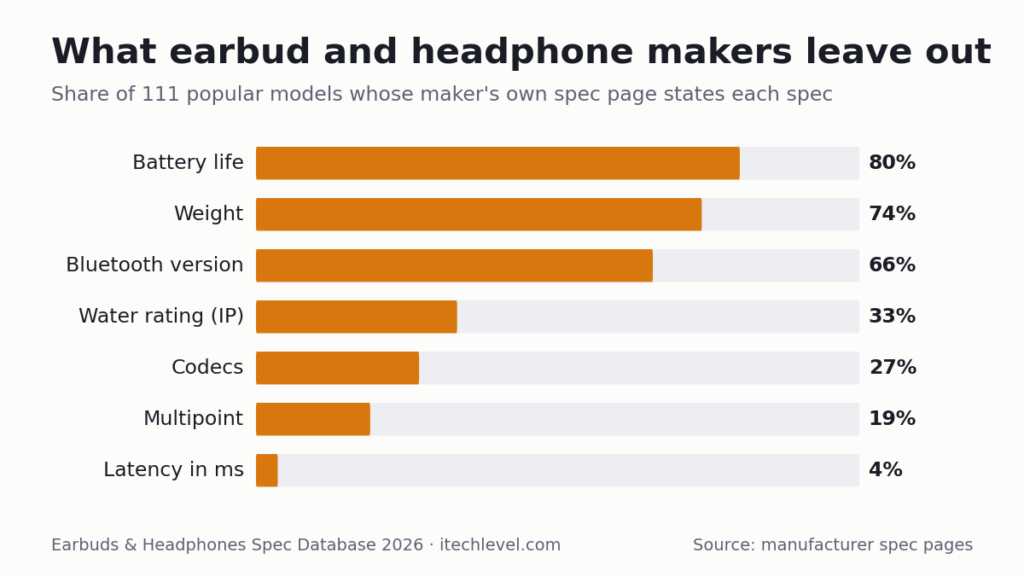
Spec sheets for earbuds and headphones are written to sell, and the numbers they leave out matter as much as the ones they print. This database puts 111 popular earbuds, headphones and gaming headsets from 43 brands side by side using only what each manufacturer publishes: battery life with and without noise cancelling, weight, water rating, Bluetooth version, codecs and latency, plus a column for what each maker doesn’t say. Only 4 of the 111 give a latency figure in milliseconds, and several battery claims depend on settings most people use.
How we put this together: every figure comes from the manufacturer’s own spec page, support article, press release or fact sheet, linked in each row. It is not based on hands-on testing by iTech Level, and we don’t fill gaps from reviews. Last updated October 23, 2026; see the methodology. Free to reuse with a link to this page (CC BY 4.0); download the data as CSV.
How to read it: battery figures are the maker’s own, for the earbuds or headphones alone and, where stated, with the charging case. “ANC” is active noise cancelling. “Not stated” means the maker’s spec page doesn’t give the figure; it doesn’t mean the feature is missing.
On this page: What makers leave out · The database · What the data shows · Reading battery claims · Methodology · FAQ
What makers leave out
| Spec | Models that state it | Share |
|---|---|---|
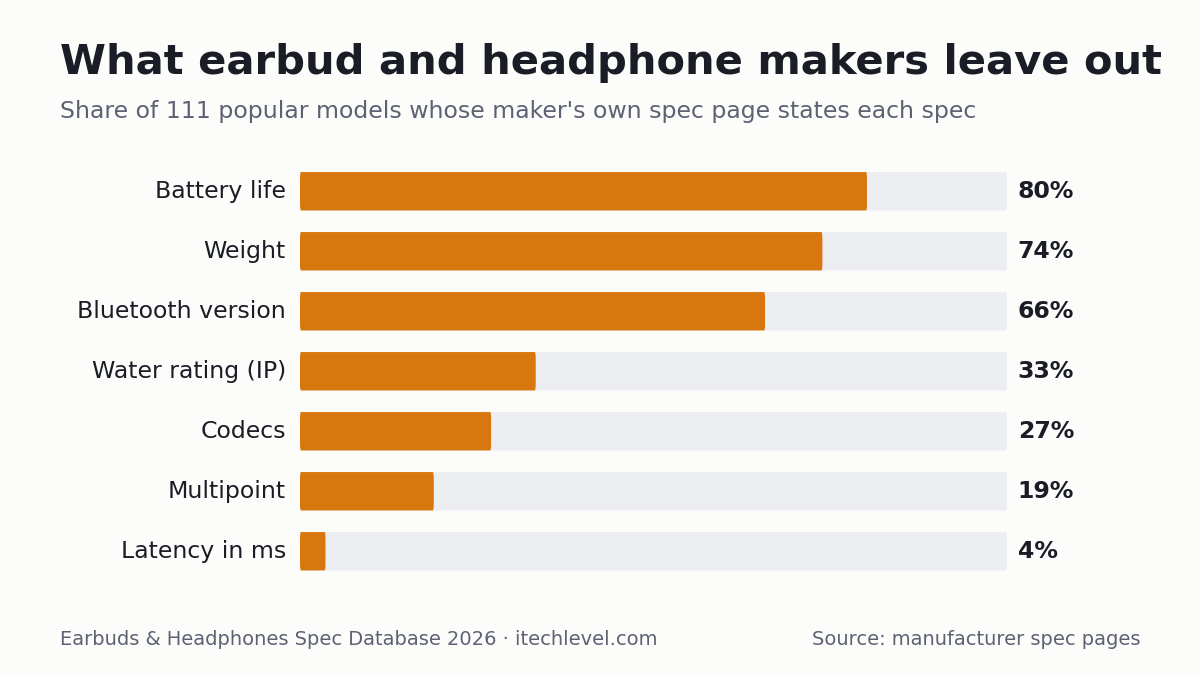
| Battery life | 89 of 111 | 80% |
| Weight | 82 of 111 | 74% |
| Bluetooth version | 73 of 111 | 66% |
| Water/dust rating (IP) | 37 of 111 | 33% |
| Codecs | 30 of 111 | 27% |
| Multipoint (two devices) | 21 of 111 | 19% |
| A latency figure in milliseconds | 4 of 111 | 4% |
Counted over the 111 models below, from their official spec pages. Wired models count as stating their connection.
The database
Filter by type or brand, search for a model, or sort by battery life or weight. Battery sorting uses the longest single-charge figure the maker gives.
| Model | Type | Connection | Codecs | Battery | Weight | Water rating | Latency (maker) | Maker doesn’t state | Source |
|---|---|---|---|---|---|---|---|---|---|
| Apple AirPods 5 | Earbuds | Bluetooth 5.3 | Not stated | ANC on (hours): 4 (USB-C case) / 5 (wireless charging case) ANC off (hours): 6 / 7 With case (hours): 20 / 22 (ANC on) | 4.3 g | IP57 | Not stated | codecs, latency, multipoint | Apple Compare AirPods (preproduction battery tests, Jul–Aug 2026) |
| Apple AirPods Pro 3 | Earbuds | Bluetooth 5.3 | Not stated | ANC on (hours): 8 With case (hours): 24 | 5.55 g | IP57 | Not stated | codecs, latency, multipoint | Apple AirPods Pro 3 tech specs |
| Beats Powerbeats Fit | Earbuds | Bluetooth, Apple H1 | Not stated | ANC on (hours): 6 ANC off (hours): 7 With case (hours): 24 (ANC on) / 30 (ANC off) | 5.78 g | IPX4 (buds and case) | Not stated | Bluetooth version, codecs, latency | Beats product + support pages |
| Beats Powerbeats Pro 2 | Earbuds | Bluetooth (Class 1), Apple H2 | Not stated | ANC off (hours): 10 With case (hours): 45 | 8.7 g | IPX4 | Not stated | Bluetooth version, codecs, battery with ANC on, latency | Beats product page |
| Beats Solo Buds | Earbuds | Bluetooth (Class 1); Bluetooth 5.3 | Not stated | Playback (hours): 18 (no battery in case) | 5.7 g | Not stated | Not stated | codecs, latency, multipoint, water rating | Beats product page |
| Bose QuietComfort Ultra Earbuds (2nd Gen) | Earbuds | Bluetooth 5.3 | Not stated | ANC on (hours): 6 | 7.3 (0.016 lb) | IPX4 | Not stated | codecs, multipoint, latency, total with case | Bose product page, Technical Specifications |
| CMF by Nothing Buds 2 Plus | Earbuds | Bluetooth | LDAC, AAC | ANC on (hours): 7.5 (AAC) ANC off (hours): 14 (AAC) With case (hours): 33 (ANC on) / 61.5 (ANC off), AAC | Not stated | IP55 (earbuds; case not waterproof) | Not stated | Bluetooth version, weight, latency | Nothing Support Centre (CMF Buds 2 Plus articles) |
| CMF by Nothing Buds Pro 2 | Earbuds | Bluetooth 5.3 | LDAC, AAC, SBC (iOS: AAC only) | ANC on (hours): 4.3 (LDAC) ANC off (hours): 11 (AAC) / 6.5 (LDAC) With case (hours): 43 (AAC, ANC off) / 25 (LDAC, ANC off) / 16.6 (LDAC, ANC on) | Not stated | IP55 (earbuds; case not waterproof) | Not stated | weight, latency, multipoint | Nothing Support Centre (CMF Buds Pro 2 articles) |
| EarFun Air Pro 4 | Earbuds | Bluetooth 5.4 | aptX Adaptive (Lossless), LDAC, SBC, LC3 | ANC on (hours): 7.5 ANC off (hours): 11 With case (hours): 35 (ANC on) / 52 (ANC off) | 56 (page does not say what it covers) | IPX5 | <50 ms (Ultra Low Latency Mode) | earbud weight | EarFun product page spec sheet |
| Google Pixel Buds 2a | Earbuds | Bluetooth 5.4 | Not stated | ANC on (hours): 7 ANC off (hours): 10 With case (hours): 20 (ANC on) / 27 (ANC off) | 4.7 g | IP54 (earbuds), IPX4 (case) | Not stated | codecs, multipoint, latency | Google Store tech specs |
| Google Pixel Buds Pro 2 | Earbuds | Bluetooth 5.4 | Not stated | ANC on (hours): 8 ANC off (hours): 12 With case (hours): 30 (ANC on) / 48 (ANC off) | 4.7 g | IP54 (earbuds), IPX4 (case) | Not stated | codecs, multipoint, latency | Google Store tech specs |
| JBL Endurance Race 2 | Earbuds | Bluetooth | Not stated | ANC on (hours): 10 ANC off (hours): 12 With case (hours): 48 | Not stated | IP68 (case IPX2) | Not stated | Bluetooth version, codecs, earbud weight, latency | JBL product page + spec sheet |
| JBL Tour Pro 3 | Earbuds | Bluetooth; case = Auracast/USB-C/AUX transmitter; Bluetooth 5.3 | Not stated | ANC on (hours): 8 (spec sheet: 7) ANC off (hours): 11 With case (hours): 44 | 5.6 g | IP55 (JBL blog: IPX4) | Not stated | latency | JBL product page + spec sheet |
| JLab GO Sport+ | Earbuds | Bluetooth | Not stated | Playback (hours): 9 With case (hours): 35 | Not stated | IP55 | Not stated | Bluetooth version, weight, multipoint, latency | JLab product page |
| JLab JBuds Mini | Earbuds | Bluetooth 5.3 | SBC, AAC | Playback (hours): 5.5 With case (hours): 20 | 3.3 (launch post; spec table lists 6.6 g for both) | IP55 | Not stated | latency | JLab product page + launch post |
| Nothing Ear (3) | Earbuds | Bluetooth | LDAC, AAC, SBC | ANC on (hours): 5.5 ANC off (hours): 10 With case (hours): 22 (ANC on) / 38 (ANC off) | Not stated | Not stated | Not stated | Bluetooth version, weight, water rating, latency | Nothing Support Centre: Ear (3) battery + codecs |
| PlayStation PULSE Explore | Earbuds | PlayStation Link USB adapter + Bluetooth (simultaneous) | Not stated | Playback (hours): 5 With case (hours): 15 (5 + 10 from case) | Not stated | Not stated | "ultra-low latency" (no figure) | Bluetooth version, codecs, weight, water rating, latency figure | PlayStation product page |
| Razer Hammerhead V3 HyperSpeed | Earbuds | 2.4 GHz HyperSpeed + Bluetooth; Bluetooth 6.0 | Not stated | ANC off (hours): 10 With case (hours): 40 (10 + 30 from case) | Not stated | Not stated | "ultra-low latency" 2.4 GHz (no figure) | weight, latency figure | Razer product page |
| Razer Hammerhead V3 X HyperSpeed (Xbox / PlayStation editions) | Earbuds | 2.4 GHz HyperSpeed (case is the receiver) + Bluetooth; Bluetooth 5.3 | Not stated | Playback (hours): 10 (8 on Xbox Series X|S / PS5) With case (hours): 35 (10 + 25 from case) | Not stated | IPX4 | "ultra-low latency" 2.4 GHz (no figure) | weight, codecs, latency figure | Razer product pages (Xbox, PlayStation editions) |
| Samsung Galaxy Buds3 FE | Earbuds | Bluetooth 5.4 | SSC, AAC, SBC | ANC on (hours): 6 ANC off (hours): 8.5 With case (hours): 24 (ANC on) / 30 (ANC off) | 5 g | IP54 (earbuds) | Not stated | latency, multipoint | Samsung Newsroom launch release |
| Samsung Galaxy Buds4 Pro | Earbuds | Bluetooth 6.1 | Not stated | ANC on (hours): 6 ANC off (hours): 7 With case (hours): 26 (ANC on) / 30 (ANC off) | Not stated | IP57 | Not stated | weight, codecs, latency, multipoint | Samsung support: Buds4 Pro vs Buds3 Pro |
| Sony INZONE Buds (WF-G700N) | Earbuds | 2.4 GHz USB-C dongle + Bluetooth LE Audio only (no classic Bluetooth); Bluetooth 5.3 (LE Audio only) | LC3 | ANC on (hours): 11 (dongle) / 18 (LE Audio) ANC off (hours): 12 (dongle) / 24 (LE Audio) With case (hours): 24 (dongle, NC off) / 48 (LE Audio, NC off) | 6.5 g | IPX4 | less than 30 ms (USB-C dongle) | multipoint, case weight | Sony UK spec page + features page |
| Sony WF-1000XM6 | Earbuds | Bluetooth 5.3 | SBC, AAC, LDAC, LC3 | ANC on (hours): 8 ANC off (hours): 12 | 6.5 g | IPX4 | Not stated | latency, total with case (not on spec page) | Sony UK spec page |
| Sony WF-C510 | Earbuds | Bluetooth 5.3 | SBC, AAC | Playback (hours): 11 (8 with ambient sound on) | 4.6 g | IPX4 | Not stated | latency, total with case | Sony UK spec page |
| Sony WF-C710N | Earbuds | Bluetooth 5.3 | SBC, AAC | ANC on (hours): 8.5 ANC off (hours): 12 | 5.2 g | IPX4 | Not stated | latency, total with case | Sony UK spec page |
| Soundcore Liberty 4 NC | Earbuds | Bluetooth | Not stated | ANC on (hours): 8 ANC off (hours): 10 With case (hours): 40 (ANC on) / 50 (ANC off) | 5.2 (AU page: 4.6) | Not stated | Not stated | Bluetooth version, codecs, water rating, latency | Soundcore product page |
| Soundcore Liberty 5 Pro | Earbuds | Bluetooth 6.1 | AAC, SBC, LDAC | ANC on (hours): 6.5 With case (hours): 28 (ANC on) | 5.5 g | IP55 | Not stated | latency | Soundcore product page |
| Soundcore P30i | Earbuds | Bluetooth | Not stated | ANC off (hours): 10 With case (hours): 45 | Not stated | IP54 | Not stated | Bluetooth version, codecs, weight, latency | Soundcore product page |
| Soundcore P31i | Earbuds | Bluetooth 6.1 | SBC, AAC, LDAC | ANC on (hours): 8 ANC off (hours): 10 With case (hours): 40 (ANC on) / 50 (ANC off) | Not stated | IP55 | Not stated | weight, latency | Soundcore product page + FAQ |
| Soundcore Space A40 | Earbuds | Bluetooth | SBC, AAC, LDAC (Android 8+) | ANC off (hours): 10 (LDAC: 6 ANC off / 5 ANC on) With case (hours): 50 | 4.9 g | IPX4 | Not stated | Bluetooth version, latency | Soundcore product page + support |
| SteelSeries Arctis GameBuds | Earbuds | 2.4 GHz USB-C dongle + Bluetooth; Bluetooth 5.3 | Not stated | ANC off (hours): 10 With case (hours): 40 (2.4 GHz, noise control off) | Not stated | IP55 | Not stated | weight, case weight, latency, battery with ANC on | SteelSeries product page |
| ASUS ROG Kithara | Gaming headset | wired (4.4 mm / 3.5 mm / 6.3 mm plugs + USB-C to dual 3.5 mm) | Not stated | Not stated | 420 g | Not stated | Not stated | — | ROG Kithara spec page |
| Audeze Maxwell 2 | Gaming headset | 2.4 GHz dongle + Bluetooth; Bluetooth 5.3 | LC3, LC3plus, LDAC, AAC, SBC | Playback (hours): 80+ (at 80 dBA) | 560 g | Not stated | Not stated | latency figure | Audeze product page + support guide |
| Corsair Virtuoso Pro | Gaming headset | wired | Not stated | Not stated | 338 g | Not stated | Not stated | — | Corsair product page + spec sheet |
| Drop + EPOS PC38X | Gaming headset | wired 3.5 mm | Not stated | Not stated | 253 (EPOS fact sheet; layout ambiguous) | Not stated | Not stated | — | EPOS fact sheet (EPOS is winding down its gaming headsets) |
| HyperX Cloud Alpha (wired) | Gaming headset | wired 3.5 mm | Not stated | Not stated | 298 g | Not stated | Not stated | — | HyperX product page (RoW) |
| HyperX Cloud Alpha Wireless | Gaming headset | 2.4 GHz dongle | Not stated | Playback (hours): 300 (at 50% volume) | 322 (335 with mic) | Not stated | Not stated | Bluetooth (none), latency | HyperX support: Cloud Alpha Wireless specifications |
| HyperX Cloud III (wired) | Gaming headset | wired 3.5 mm + USB (USB-C/USB-A) | Not stated | Not stated | 308 (320 with mic) | Not stated | Not stated | — | HyperX product page |
| JBL Quantum 250 | Gaming headset | wired 3.5 mm | Not stated | Not stated | 282.6 g | Not stated | Not stated | — | JBL product page + spec sheet |
| JBL Quantum 650X | Gaming headset | 2.4 GHz + Bluetooth | Not stated | Playback (hours): 45 (2.4 GHz) / 60 (Bluetooth); replaceable battery | 331.5 g | Not stated | Not stated | Bluetooth version, latency | JBL spec sheet |
| JBL Quantum 910X Wireless (Xbox) | Gaming headset | 2.4 GHz dongle + Bluetooth | Not stated | Playback (hours): 37 (dongle) / 42 (Bluetooth) | 420 g | Not stated | Not stated | Bluetooth version, latency | JBL product page + spec sheet |
| JBL Quantum 950X | Gaming headset | 2.4 GHz base station + Bluetooth; Bluetooth 5.3 | Not stated | ANC off (hours): 25 (2.4 GHz) / 30 (Bluetooth) per battery; 2 swappable | 398 g | Not stated | Not stated | latency | JBL product page + spec sheet |
| LucidSound LS500 / LS500X | Gaming headset | 2.4 GHz wireless + Bluetooth | Not stated | Playback (hours): 50 (wireless) / 70 (Bluetooth) | 246 (0.543 lb) | Not stated | Not stated | Bluetooth version, latency, codecs | LucidSound product listing |
| Microsoft Xbox Wireless Headset (2024) | Gaming headset | Xbox Wireless + Bluetooth + USB-C; Bluetooth 5.3 | SBC | ANC off (hours): 20 | 320 g | Not stated | Not stated | latency figure | Xbox product page |
| PlayStation PULSE Elite | Gaming headset | PlayStation Link USB adapter + Bluetooth (simultaneous) | Not stated | Playback (hours): 30 | Not stated | Not stated | "ultra-low latency" (no figure) | Bluetooth version, codecs, weight, latency figure | PlayStation product page |
| Razer BlackShark V3 | Gaming headset | 2.4 GHz HyperSpeed Wireless Gen-2 + Bluetooth | Not stated | Playback (hours): 70 | 270 g | Not stated | as low as 10 ms (2.4 GHz) | Bluetooth version, platforms for this model | Razer product page |
| Skullcandy Crusher PLYR 720 | Gaming headset | 2.4 GHz + Bluetooth | Not stated | Playback (hours): 48 (2.4 GHz) / 38 (2.4 GHz + Bluetooth) | 354.2 (a collection page shows 274) | Not stated | Not stated | Bluetooth version, latency | Skullcandy product page |
| Skullcandy PLYR (wireless) | Gaming headset | 2.4 GHz transmitter + Bluetooth; Bluetooth 5.2 | Not stated | Playback (hours): 24 | 315 (other Skullcandy listings show 274) | Not stated | Not stated | latency, codecs | Skullcandy product page + support FAQ |
| Skullcandy SLYR Pro (wired) | Gaming headset | wired USB-C to USB-A + 3.5 mm | Not stated | Not stated | 276 g | Not stated | Not stated | — | Skullcandy product page |
| Sony INZONE H5 | Gaming headset | 2.4 GHz dongle + wired | Not stated | Playback (hours): 28 | 260 g | Not stated | "low-latency" 2.4 GHz (no figure) | Bluetooth (none listed), latency figure | Sony UK spec page |
| Sony INZONE H6 Air | Gaming headset | wired 3.5 mm (4-pole) | Not stated | Not stated | 199 (without cable and mic) | Not stated | Not stated | — | Sony UK spec page |
| Sony INZONE H9 II | Gaming headset | 2.4 GHz dongle + Bluetooth + wired; Bluetooth 5.3 | SBC, AAC, LC3 | ANC off (hours): 30 | 260 (without mic) | Not stated | "ultra-low-latency" 2.4 GHz (no figure) | battery with NC on, latency figure, multipoint | Sony UK spec page |
| SteelSeries Arctis Nova 1 | Gaming headset | wired 3.5 mm | Not stated | Not stated | 253 (an image on the same page says 236) | Not stated | Not stated | — | SteelSeries product page |
| SteelSeries Arctis Nova 5 Wireless | Gaming headset | 2.4 GHz dongle + Bluetooth; Bluetooth 5.3 | Not stated | Playback (hours): 60 | 265 g | Not stated | Not stated | latency, quick charge, Xbox | SteelSeries Arctis Nova 5 product page |
| SteelSeries Arctis Nova 5X Wireless | Gaming headset | 2.4 GHz USB-C dongle + Bluetooth | Not stated | Playback (hours): 60 | 265 g | Not stated | Not stated | Bluetooth version, latency | SteelSeries product page + press release |
| SteelSeries Arctis Nova 7 Wireless Gen 2 | Gaming headset | 2.4 GHz + Bluetooth (simultaneous) | Not stated | Playback (hours): 50+ | Not stated | Not stated | Not stated | Bluetooth version, weight, latency (page truncated) | SteelSeries product page |
| SteelSeries Arctis Nova 7X Wireless Gen 2 | Gaming headset | 2.4 GHz USB-C dongle + Bluetooth (simultaneous) | Not stated | Playback (hours): 50+ | Not stated | Not stated | Not stated | Bluetooth version, weight, latency (page truncated for mic/weight) | SteelSeries product page |
| SteelSeries Arctis Nova Pro Omni | Gaming headset | 2.4 GHz + Bluetooth (simultaneous, mixes 4 sources); Bluetooth 5.3 | SBC, LC3 | ANC on (hours): 19 per battery (2.4 GHz + BT) ANC off (hours): 30 per battery (2.4 GHz) / 50 (Bluetooth); 2 hot-swap batteries | 339 (GameHub 169) | Not stated | Not stated | latency | SteelSeries product page, Specifications |
| Turtle Beach Atlas Air | Gaming headset | 2.4 GHz + Bluetooth + 3.5 mm; Bluetooth 5.2 | Not stated | Playback (hours): 50 | 301 (with mic) | Not stated | Not stated | latency | Turtle Beach product page |
| Turtle Beach Stealth 600 Gen 3 | Gaming headset | 2.4 GHz + Bluetooth (QuickSwitch); Bluetooth 5.2 | SBC, AAC | Playback (hours): 80 | Not stated | Not stated | Not stated | weight, latency | Turtle Beach product + support pages |
| Turtle Beach Stealth 700 Gen 3 | Gaming headset | 2.4 GHz + Bluetooth (simultaneous); Bluetooth 5.2 | Not stated | Playback (hours): 80 | Not stated | Not stated | Not stated | weight, latency, codecs | Turtle Beach product page |
| EarFun K4NC | Kids headphones | Bluetooth 5.4 | Not stated | ANC off (hours): 120 (conditions not stated) | Not stated | Not stated | Not stated | weight, battery with ANC on | EarFun product page |
| JBL Junior 470NC | Kids headphones | Bluetooth | Not stated | ANC on (hours): 28 (spec sheet PDF: 34) ANC off (hours): 50 | 196 g | Not stated | Not stated | Bluetooth version, codecs | JBL product page + spec sheet |
| JLab JBuddies Pro Wireless | Kids headphones | Bluetooth + 3.5 mm (share port); Bluetooth 5 | SBC, AAC | Playback (hours): 35 | 165 g | Not stated | Not stated | — | JLab product page + tech specs |
| Puro Sound Labs BT2200-Plus | Kids headphones | Bluetooth | Not stated | Playback (hours): 20 | Not stated | Not stated | Not stated | Bluetooth version, weight | Puro product page + FAQ |
| Jabra Evolve2 65 Flex | Office headsets | Bluetooth 5.2 | Not stated | ANC on (hours): 21 ANC off (hours): 32 | 136 g | Not stated | Not stated | codecs, latency | Jabra tech specs (Rev C) |
| Logitech Zone Vibe 100 | Office headsets | Bluetooth | Not stated | Playback (hours): 20 | 185 g | Not stated | Not stated | Bluetooth version, codecs | Logitech product page + setup guide |
| Bose Ultra Open Earbuds (2nd Gen) | Open-ear / bone conduction | Bluetooth 5.4 | Not stated | Playback (hours): 9 (5 with Immersive Audio) With case (hours): 28.5 (9 + 19.5 from case) | 5.9 (0.013 lb) | IPX4 | Not stated | codecs, multipoint, latency | Bose support: product specifications |
| Creative Outlier Free Pro | Open-ear / bone conduction | Bluetooth + 8 GB MP3 player; Bluetooth 5.3 | Not stated | Playback (hours): 10 | 31.5 g | IPX8 (1.5 m fresh water, 40 min) | Not stated | latency, multipoint | Creative US product page |
| EarFun Clip 2 | Open-ear / bone conduction | Bluetooth 6.0 | LDAC | Playback (hours): 11 (6 with LDAC) With case (hours): 40 (22 with LDAC) | 5.5 (press release: 5.7) | IP55 | Not stated | latency | EarFun product page |
| Shokz OpenDots 2 | Open-ear / bone conduction | Bluetooth 6.1 | Not stated | Playback (hours): 10 With case (hours): 40 | 6.4 g | IP57 (earbuds), IP54 (case) | Not stated | codecs, latency, multipoint | Shokz product page + compare table |
| Shokz OpenRun | Open-ear / bone conduction | Bluetooth | Not stated | Playback (hours): 8 | 26 g | IP67 (not for swimming) | Not stated | Bluetooth version, multipoint, latency | Shokz UK product page |
| Shokz OpenRun Pro 2 | Open-ear / bone conduction | Bluetooth 5.3 | Not stated | Playback (hours): 12 | 30.3 (Mini 30) | IP55 | Not stated | multipoint, latency, codecs | Shokz spec sheet S820/S821 |
| Shokz OpenSwim Pro | Open-ear / bone conduction | Bluetooth + 32 GB MP3 player | Not stated | Playback (hours): 9 (Bluetooth) / 6 (MP3) | 27.3 g | IP68 (2 m for 2 h) | Not stated | Bluetooth version, latency | Shokz product page |
| Sony LinkBuds Clip | Open-ear / bone conduction | Bluetooth 5.3 | SBC, AAC | Playback (hours): 9 | 6.4 g | IPX4 | Not stated | latency, total with case | Sony UK spec page |
| Soundcore AeroClip | Open-ear / bone conduction | Bluetooth | Not stated | Playback (hours): 8 With case (hours): 32 | 6.0 g | IP55 | Not stated | Bluetooth version, codecs, latency | Soundcore product page + FAQ |
| Apple AirPods Max 2 | Over-ear headphones | Bluetooth + USB-C; Bluetooth 5.3 | Not stated | ANC on (hours): 20 | 386.2 g | Not stated | Not stated | codecs, latency, multipoint, water rating | Apple Compare AirPods |
| Beats Beats 360 | Over-ear headphones | Bluetooth + USB-C | Not stated | ANC on (hours): 32 (preproduction tests) | 294.5 g | Not stated | Not stated | Bluetooth version, codecs, latency | Beats product page + press release |
| Beats Studio Pro | Over-ear headphones | Bluetooth (Class 1) + USB-C lossless audio | Not stated | ANC on (hours): 24 ANC off (hours): 40 | 260 g | Not stated | Not stated | Bluetooth version, codecs, latency, multipoint, water rating | Beats product page |
| Beyerdynamic DT 770 PRO (80 ohm) | Over-ear headphones | wired (3 m cable) | Not stated | Not stated | 270 without cable g | Not stated | Not stated | — | beyerdynamic product page |
| Bose QuietComfort Headphones | Over-ear headphones | Bluetooth | Not stated | ANC on (hours): 24 | 236 (0.520 lb) | Not stated | Not stated | Bluetooth version, codecs, latency | Bose product page |
| Bose QuietComfort Ultra Headphones (2nd Gen) | Over-ear headphones | Bluetooth + wired (audio cable; USB-C); Bluetooth 5.4 | Not stated | ANC on (hours): 30 (23 with Immersive Audio) | 264 (0.583 lb) | Not stated | Not stated | codecs, multipoint, latency, water rating | Bose product page, Technical Specifications |
| EarFun Wave Pro | Over-ear headphones | Bluetooth + 3.5 mm | LDAC, SBC | ANC on (hours): 55 ANC off (hours): 80 | 268 g | Not stated | Not stated | Bluetooth version, latency | EarFun product page + support |
| Edifier W830NB | Over-ear headphones | Bluetooth 5.4 | LDAC, AAC, SBC (US page: LDAC, SBC) | ANC on (hours): 54 ANC off (hours): 94 | 267 g | Not stated | Not stated | latency, water rating | Edifier product page |
| JLab JBuds Lux ANC | Over-ear headphones | Bluetooth 5.4 | SBC, AAC | ANC on (hours): 40 ANC off (hours): 70 | 235 (some colour listings: 252) | Not stated | Not stated | latency, water rating | JLab product page |
| OneOdio Focus A6 | Over-ear headphones | Bluetooth 6.0 | LDAC | ANC off (hours): 75 (conditions not stated) | 240 g | Not stated | Not stated | battery with ANC on, latency | OneOdio product page |
| Sennheiser HD 550 | Over-ear headphones | wired | Not stated | Not stated | 237 g | Not stated | Not stated | — | Sennheiser support: HD 550 specifications |
| Sennheiser HD 560S | Over-ear headphones | wired | Not stated | Not stated | 240 without cable (another page: 280) | Not stated | Not stated | — | Sennheiser product page |
| Sennheiser MOMENTUM 5 Wireless | Over-ear headphones | Bluetooth + USB-C/wired; Bluetooth 5.4 (6.0 by firmware update) | SBC, AAC, aptX, aptX HD, aptX Adaptive, aptX Lossless | ANC on (hours): 57 | 290 g | none | Not stated | latency, multipoint | Sennheiser support: MOMENTUM 5 Wireless specifications |
| Skullcandy Crusher 720 | Over-ear headphones | Bluetooth | Not stated | ANC on (hours): 40 (sale page) ANC off (hours): 65 (product page; sale page 60) | 362.8 g | Not stated | Not stated | Bluetooth version, latency | Skullcandy product page |
| Sony WH-1000XM6 | Over-ear headphones | Bluetooth + 3.5 mm wired; Bluetooth 5.3 | SBC, AAC, LDAC, LC3 | ANC on (hours): 30 ANC off (hours): 40 | 254 g | Not stated | Not stated | latency, water rating | Sony UK spec page |
| Sony WH-CH720N | Over-ear headphones | Bluetooth + 3.5 mm wired; Bluetooth 5.2 | SBC, AAC | ANC on (hours): 35 ANC off (hours): 50 | 192 g | Not stated | Not stated | multipoint, latency, water rating | Sony UK spec page |
| Soundcore Life Q30 | Over-ear headphones | Bluetooth + 3.5 mm | SBC, AAC | ANC on (hours): 40 ANC off (hours): 60 | 260 g | Not stated | Not stated | Bluetooth version (varies by listing), latency | Soundcore product page |
| Soundcore Space 2 | Over-ear headphones | Bluetooth 6.1 | SBC, AAC, LDAC | ANC on (hours): 50 (45 with wear detection; 40 with LDAC) ANC off (hours): 70 (65 with wear detection) | Not stated | Not stated | Not stated | weight, multipoint, mics, latency, water rating (support spec article) | Soundcore support: Space 2 specs |
| Ozlo Sleepbuds 2 | Sleep earbuds | Bluetooth | Not stated | Playback (hours): 14 (at 50% volume) | 1.6 (without tip) | Not stated | Not stated | Bluetooth version, water rating | Ozlo product page, Tech Specs |
| Soundcore Sleep A20 | Sleep earbuds | Bluetooth 5.3 | Not stated | Playback (hours): 14 (sleep mode) / 10 (Bluetooth) With case (hours): 80 (sleep) / 55 (Bluetooth) | 3.1 g | IPX4 | Not stated | codecs | Soundcore product page |
| Avantree HT5009 Plus | TV headphones | Bluetooth transmitter + charging dock | Not stated | Playback (hours): 50 | Not stated | Not stated | <68 ms (spec sheet; comparison table says ~50 ms) | weight | Avantree product page |
| Sennheiser RS 120-W | TV headphones | RF transmitter base | Not stated | Playback (hours): 20 | Not stated | Not stated | Not stated | weight, latency | Sennheiser launch release |
| TV Ears 5.0 Digital | TV headphones | infrared transmitter (line of sight) | Not stated | Playback (hours): about 4 per charge | 57 (2 oz) | Not stated | Not stated | range | TV Ears product page |
| Timekettle M3 | Translation earbuds | Bluetooth | Not stated | ANC on (hours): 6 (music) ANC off (hours): 7 (music) / 7.5 per charge With case (hours): 25 | 5 g | Not stated | Not stated | Bluetooth version, water rating | Timekettle M3 product page + user manual |
| Timekettle W4 Pro | Translation earbuds | Bluetooth | Not stated | Playback (hours): 6 (translation) / 12 (music) With case (hours): 10 translation / 18 music (2-pack listing: 20 / 36) | Not stated | Not stated | Not stated | Bluetooth version, weight (199 g figure unclear), water rating | Timekettle product page |
| 1MORE Triple Driver (wired) | Wired earbuds / IEMs | wired 3.5 mm, in-line mic | Not stated | Not stated | 18 g | Not stated | Not stated | — | 1MORE US product page |
| Apple EarPods (USB-C) | Wired earbuds / IEMs | wired USB-C | Not stated | Not stated | Not stated | Not stated | Not stated | weight, water rating | Apple product page |
| House of Marley Smile Jamaica USB-C | Wired earbuds / IEMs | wired USB-C, in-line mic | Not stated | Not stated | Not stated | Not stated | Not stated | weight, impedance | House of Marley product page |
| HyperX Cloud Earbuds II | Wired earbuds / IEMs | wired 3.5 mm (TRRS) | Not stated | Not stated | 20 g | Not stated | Not stated | — | HyperX product page + press release |
| Moondrop CHU II | Wired earbuds / IEMs | wired 3.5 mm, 0.78 mm 2-pin | Not stated | Not stated | Not stated | Not stated | Not stated | weight, mic (none listed) | Moondrop product page |
| Oriveti bleqk Dynabird | Wired earbuds / IEMs | wired, 0.78 mm 2-pin | Not stated | Not stated | Not stated | Not stated | Not stated | weight | Oriveti product page |
| Shure SE215 | Wired earbuds / IEMs | wired (detachable cable) | Not stated | Not stated | 20.8 g | Not stated | Not stated | — | Shure SE215 user guide |
| Sony INZONE E9 | Wired earbuds / IEMs | wired 3.5 mm | Not stated | Not stated | 4.7 (without cable) | Not stated | Not stated | — | Sony UK spec page |
| Truthear GATE | Wired earbuds / IEMs | wired (mic cable option) | Not stated | Not stated | Not stated | Not stated | Not stated | weight, mic specs | Truthear product page |
| Truthear PURE | Wired earbuds / IEMs | wired | Not stated | Not stated | Not stated | Not stated | Not stated | weight | Truthear product page |
Download the full database (CSV): free to reuse with a link to this page (CC BY 4.0).
What the data shows
- Latency is the spec almost nobody prints. Only 4 of 111 models give a number: Sony INZONE Buds (WF-G700N) (less than 30 ms (USB-C dongle)); EarFun Air Pro 4 (<50 ms (Ultra Low Latency Mode)); Razer BlackShark V3 (as low as 10 ms (2.4 GHz)); Avantree HT5009 Plus (<68 ms (spec sheet; comparison table says ~50 ms)). PlayStation’s PULSE Explore and PULSE Elite, Razer’s Hammerhead V3 X and Sony’s INZONE H9 II and H5 promise low latency over their USB transceivers without a figure, and Apple, Google, Samsung and Bose don’t mention it at all. For gaming, a model with its own USB transceiver is the safer bet than one that only says “game mode”.
- Sony INZONE Buds have no regular Bluetooth. Sony lists Bluetooth 5.3 “LE Audio only. Regular Bluetooth is not supported”, so they connect through their USB-C transceiver or to phones and consoles with LE Audio. Battery life also depends on the link: 11 hours with noise cancelling on the transceiver, 18 hours on LE Audio.
- Codecs change battery life a lot. Nothing rates the CMF Buds Pro 2 at 11 hours with AAC but 6.5 hours with LDAC (noise cancelling off). Soundcore rates the Space 2 at 50 hours with noise cancelling, 45 with wear detection on, and 40 with LDAC.
- Some makers contradict themselves or skip the basics. Samsung’s comparison page gives no weight for the Galaxy Buds4 Pro. SteelSeries lists the Arctis Nova 1 at 253 g in the text and 236 g in an image on the same page, and Skullcandy’s PLYR appears as 315 g and 274 g on different listings. We show the figures as published and flag the conflict.
- Weight spreads wider than you’d think. The lightest in-ear models are sleep earbuds: Ozlo Sleepbuds 2 at 1.6 g each (without the tip) and Soundcore Sleep A20 at 3.1 g. Among everyday earbuds, JLab’s JBuds Mini (3.3 g in JLab’s launch post), AirPods 5 (4.3 g) and Sony’s WF-C510 (4.6 g) are the lightest, while Bose’s QuietComfort Ultra Earbuds (2nd Gen) are about 7.3 g. Wireless gaming headsets here run from 246 g (LucidSound LS500) to 420 g (JBL Quantum 910X), with the Audeze Maxwell 2 an outlier at 560 g; among wired models, Sony’s open-back INZONE H6 Air is 199 g and the planar ASUS ROG Kithara 420 g.
How to read battery claims
- Check which mode the number is for. Many makers lead with the noise-cancelling-off figure. Sony’s WH-1000XM6 is 30 hours with noise cancelling and 40 without.
- “With case” is not one charge. Earbuds in our table run for 5 to 14 hours per charge (Beats Solo Buds reach 18, but their case has no battery); totals of 10 to 80 hours include recharges from the case (the 80 is Soundcore’s Sleep A20 in sleep mode).
- Codec and features matter. LDAC, spatial audio and wear detection shorten playback, and makers usually test at 50% volume.
- Quick charge is the useful number for travel. Claims range from 5 minutes for 1 hour (Beats Solo Buds and Powerbeats Fit, Sony INZONE Buds) to 10 minutes for 10 hours (EarFun Wave Pro and the K4NC kids’ headphones) and 15 minutes for 10 hours (Edifier W830NB). Over-ear headphones, with bigger batteries, gain the most from a short charge.
Methodology and update log
- Which models: the earbuds, headphones and headsets our buying guides recommend, so the database covers the models people are actually comparing. Kids’ headphones include the maker’s volume limit, and TV headphones their stated range (in the CSV).
- Sources: manufacturer spec pages (for Sony, the official UK spec pages, which list the same hardware as the US models), support articles, press releases and fact sheets. Each row links to its source. Retail listings and reviews are not used.
- “Not stated”: we only record what the maker publishes. Where a feature exists but the spec page doesn’t say so, it stays blank and is listed under “Maker doesn’t state”.
- Conversions: Bose gives weights in pounds; we convert to grams and show the original. Where a page gives two figures, we show both.
- October 23, 2026: first version: 44 models from 22 brands.
- October 23, 2026 (update): added the single-guide picks (kids, TV, sleep, open-ear, translation and budget models), for 86 models from 33 brands; new volume-limit and range columns in the CSV.
- October 23, 2026 (second update): added the picks from our upcoming guides (wired earbuds and IEMs, open-back and office headsets, JBL, Skullcandy and Sennheiser gaming headsets, Auracast earbuds), for 111 models from 43 brands; new impedance column in the CSV.
Spotted an error or a missing model? Let us know, ideally with a link to the manufacturer’s spec page.
Frequently asked questions
Which earbuds and headphones publish their latency?
Very few. Of the 111 models in our database, only 4 give a figure in milliseconds: Sony INZONE Buds (WF-G700N) (less than 30 ms (USB-C dongle)); EarFun Air Pro 4 (<50 ms (Ultra Low Latency Mode)); Razer BlackShark V3 (as low as 10 ms (2.4 GHz)); Avantree HT5009 Plus (<68 ms (spec sheet; comparison table says ~50 ms)). PlayStation's PULSE models, Razer's Hammerhead V3 X and Sony's INZONE H9 II and H5 promise low latency without a number, and Apple, Google, Samsung and Bose don't mention latency on their spec pages.
Do Sony INZONE Buds work with regular Bluetooth?
No. Sony's spec page lists Bluetooth 5.3 for LE Audio only and says regular (classic) Bluetooth isn't supported. They connect through their USB-C transceiver or to devices with Bluetooth LE Audio.
Why is my battery life shorter than the box says?
Makers test under specific conditions. Soundcore rates the Space 2 at 50 hours with noise cancelling, but 45 hours with wear detection on and 40 hours using LDAC. Nothing rates the CMF Buds Pro 2 at 11 hours with AAC and 6.5 hours with LDAC (noise cancelling off). Higher-quality codecs, noise cancelling, spatial audio and volume all cut battery life.
Which gaming headsets have the longest battery life?
In our database, the HyperX Cloud Alpha Wireless leads by far at up to 300 hours (HyperX tested at 50% volume). Next come the Audeze Maxwell 2 (80+ hours at 80 dBA), the Turtle Beach Stealth 600 Gen 3 and Stealth 700 Gen 3 (80 hours), the Razer BlackShark V3 (70 hours) and the LucidSound LS500 (70 hours over Bluetooth, 50 on its wireless dongle). The SteelSeries Arctis Nova Pro Omni uses two swappable batteries instead.
Can I use this data on my site?
Yes. The database is free to reuse under CC BY 4.0: link to this page as the source. You can download it as a CSV file.