Short answer: you can use Bluetooth headphones for gaming, but standard Bluetooth adds roughly 150–200 ms of delay, which is enough to hear footsteps and gunshots after they happen on screen. That’s fine for story games and videos, not for competitive play. For lag-free gaming, use a wired connection or a headset with a 2.4 GHz USB dongle. The newer Bluetooth LE Audio (LC3) standard closes most of the gap, but few consoles support it yet.
How we put this together: latency figures come from published codec specifications and independent measurements (linked at the end), not from hands-on testing by iTech Level. Real-world delay also depends on your phone, PC or console, so treat the numbers as typical ranges.
How much delay is too much?
Broadcast standards give a useful benchmark. The ATSC recommends keeping audio within about 45 ms behind the picture, and research on lip sync puts the point where most people notice a mismatch at around 40–45 ms. Standard Bluetooth is three to four times over that, which is why it feels “off” in fast games even when it’s fine for YouTube, where apps and TVs can delay the video to match.
Games can’t do that trick. Your inputs have to happen in real time, so the audio simply arrives late.
Latency by connection type
Connection
Typical delay
Good for competitive gaming?
Wired (3.5 mm or USB)
Effectively zero
Yes
2.4 GHz USB dongle (gaming headsets)
Very low; designed for gaming
Yes
Bluetooth LE Audio (LC3)
~20–30 ms codec latency; ~30–50 ms measured on the Sony XM6
Mostly, where supported
aptX Adaptive
~80 ms
Casual only
Standard Bluetooth (SBC / AAC)
~150–200 ms or more
No
LDAC (hi-res Bluetooth)
Similar to SBC or higher
No
Tip: if your headphones support several codecs, choose AAC or LC3 over LDAC for gaming. LDAC is great for music quality but has the most delay.
Can you use Bluetooth headphones on each platform?
PS5
No, not directly. The PS5 doesn’t support Bluetooth audio. Your options are to plug your headphones into the DualSense controller’s 3.5 mm jack, use a USB-dongle headset, or use a headset built on Sony’s PlayStation Link wireless tech, such as the PlayStation Pulse Elite, which Sony describes as lossless and ultra-low latency.
Xbox Series X|S
No. Xbox consoles don’t support Bluetooth audio either. Plug into the controller’s headset jack, or use a headset made for Xbox Wireless or with an Xbox-compatible dongle, such as the SteelSeries Arctis Nova 7X.
Nintendo Switch and Switch 2
Yes. The Switch gained Bluetooth audio in a 2021 update, and the Switch 2 supports it too, but expect standard Bluetooth delay. Wired is better for rhythm and action games. The Switch 2 doesn’t support Bluetooth microphones, so for GameChat use a USB-C dongle or wired headset: see our best headphones for Switch 2.
PC
Yes, but with a catch: when you use the headset mic over Bluetooth, Windows usually switches to a low-quality “headset” profile, and game audio sounds noticeably worse. A USB dongle headset or a separate desk mic avoids this.
Phones
Yes, and phones are where Bluetooth gaming works best. Many earbuds have a “game mode” that trims delay, and newer Android phones with LE Audio can get close to wired latency with compatible earbuds and headphones.
What about Sony’s WH-1000X headphones?
They’re some of the most popular headphones people try to game with. The short version: excellent wired, laggy over standard Bluetooth, and the headset mic doesn’t work over the cable. We cover each model in detail:
The INZONE H9 II uses the same drivers as the Sony WH-1000XM6, so it’s the closest thing to “XM6 sound without the lag,” with a proper boom mic. The Arctis Nova 7’s ability to mix dongle audio with Bluetooth is handy if you take calls or use Discord on your phone while gaming.
How to reduce Bluetooth lag
Use the lowest-latency codec your devices share: LC3, then aptX Adaptive, then AAC. Avoid LDAC for gaming.
Turn on game mode in your earbuds’ app if it has one.
Keep the source close with nothing blocking the signal; dropouts and re-buffering add delay.
Turn off multipoint while gaming on headphones that lower codec quality or add buffering when two devices are connected.
Go wired for competitive play. Most headphones include a 3.5 mm cable; it’s the only zero-latency option on consoles.
Specs from the makers, side by side
Every figure below comes from the manufacturer’s own spec page, taken from our earbuds and headphones spec database. “Not stated” means the maker doesn’t publish it, not that the feature is missing.
Model
Battery
Weight
Latency (maker)
Connection
Maker doesn’t state
PlayStation PULSE Elite
30 h
Not stated
"ultra-low latency" (no figure)
PlayStation Link USB adapter + Bluetooth (simultaneous)
Bluetooth version, codecs, weight, latency figure
SteelSeries Arctis Nova 7X Wireless Gen 2
50+ h
Not stated
Not stated
2.4 GHz USB-C dongle + Bluetooth (simultaneous)
Bluetooth version, weight, latency (page truncated for mic/weight)
Sony INZONE H9 II
ANC off: 30 h
260 (without mic)
"ultra-low-latency" 2.4 GHz (no figure)
2.4 GHz dongle + Bluetooth + wired; Bluetooth 5.3
battery with NC on, latency figure, multipoint
SteelSeries Arctis Nova 7 Wireless Gen 2
50+ h
Not stated
Not stated
2.4 GHz + Bluetooth (simultaneous)
Bluetooth version, weight, latency (page truncated)
Frequently asked questions
Is Bluetooth good for gaming?
For casual and story games, yes. For fast competitive games, standard Bluetooth’s 150–200 ms delay is noticeable. Use wired, a 2.4 GHz dongle headset, or Bluetooth LE Audio where your device supports it.
Do Bluetooth headphones have lag in games?
Yes. Standard Bluetooth (SBC or AAC) typically adds about 150–200 ms, while LE Audio’s LC3 codec cuts that to roughly 20–50 ms depending on the device.
Why doesn’t the PS5 support Bluetooth headphones?
Sony and Microsoft left Bluetooth audio out of the PS5 and Xbox mainly because of latency and bandwidth. Standard Bluetooth is too slow for game audio, so they use their own low-latency wireless systems instead.
Can I use AirPods or other earbuds for gaming?
On a phone, tablet or Switch, yes, with standard Bluetooth delay. On PS5 and Xbox, not directly, because those consoles don’t support Bluetooth audio.
What is the lowest-latency wireless option for gaming?
A headset with a 2.4 GHz USB dongle or a console-specific link like PlayStation Link. These are designed for gaming and avoid Bluetooth’s delay.
What does game mode on earbuds do?
It lowers audio delay so sound stays closer to what’s on screen. Samsung, for example, says Game Mode on Galaxy Buds reduces audio latency. It usually works best on the brand’s own phones, so turn it on in the earbuds’ app for games and videos; for music you can leave it off.
Short answer: the Sony WH-1000XM5 and WH-1000XM6 are excellent headphones for single-player and casual gaming, especially plugged in with the included cable. For competitive online play on PS5 or Xbox, they’re the wrong tool: consoles don’t send game audio over Bluetooth, and the headset mic doesn’t work over the cable. If you want Sony sound with low-latency wireless and a real boom mic, the INZONE H9 II (same drivers as the XM6) is the one built for gaming. For every Sony option ranked, including the cheaper INZONE H5 and the PlayStation Pulse Elite, see our best Sony headphones for gaming.
Latency in numbers: none with the 3.5 mm cable, about 30–50 ms on the XM6 over AAC or LC3, and 100–200 ms over standard Bluetooth (SBC or LDAC). The XM6’s LE Audio gaming mode, added in the July 2026 update, cuts delay and keeps mic chat usable, but so far only on supported Android phones such as the Galaxy S24 Ultra.
How we put this together: this guide is based on Sony’s official specifications and help guides, plus published latency measurements and hands-on reports from independent reviewers (linked below). It is not based on hands-on testing by iTech Level.
Can you use the Sony XM5 or XM6 for gaming?
Yes, but how well it works depends almost entirely on how you connect them:
About 30–50 ms, depending on the device (SoundGuys)
Casual games on supported phones and PCs
LE Audio gaming mode
Not supported
Lower latency and usable mic chat on supported Android phones (July 2026 update; SoundGuys)
Phone gaming
PS5 or Xbox over Bluetooth
Not possible
Not possible
Use the cable: the consoles don’t support Bluetooth audio
The mic doesn’t work over the cable. Sony’s own help guide says you talk through your phone’s mic when wired, so on a console you’ll need the controller mic or a separate mic for chat.
The XM6’s gaming mode is limited for now. The July 2026 firmware update added the Bluetooth Gaming Audio Profile (GMAP), which promises lower latency and mic chat without game audio dropping to call quality. SoundGuys found it works on a Samsung Galaxy S24 Ultra, but PS5 and Xbox don’t support Bluetooth audio at all, and neither Nintendo (Switch 2) nor Valve (Steam Deck) has enabled it yet.
Bluetooth only; better with LE Audio on supported phones
Detachable cardioid boom mic
Multipoint
Yes
Yes
Not listed
Rated battery (ANC on)
Up to 30 h
Up to 30 h (SoundGuys measured 37 h)
Up to 30 h
Folds for travel
No (lies flat)
Yes
Not listed
Best for
Wired gaming + travel ANC
Wired gaming, phone gaming, travel
Competitive PC/PS5 gaming
Which one should you buy for gaming?
Buy the XM5 if:
You mostly play single-player games and don’t mind plugging in the cable.
You want top-tier noise cancelling for travel and commuting first, gaming second.
You want to save money: the XM5 is the older model and is often discounted.
Buy the XM6 if:
You game on an Android phone that supports LE Audio, where the XM6’s gaming mode actually works today.
You want the newest noise cancelling, a folding design and the lowest Bluetooth latency Sony offers in this line.
You’re buying one headphone for everything and gaming is a regular but not competitive part of it.
Skip both and get a gaming headset if:
You play competitive shooters where every millisecond and clear team chat matter.
You play on PS5 or PC wirelessly and want a proper boom mic. The Sony INZONE H9 II uses the same drivers as the XM6 and adds a 2.4 GHz dongle and a cardioid boom mic.
What about the XM4?
The XM4 behaves much like the XM5 for gaming: great wired, laggy over standard Bluetooth, and no mic over the cable. We cover it in detail in our Sony WH-1000XM4 for gaming guide. If you already own the XM4, upgrading to the XM5 won’t change much for gaming; the XM6’s LC3 and LE Audio support is the only meaningful gaming upgrade in the series.
Setup tips for gaming with Sony XM headphones
PS5 / Xbox: plug the included cable into the controller’s 3.5 mm jack. Game audio comes through the headphones; use the controller’s built-in mic (PS5) or a separate mic for chat.
PC: wired gives zero lag. Over Bluetooth, Windows switches to a low-quality “headset” profile the moment the mic is in use. A USB or desk mic avoids that.
Android phones: on the XM6, enable LE Audio in the Sony Sound Connect app if your phone supports it; otherwise prefer AAC over LDAC for lower lag.
Turn LDAC off for gaming: LDAC sounds great for music but has the highest delay.
Nintendo Switch: the original Switch and Switch 2 both support Bluetooth audio, but expect standard Bluetooth lag. Wired is better for rhythm or action games.
Frequently asked questions
Are Sony headphones good for gaming?
Sony’s WH-1000X series sounds excellent for immersive single-player games, especially wired. For competitive online gaming, Sony’s INZONE headsets are the better choice because they add a low-latency wireless dongle and a boom mic.
Do the Sony XM5 or XM6 have lag when gaming?
Over standard Bluetooth, yes: roughly 100–200 ms with SBC or LDAC. With AAC or LC3 on the XM6 it drops to about 30–50 ms, and with the cable it’s effectively zero.
Can you use the Sony XM5 or XM6 on PS5?
Only wired. The PS5 doesn’t support Bluetooth headphones, so plug the included cable into the DualSense controller. The headset mic won’t work that way; use the controller’s mic instead.
Can you use the Sony XM5 or XM6 on Xbox?
Same as PS5: Xbox consoles don’t support Bluetooth audio, so use the 3.5 mm cable through the controller’s headset jack.
Does the microphone work for game chat?
Only over Bluetooth, and on most PCs that drops game audio to call quality while the mic is active. The XM6’s LE Audio gaming mode fixes this on supported Android phones. Over the cable, the headset mic doesn’t work on either model.
Is the XM6 worth it over the XM5 for gaming?
Only if you game on a phone that supports LE Audio or LC3. For wired console gaming the two perform the same, so the cheaper XM5 is the better value.
Does the Sony XM6 have a gaming mode?
Yes, since the July 2026 firmware update, which added the Bluetooth Gaming Audio Profile (GMAP) for lower latency and mic chat without call-quality audio. It works on supported Android phones like the Galaxy S24 Ultra; PS5 and Xbox don’t support Bluetooth audio, and Switch 2 and Steam Deck haven’t enabled it yet.
The best earbuds under $50 right now are the Soundcore P31i: strong noise cancelling (Anker rates it at up to 52 dB), up to 10 hours per charge and 50 with the case, two-device multipoint and an IP55 rating, for about $35. If you want the best sound under $50, the CMF Buds Pro 2 add a two-driver design and a volume dial on the case for $49. On a tighter budget, the Soundcore P30i still bring noise cancelling for about $28. All five picks work with iPhone and Android; three also support LDAC hi-res audio on Android.
The P31i pack features that cost twice as much a couple of years ago. Anker rates the adaptive noise cancelling at up to 52 dB of noise reduction, it supports LDAC on Android and AAC on iPhone, and its dual connection keeps a phone and a laptop paired at once, even with LDAC switched on (many budget earbuds make you choose). Battery life is up to 10 hours per charge without noise cancelling, 8 hours with it, and 40 to 50 hours with the case; a 10-minute charge gives about 3.5 hours. The buds are IP55-rated against sweat and dust.
Pros
Strong adaptive noise cancelling for the price
LDAC and multipoint at the same time
Up to 50 hours with the case
Cons
Anker doesn’t publish the earbud weight
LDAC on both connected devices shortens battery life, per Anker
Soundcore.com code AFSC20: an extra 20% off full-price items (valid through Dec 31, 2026).
Best sound: CMF Buds Pro 2
The CMF Buds Pro 2 (by Nothing) pair an 11 mm driver with a 6 mm tweeter, and CMF rates the hybrid noise cancelling at up to 50 dB. The case has a Smart Dial for volume and noise modes without your phone. On Android you can turn on LDAC in the Nothing X app; iPhones use AAC. Nothing rates battery life at up to 11 hours per charge and 43 hours with the case using AAC, or 6.5 hours per charge with LDAC, and the buds are IP55-rated.
If you just want noise cancelling for as little as possible, the P30i do it for under $30. Anker lists up to 10 hours per charge and 45 hours with the case, multipoint for two devices and an IP54 rating. They’re the older sibling of the P31i, with weaker noise cancelling (Anker says the P31i’s is three times stronger) and no LDAC listed.
Semi-in-ear earbuds rest in the outer ear instead of sealing the canal, which suits people who find silicone tips uncomfortable. SoundPEATS lists a 13 mm driver, Hi-Res Audio certification with LDAC at up to 24-bit/96 kHz on Android, up to 9 hours per charge or 45 hours with the case, and Bluetooth 6.0 multipoint. Because they don’t seal, there’s no noise cancelling and the bass is lighter, and SoundPEATS says they aren’t recommended for gaming.
At about 3.3 g per earbud in JLab’s launch announcement, the JBuds Mini are among the smallest earbuds you can buy, which helps if standard earbuds feel too big. They have multipoint, AAC and an IP55 rating, but no noise cancelling, and battery life is shorter: 5.5 hours per charge and 20 hours with the case.
All five picks pair with both. The difference is the codec: iPhones use AAC, which all of these support. Android phones can also use LDAC, a higher-bitrate codec, on the Soundcore P31i, CMF Buds Pro 2 and SoundPEATS Air6 HS; turn it on in the earbuds’ app. LDAC uses more battery, so leave it off when you need the longest runtime.
Just over $50
The Soundcore Space A40 (LDAC, adaptive noise cancelling, about 4.9 g per bud, up to 50 hours with the case) were about $60 on October 23 and often drop to around $50 in sales. The CMF Buds 2 Plus (up to 61.5 hours with the case) were $59.
Specs from the makers, side by side
Every figure below comes from the manufacturer’s own spec page, taken from our earbuds and headphones spec database. “Not stated” means the maker doesn’t publish it, not that the feature is missing.
Model
Battery
Weight
Water rating
Connection
Maker doesn’t state
Soundcore P31i
ANC on: 8 h ANC off: 10 h with case: 40 (ANC on) / 50 (ANC off)
3.3 (launch post; spec table lists 6.6 g for both)
IP55
Bluetooth 5.3
latency
Frequently asked questions
Can you get noise cancelling earbuds for under $50?
Yes. The Soundcore P31i (about $35, rated up to 52 dB of noise reduction), CMF Buds Pro 2 ($49, up to 50 dB) and Soundcore P30i (about $28) all have active noise cancelling.
What are the best earbuds under $50 for Android?
The Soundcore P31i, because they combine LDAC with multipoint and strong noise cancelling. The CMF Buds Pro 2 and SoundPEATS Air6 HS also support LDAC.
What are the best earbuds under $50 for iPhone?
Any of these picks work with iPhone over AAC. The Soundcore P31i are the best all-rounder, and the JLab JBuds Mini are the smallest.
Most “best wireless earbuds” guides quietly test on iPhone. That’s a problem if you’re one of the roughly seven in ten smartphone users worldwide running Android (StatCounter). This guide answers the questions other reviewers skip — and helps you pick the earbuds actually worth your money for your specific Android phone. Whether you call them wireless earbuds or Bluetooth earbuds, the goal is the same: finding a pair that actually works well with your Android phone — not one designed for an iPhone first.
Next sale: Black Friday
Prime Big Deal Days has ended. Black Friday is November 27, 2026, and Cyber Monday is November 30. Amazon's Black Friday deals often start a few days early. Some Amazon Black Friday deals are for Prime members only. New members can start a free Prime trial (eligible customers; it becomes paid unless you cancel). Our picks are chosen on year-round value, not just sale pricing; tap any link to see today's price.
About iTech Level — We help mainstream tech buyers answer the question that actually matters: is this worth it? Every roundup and review on this site weighs price against performance for everyday use — commuting, working from home, gaming, family life — so you can decide whether to spend more or save your money. We don’t chase audiophile measurements or fringe benchmarks. We focus on the practical trade-offs real buyers face when comparing products in 2026. Learn more about how we evaluate products →
Quick recommendations: skip ahead to your pick
If you only have 30 seconds, here are the four earbuds we recommend most often to Android users, organized by what you actually care about. We explain why each won its category further down — but if you trust our reasoning and want to buy, start here.
IP55 sweat resistance, secure ear-hook fit, under $50
If you want to know why these are the picks — and which one matches your specific Android phone, use case, and budget — keep reading. The rest of this guide is the framework we used to choose them.
Android specs from the makers, side by side
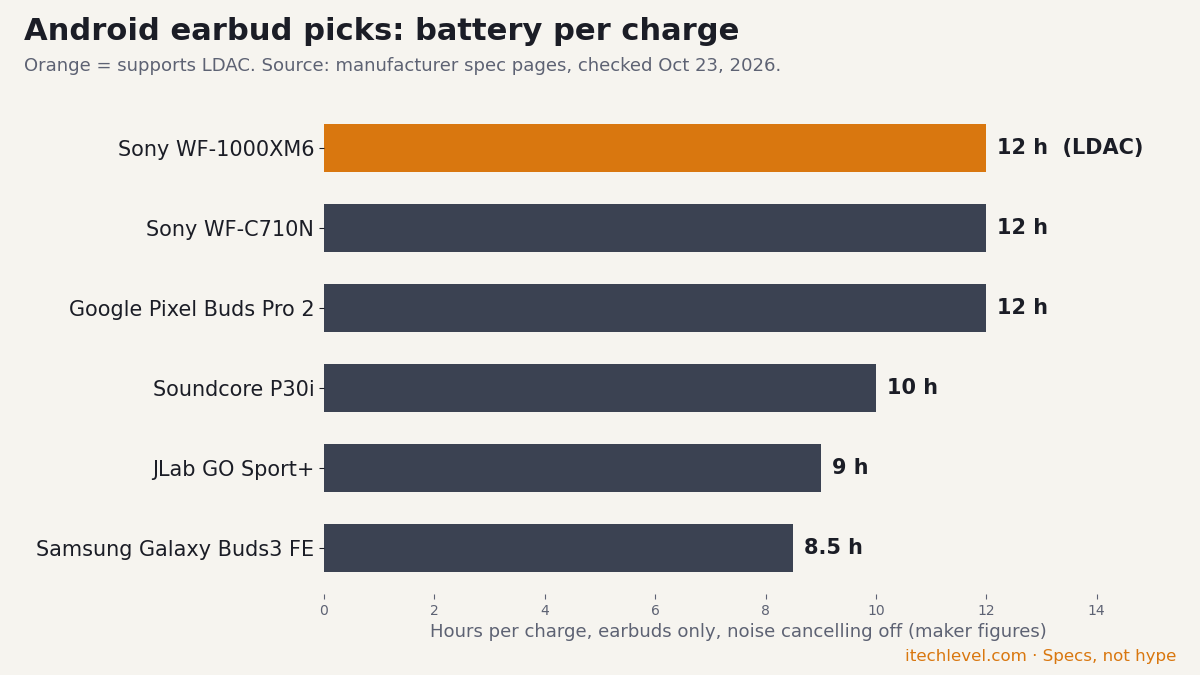
Every figure below comes from the manufacturer’s own spec page (click a model name to see it), taken from our earbuds and headphones spec database. “Not stated” means the maker doesn’t publish it, not that the feature is missing. For Android, the codec column matters most: only the Sony WF-1000XM6 lists LDAC, and Samsung’s own SSC codec only works on Galaxy phones.
Battery per charge from the makers’ spec pages. Orange bars support LDAC.
What makes earbuds “good for Android”?
Most premium wireless Bluetooth earbuds were designed with iPhone integration in mind. The AirPods, the Beats lineup, and even some Bose and Sony models lean on Apple’s ecosystem for their best features. On Android, those same earbuds technically work — they just lose most of what makes them special.
“Good for Android” means something specific. It comes down to four practical factors that other reviewers rarely test.
1. Audio codecs that actually work on Android
Wireless earbuds transmit audio through a Bluetooth codec — a compression standard that affects sound quality and latency. Android phones support a wider range of codecs than iPhones, but you only benefit if your earbuds support the same ones.
The codecs that matter for Android in 2026:
LDAC — Sony’s high-resolution codec, also adopted by Google. Transmits up to 990 kbps for genuinely high-quality streaming. Sony’s WF-1000XM6 and the EarFun Air Pro 4 use LDAC; Google’s own Pixel Buds Pro 2 don’t (they use AAC). iPhones don’t support it at all.
aptX Adaptive — Qualcomm’s adaptive codec that scales quality with connection strength. Common on premium Android phones (Samsung, OnePlus, Sony). Excellent for stable connections.
AAC — Apple’s preferred codec, also supported on Android but with inconsistent results. Quality varies depending on the Android phone manufacturer’s implementation.
SBC — The basic universal codec. Every Bluetooth device supports it, but it’s the lowest quality tier. Avoid earbuds that only support SBC if you care about sound.
If you have a Pixel, Samsung Galaxy, OnePlus, or other premium Android phone, prioritize earbuds that support LDAC or aptX Adaptive. The difference is genuinely audible on hi-res music.
2. Multipoint Bluetooth — more important than you think
Multipoint lets your earbuds connect to two devices simultaneously. You’re listening to a podcast on your laptop, your phone rings, and the earbuds switch automatically. No re-pairing, no menu diving.
This matters more for Android users than iPhone users because Apple’s ecosystem handles device switching natively for AirPods. On Android, multipoint is the only way to get the same experience. Most flagship Android-friendly earbuds support it in 2026, including the Pixel Buds Pro 2, Soundcore Liberty line, and Sony’s WF-1000XM6.
3. Companion app quality
Android earbud apps vary wildly in quality. Some manufacturers ship genuinely polished apps with custom EQ, ANC tuning, and firmware updates. Others ship buggy software that crashes every other launch.
Apps that consistently deliver a good Android experience:
Samsung Galaxy Wearable — exclusive to Samsung phones, but excellent when you have one
Sony Headphones Connect — feature-rich, occasionally complex, well-maintained
If you’ve ever bought “no-name” budget earbuds and discovered the app crashes constantly or asks for invasive permissions, you know why this matters. Stick to brands with proven Android app quality.
4. Native voice assistant support
Android phones default to Google Assistant or Gemini. Samsung phones add Bixby. Whether your earbuds let you summon the assistant hands-free — or whether you have to tap your phone — comes down to how the earbuds were designed.
The Pixel Buds Pro 2 have the deepest Google integration, with hands-free Gemini. Samsung’s Galaxy Buds support Bixby natively. Beyond those, support varies: some earbuds let you map a touch gesture to “summon assistant” but won’t trigger from voice alone. Check before you buy if hands-free voice control is important to you.
Android-specific compatibility considerations
Beyond codecs and apps, a few Android-specific quirks affect which earbuds work best for you.
Bluetooth version on your phone
Most Android phones sold since 2020 support Bluetooth 5.0 or newer, which handles modern multipoint and energy-efficient audio well. If your phone is older — Bluetooth 4.2 or earlier — some premium earbud features won’t work properly. To check: Settings → Bluetooth → Advanced (the exact menu varies by manufacturer).
Volume sync issues
Older Android versions (Android 9 and below) had inconsistent absolute volume control with Bluetooth earbuds. You’d adjust volume on your phone and the earbuds wouldn’t respond, or vice versa. Modern Android handles this correctly, but if you’re running Android 10 or older, look for earbuds explicitly listed as having reliable Android volume sync.
USB-C charging
Every Android phone sold today uses USB-C. Most modern earbud cases also use USB-C — but some budget models and older designs still ship with micro-USB. If you’ve already gone all-USB-C with your other devices, double-check your earbuds match. It’s a small thing that becomes annoying fast.
Find My Device support
Google’s Find My Device network now supports compatible Bluetooth earbuds for location tracking when lost. As of 2026, only some earbuds participate — including newer Pixel Buds and certain Samsung models. If losing an earbud is a real fear, this feature matters.
Budget tiers: what you actually get at each price
Wireless earbuds for Android span $20 to $500. Here’s what you realistically get at each tier, with honest expectations.
Under $50 — entry-level wireless audio
At this price, you get functional wireless earbuds with basic features. Sound quality is decent but not impressive. Active noise cancellation, if present, is more “noise reduction” than true ANC. Battery life is often the headline feature — some budget models advertise 30+ hours of total battery with the case, which is genuinely impressive.
What you usually compromise on: codec support (often SBC and AAC only), companion app polish, build quality, microphone clarity on calls. The earbuds will pair with any Android phone and play music — they won’t impress anyone.
Best uses at this tier: secondary earbuds for the gym, backup pair for travel, replacement for lost AirPods Pro, kids’ devices. Our top picks under $50: Soundcore P30i for ANC under $30, and the JLab Go Sport+ for workout-specific use.
$50–$150 — the sweet spot for most buyers
This is where most Android users should shop. You get genuine ANC, multipoint Bluetooth, real codec support (usually LDAC or aptX Adaptive), polished apps, and 30+ hours of total battery. The earbuds feel like products you’d actually recommend to a friend.
Notable picks in this range: the Samsung Galaxy Buds 3 FE (list $149.99) for Samsung users specifically, Google’s Pixel Buds 2a ($129, now with noise cancelling), and a wide range of mid-tier Soundcore and JBL options.
$150–$300 — premium territory
At this price, you’re paying for the best ANC available, audiophile-grade codecs, premium build materials, and ecosystem integration. The Pixel Buds Pro 2 (list $229), the Sony WF-1000XM6 (just above the range at $329.99 at launch), and certain higher-tier Galaxy Buds models live here.
The question at this tier isn’t “is this good?” — it’s “are the upgrades worth the price gap?” For most Android users, the answer is yes only if you listen for hours daily, work in noisy environments where premium ANC matters, or value the specific ecosystem features.
$300+ — diminishing returns for most Android users
Earbuds above $300 exist, but few make sense for Android users. The AirPods Pro 3, Apple AirPods Max, and similar flagship Apple products lose most of their value when paired with Android — you’re paying premium prices for features you can’t fully access.
If you have $300+ to spend on audio for Android, consider over-ear noise-cancelling headphones instead. The Sony WH-1000XM5 and Bose QuietComfort Ultra both deliver better sound and ANC than any earbuds at any price, and they’re Android-friendly. See our over-ear noise-cancelling headphones guide for the comparison.
Your specific Android phone changes which earbuds make the most sense. Here’s what to choose based on what you carry.
For Google Pixel users
The Pixel Buds Pro 2 are the obvious pick. Built by Google to pair seamlessly with Pixel phones, they offer Fast Pair, hands-free Gemini, Silent Seal 2.0 adaptive noise cancelling and new Pixel features first. They stream over AAC, not LDAC. The combination of Pixel-first features and genuinely good audio quality makes them hard to beat for Pixel owners.
If you want Sony’s sound for less, the Sony WF-C710N (list $129.99) is the alternative. Sony’s audio tuning consistently beats Google’s, but you give up native Assistant integration. Worth the trade-off if you stream a lot of music and use the Assistant less.
Samsung’s Galaxy Buds 3 FE are the easy mid-range recommendation. Auto Switch across Samsung devices, Quick Panel controls, hands-free Gemini, and strong ANC at a fair price. If you have multiple Galaxy devices (phone, tablet, watch), the seamless switching is worth real money.
For higher-end Samsung pairs, the Galaxy Buds 3 Pro bring better sound and stronger ANC. But unless you’re a Galaxy power user, the FE gives you 80% of the experience at half the price.
Want cross-platform flexibility instead? The Pixel Buds Pro 2 also work on Samsung phones — you lose Bixby integration and some Pixel-only features but keep multipoint and the noise cancelling. A reasonable alternative if you might switch phone brands later.
For OnePlus, Xiaomi, Motorola, and other Android phones
If your phone isn’t a Pixel or Samsung, “best earbuds for [brand]” guides barely exist. The good news: cross-platform picks work well for you. The Soundcore P30i (budget), Pixel Buds Pro 2 (premium), and Sony WF-C710N all pair cleanly with any modern Android phone and deliver consistent experiences.
OnePlus owners specifically should consider OnePlus Buds 3 if you want maximum integration. Motorola users might consider Moto Buds+ for the same reason. But honestly? The cross-platform picks above will serve you better than most brand-specific earbuds from non-flagship manufacturers.
For older Android phones (3+ years old)
If your phone is older — Android 11 or earlier, Bluetooth 4.2 — be cautious with premium earbuds. Features like multipoint and high-resolution codecs may not work as advertised. Budget picks like the Soundcore P30i and JLab Go Sport+ work reliably on older phones and don’t expect features your phone can’t deliver.
Picks by use case
What you’ll actually do with your earbuds matters as much as your phone brand. Here are the picks for the most common Android user scenarios.
For workouts and running
Look for IP rating (IP55 or better), secure ear-hook or wing-tip design, and durable build. The JLab Go Sport+ is the budget champion — IP55 rated, ear-hook design that won’t fall out during runs, under $50. For a step up, the Shokz OpenRun uses bone conduction so you stay aware of your surroundings (essential for road running).
For long phone calls and video meetings
Microphone quality matters more than audio quality here. The Sony WF-1000XM6 have much-improved microphones for calls, according to SoundGuys. The Galaxy Buds 3 FE also do well, especially when paired with Samsung phones that handle echo cancellation natively.
Avoid budget earbuds for serious call duty — the mic compression and background noise rejection at sub-$50 prices isn’t reliable enough for daily work calls.
For commuting (train, bus, plane)
You need active noise cancellation. Real ANC, not “noise reduction.” The Pixel Buds Pro 2 have strong adaptive noise cancelling (Silent Seal 2.0). The Galaxy Buds 3 FE ANC is good enough for most commutes. For the absolute best ANC available, you’d step up to over-ear options — see our over-ear ANC headphones guide.
For sleeping or quiet listening
Look for low-profile earbuds you can lie on your side with. The JLab JBuds Mini are remarkably small and unobtrusive. ANC isn’t essential for sleeping use — passive isolation matters more, which means a good seal with the right ear tips.
What to skip
Not every popular earbud is right for Android users. We considered these alternatives and recommend skipping them for Android-specific reasons.
Apple AirPods (all models)
AirPods technically pair with Android via Bluetooth, but you lose almost everything that makes them special: H1/H2 chip features, Spatial Audio, automatic device switching, Find My, Siri integration, battery status, and case interactions. You’re paying premium prices for features you can’t use. Skip unless you’re switching back to iPhone soon.
Beats Studio Buds (and most Beats earbuds)
Beats actually work better on Android than AirPods do — Apple built Android support intentionally. But the standout Beats features (Apple ecosystem integration, Spatial Audio) still require iPhone. On Android, you’re getting decent earbuds at premium prices when better alternatives exist. The Pixel Buds Pro 2 or Galaxy Buds 3 FE beat them on every Android-specific metric.
Most sub-$20 “AirPods clones”
These flood Amazon search results. The pattern: knockoff design, exaggerated battery claims, no companion app, mystery brand names that change weekly. Battery degrades fast, Bluetooth connections drop unpredictably, and warranty support doesn’t exist. The Soundcore P30i exists at $20–$30 — pay the extra few dollars for genuine quality and an actual warranty.
Older Beats Powerbeats Pro models
Once excellent workout earbuds, the original Powerbeats Pro are now several generations old. Battery cells have degraded for most units still in circulation. Buy newer alternatives — the JLab Go Sport+ at half the price is more reliable in 2026.
How we evaluate earbuds for Android
iTech Level focuses specifically on the Android wireless audio market because mainstream tech reviewers don’t. We judge each pick against the questions Android users actually ask: Does the companion app work without crashing? Is multipoint reliable? Does the codec actually deliver the quality the manufacturer claims? Will it work with my specific phone brand?
Every recommendation here is based on four practical factors:
Real-world performance on Android specifically — not iPhone-first feature comparisons
Price-to-value at multiple budget tiers — what you actually get for what you pay
Who the product is for (and who should skip it) — every earbud has a target user; we name that user clearly
Honest trade-offs — no earbuds are perfect; we name the flaws that matter and explain when they’re not deal-breakers
We update this guide as new products launch and older recommendations stop being available. The companion roundups (linked throughout) go deeper on specific tiers and use cases.
No, generally. AirPods will pair with Android phones via standard Bluetooth and play music, but you lose almost all the features that justify their premium price — H2 chip integration, Spatial Audio, automatic device switching, Find My, Siri, case interactions, and battery status. For the same money, Pixel Buds Pro 2 or Galaxy Buds 3 FE deliver dramatically better Android experiences.
What’s the best wireless earbud codec for Android?
LDAC is currently the best codec for Android. It transmits up to 990 kbps for genuinely high-resolution audio — significantly better than the SBC or AAC defaults. Sony’s WF-1000XM6 and the EarFun Air Pro 4 support it; most earbuds, including Google’s Pixel Buds Pro 2 and Sony’s cheaper WF-C710N, use AAC instead. For Qualcomm-equipped Android phones, aptX Adaptive is the next-best alternative.
Do Google Pixel Buds work with Samsung phones?
Yes. The Pixel Buds Pro 2 work with any modern Android phone, including Samsung Galaxy devices, with multipoint and Google Fast Pair. Some features work best, or only, on Pixel phones. For most users, the Android-first design makes them a strong cross-brand pick.
Can I use Wear OS smartwatches with non-Pixel earbuds?
Yes, with caveats. Wear OS watches handle Bluetooth audio output to any standard Bluetooth earbuds. What you lose is brand-specific integration — for example, controlling Pixel Buds from a Galaxy Watch works but won’t show battery status, while Galaxy Buds on a Galaxy Watch show full status. Most workout and music control features work universally.
What’s the difference between LDAC and aptX?
Both are high-quality Bluetooth codecs, but they’re owned by different companies. LDAC was developed by Sony and is now an open standard supported by Google and most premium Android phones — it can transmit up to 990 kbps. aptX (and its successor aptX Adaptive) is owned by Qualcomm and is built into most Snapdragon-powered Android phones — it caps at 420 kbps but adjusts dynamically to connection strength. For most listeners, both sound great. LDAC has higher peak quality; aptX has more reliable streaming.
Why don’t most reviewers test Android compatibility?
Most major tech reviewers — Wirecutter, RTINGS, MKBHD, The Verge — primarily test on iPhone. Multiple factors drive this: iPhones are dominant in the US tech press market, Apple controls test units more tightly, and Apple-first reviews drive more affiliate revenue from premium AirPods sales. Android users are left with information gaps on which earbuds actually work well with their specific phones.
Are budget Android earbuds actually good in 2026?
Yes, surprisingly. The Soundcore P30i delivers genuine active noise cancellation, multipoint Bluetooth, and 45-hour battery life for under $30. The JLab Go Sport+ provides workout-grade build quality at similar prices. Budget earbuds in 2026 deliver features that cost $200+ five years ago. The trade-offs (sound quality, companion app polish, premium materials) are real but often acceptable.
Do I need a Bluetooth 5.0 phone for modern earbuds?
Most modern earbuds work best with Bluetooth 5.0 or newer phones. Bluetooth 4.2 connections still work but lose features like reliable multipoint, advanced codecs, and energy-efficient pairing. If your Android phone is from 2020 or later, you almost certainly have Bluetooth 5.0+. Check your phone’s settings if unsure.
Are Bluetooth earbuds and wireless earbuds the same thing for Android?
Yes — for Android phones, “wireless earbuds” and “Bluetooth earbuds” mean the same thing. All true wireless earbuds connect to your Android phone over Bluetooth. The terms are used interchangeably, so when you search for wireless Bluetooth earbuds for Android, you’re looking at the same products. What actually matters is which Bluetooth codec they support (LDAC or aptX Adaptive for the best quality), whether they offer multipoint, and how well their companion app works on Android — covered in detail above.
The bottom line
Android users have been underserved by mainstream wireless earbud reviews for years. The good news in 2026: products genuinely built for Android are excellent at every price point.
If you want the best overall earbuds for Android, get the Pixel Buds Pro 2. If you have a Samsung Galaxy phone, get the Galaxy Buds 3 FE. If you’re on a tight budget, get the Soundcore P30i. If you’ll use them for workouts, get the JLab Go Sport+.
For deeper dives into specific tiers and use cases, see our supporting guides:
New to choosing audio gear? Start with our complete framework on how to choose wireless earbuds and headphones — it covers codecs, noise cancellation, and fit, with special attention to what matters for Android users.
The best noise-cancelling headphones in 2026 are the Sony WH-1000XM6: top-tier noise cancelling from 12 microphones, up to 30 hours with ANC, LDAC, and a design that folds for travel. The Bose QuietComfort Ultra (2nd Gen) are the most comfortable, the Sennheiser Momentum 5 last longest (up to 57 hours), and the Soundcore Space 2 are the best budget pick. Prefer earbuds? See our best noise-cancelling earbuds.
How we put this together: picks are based on manufacturer specs and published reviews, not hands-on testing by iTech Level. See how we choose products.
On a long commute, in a busy office or on a long-haul flight, the right headphones can turn noise into calm. Today’s market has premium flagships and smart budget options, all promising strong noise cancelling (ANC), all-day comfort and long battery life.
We judge each pair on four things: how well the ANC works, comfort over hours of wear, battery life for travel, and sound quality. We also look at how each one fits your devices, whether you use Apple, Android or both.
Below you’ll find a flagship pick, a comfort pick, a battery-life pick, an Apple pick, a value pick and a budget pick, so you can match the right headphones to your routine.
The most powerful ANC headphones for commuters and travelers, with premium sound and crystal‑clear calls.
The Sony WH-1000XM6 sets the benchmark for noise cancelling. Its QN3 processor is seven times faster than the previous generation and drives 12 microphones to cancel noise in real time. A lightweight carbon-fiber driver keeps vocals and instruments clear and balanced. With up to 30 hours of battery life with ANC on, it lasts through long flights and a week of commutes.
It’s also excellent for calls: a six-microphone beamforming system picks out your voice, even in busy places. And unlike the XM5, it folds into a compact case, which makes it the best all-rounder for travel.
Pros
Top-tier ANC: QN3 processor and 12 microphones
High‑fidelity carbon‑fiber driver
30‑hour battery life with ANC
Excellent call clarity with AI beamforming
Cons
Costs more than the still-excellent XM5
Slightly heavier than the XM5 (about 254 g vs 250 g)
Flaws but not dealbreakers
It costs noticeably more than the XM5, which is still excellent and often discounted. If you don’t need the folding design or LE Audio support, the XM5 is the better value.
Most Comfortable: Bose QuietComfort Ultra (2nd Gen)
The most comfortable flagship here, with immersive spatial audio and strong noise cancelling.
The Bose QuietComfort Ultra (2nd Gen) is the most comfortable flagship here. Soft ear cushions and a plush headband make long sessions easy. You get three listening modes (Quiet, Aware and Immersion) plus a new Cinema mode for movies on the go.
Mostly listening to the TV? Bluetooth headphones can lag behind the picture, so our guide to the best headphones for TV focuses on sets with their own transmitter and a speech mode for clearer dialogue.
Battery life reaches up to 30 hours (23 with Immersive Audio), and you can listen over USB-C while it charges. The mics handle calls and video meetings well, and Immersive Audio places sound around you. It suits listeners who put comfort and flexible listening modes first.
Pros
Ultra‑soft ear cushions for all‑day comfort
Strong noise cancelling with Quiet, Aware and Immersion modes
Immersive spatial audio and dedicated Cinema Mode
30‑hour battery life with USB‑C fast charging
Cons
No LDAC (aptX Adaptive on Snapdragon Sound phones)
One of the priciest pairs here
Flaws but not dealbreakers
There’s no LDAC: Android users get aptX Adaptive only on phones with Snapdragon Sound. It’s also one of the priciest pairs here, so if comfort isn’t your top priority, the Sony XM6 or XM5 may be better value.
Unmatched 57‑hour ANC battery life makes the Momentum 5 the ultimate travel companion for audiophiles.
The Sennheiser Momentum 5 Wireless has the longest battery life of these picks: up to 57 hours. Its 42 mm drivers, inspired by Sennheiser’s HD 600, sound rich and detailed. Support for aptX Lossless and aptX Adaptive gets the most out of Android phones with Snapdragon Sound. Sennheiser says its hybrid adaptive ANC, with eight microphones, is up to three times stronger in the midrange than the Momentum 4’s.
The battery is user-replaceable, which helps the headphones last for years. It’s a premium pick for listeners who want great sound and very long battery life.
Pros
57‑hour battery life with ANC enabled
42 mm HD 600‑inspired drivers for rich, detailed sound
Hybrid adaptive ANC up to 3× stronger than previous model
Replaceable battery reduces electronic waste
Cons
ANC trails Sony and Bose’s best
Premium price
Flaws but not dealbreakers
Noise cancelling is much improved but still trails the Sony XM6 and Bose QuietComfort Ultra. It’s also a premium purchase, so it makes most sense if you’ll use the extra battery life.
Apple’s over-ear headphones, updated in 2026 with the H2 chip and stronger noise cancelling.
Apple released the AirPods Max 2 in April 2026. They move to Apple’s H2 chip, and Apple says their noise cancelling is up to 1.5x more effective than the previous generation. They add the features AirPods Pro owners already have, including Adaptive Audio, Conversation Awareness, Live Translation and Loud Sound Reduction, and the USB-C port carries lossless audio over a cable (Apple Newsroom). Apple rates the battery at up to 20 hours with noise cancelling, and they keep the stainless-steel frame and knit-mesh canopy (Apple).
They’re built for iPhone, iPad and Mac owners who want seamless switching between devices. The drawbacks are the price, the weight (Apple lists 386.2 g, heavy for all-day wear) and battery life: 20 hours is well behind the Sony’s 30 and the Sennheiser’s 57. If you see the 2024 USB-C AirPods Max discounted, note that they use the older H1 chip and miss the new features.
Pros
Noise cancelling up to 1.5x more effective than the previous AirPods Max (Apple)
Adaptive Audio, Conversation Awareness and Live Translation
Lossless, ultra-low-latency audio over USB-C
Seamless switching across iPhone, iPad and Mac
Cons
High price
Heavy at 386 g
Shorter battery life than Sony, Bose and Sennheiser rivals
Premium ANC and spatial audio at a price that undercuts the AirPods Max.
New in 2026: Beats launched the Beats 360 in September 2026, and Apple cut the Studio Pro’s price. See Beats Studio Pro vs Beats 360 for which to buy.
The Beats Studio Pro offer a lot for the price: solid noise cancelling, Personalized Spatial Audio and one-touch pairing on both iPhone and Android. Battery life is up to 40 hours with ANC off and 24 with it on, and the USB-C port plays lossless audio over a cable.
The trade-offs: the noise cancelling isn’t as strong as Sony’s or Bose’s best, and Android users don’t get Personalized Spatial Audio, which needs an Apple device.
Pros
Solid ANC and Transparency mode
Personalized Spatial Audio for Apple devices
Long battery life (40 hrs without ANC, 24 hrs with ANC)
USB‑C lossless wired audio and fast‑pair for both Apple and Android
The Space One’s successor: over 50 hours with ANC on, LDAC that works with multipoint, and a very comfortable fit.
Soundcore replaced the popular Space One with the Space 2 in April 2026. In SoundGuys‘ review it lasted 53 hours 21 minutes with noise cancelling on, beating its 50-hour rating, and blocked an average of 84% of outside noise, which is impressive for the price, though not at Sony or Bose level. It supports LDAC for hi-res audio on Android, and unlike most headphones it keeps LDAC while connected to two devices at once. It has Bluetooth 6.1, four noise-cancelling modes (office, transit, airplane and manual), a 3.5 mm input and weighs about 261 g.
SoundGuys found it exceptionally comfortable, with a feature-rich app. The catch is the default sound, which they describe as dull and closed-in until you adjust the EQ.
Plan to spend a few minutes in the EQ, and frequent flyers may still want a Sony or Bose for the strongest noise cancelling. If you find the older Space One discounted below $100, it’s still a good buy, with up to 40 hours with ANC on and LDAC. On a tighter budget, see our best headphones under $100.
Soundcore.com code AFSC20: an extra 20% off full-price items (valid through Dec 31, 2026).
Also worth a look
Sony WH-1000XM5: the XM6’s predecessor, still excellent and often discounted. Up to 30 hours with ANC and LDAC, but it lies flat instead of folding.
Bose QuietComfort Ultra (1st gen): replaced by the 2nd Gen, which adds longer battery life (30 vs 24 hours) and USB-C audio. Worth it at a clear discount.
Soundcore Life Q30: much cheaper than the Space 2, with up to 40 hours with ANC and three ANC modes, but no LDAC.
JBL Tour One M2: adaptive ANC, multipoint and up to 30 hours with ANC (50 without); best bought on sale.
Sony WH-1000XM4: older, but it folds and is often much cheaper; see whether it suits gaming in our guide.
How often will you charge? Battery life in real routines
Battery ratings are easier to compare as days than as hours. We took each pick’s battery life with noise cancelling on and worked out how long a full charge lasts for a 2-hour daily commute, a 4-hour day of commuting plus office or study time, and 10-hour flights. All figures are rounded down. They’re best-case numbers: makers measure at moderate volume, so listening louder or taking lots of calls will shorten them.
Headphones
ANC-on battery
2 h a day
4 h a day
10-hour flights per charge
Sennheiser Momentum 5 Wireless
57 h (rated)
28 days
14 days
5
Soundcore Space 2
53 h (SoundGuys test)
26 days
13 days
5
Sony WH-1000XM6
30 h (rated)
15 days
7 days
3
Bose QuietComfort Ultra (2nd Gen)
30 h (rated)
15 days
7 days
3
Beats Studio Pro
24 h (rated)
12 days
6 days
2
Apple AirPods Max 2
20 h (rated)
10 days
5 days
2
The gap is bigger than the hours suggest. At 4 hours a day, the Momentum 5 and Space 2 need charging about every two weeks, the Sony and Bose about once a week, and the AirPods Max 2 every five days. For a long-haul return trip, only the Momentum 5 and Space 2 get you there and back twice without a charger. And the budget Space 2 lasts almost as long as the Sennheiser for a fraction of the price.
What to look for
Choosing over-ear ANC headphones means balancing a few factors. Not every feature matters equally, so focus on what fits your routine:
ANC performance: Look past marketing claims to independent measurements of how much low rumble (engines) and higher-pitched chatter each pair blocks.
Comfort and build: Ear-cup size, padding and headband pressure decide whether you can wear them for hours without fatigue.
Battery life: For travel, aim for at least 30 hours with ANC on; quick charging is a bonus.
Sound and codecs: Balanced sound works for music, podcasts and calls. Hi-res Bluetooth codecs like LDAC or aptX Adaptive help on compatible Android phones, and some Apple and Beats headphones play lossless audio over USB-C.
Device compatibility: Multipoint Bluetooth and platform features (Apple Spatial Audio, Android Fast Pair) make daily use smoother.
Extras: Spatial audio, adaptive ANC, personalization apps and a folding design for travel.
Weigh these against your budget and how you listen, and you’ll find a pair that delivers real quiet, comfort and lasting battery life.
Watch: Sony WH-1000XM6 vs Bose QuietComfort Ultra (2nd Gen)
Still torn between our top two picks? SoundGuys, whose measurements we cite throughout this guide, put the two flagships side by side in this 12-minute comparison. Their answer matches ours: it depends on what you value most.
The Sony WH-1000XM6 are the best noise-cancelling headphones for most people: top-tier ANC, clear calls, LDAC and a folding design. If comfort matters most, choose the Bose QuietComfort Ultra (2nd Gen). For the longest battery life, the Sennheiser Momentum 5 last up to 57 hours and have a replaceable battery.
Apple users will feel at home with the AirPods Max 2, the Beats Studio Pro bring Apple-friendly features for less, and the Soundcore Space 2 are the best budget pick, with LDAC and over 50 hours with ANC.
Prime Big Deal Days has ended. Black Friday is November 27, 2026, and Cyber Monday is November 30. Amazon's Black Friday deals often start a few days early. Some Amazon Black Friday deals are for Prime members only. New members can start a free Prime trial (eligible customers; it becomes paid unless you cancel). Our picks are chosen on year-round value, not just sale pricing; tap any link to see today's price.
Black Friday 2026 is November 27, with many deals starting the week before and running through Cyber Monday (November 30). Compare each deal against the product’s price history, not the “was” price.
Last year’s model is often the best deal. The older XM5 usually gets a deeper cut than the newer XM6, and both are excellent.
New models have no deal history. The Soundcore Space 2 (April 2026) hasn’t been through a Black Friday yet, so compare it against its list price.
Compare against the price history, not the “was” price, since some “was” prices are inflated.
Frequently Asked Questions
How does active noise cancellation actually work?
ANC uses built‑in microphones to pick up ambient sound, then a processor creates an inverse sound wave that cancels out the noise before it reaches your ears.
Can I use these headphones with both iOS and Android devices?
Yes. Most models support standard Bluetooth and offer platform‑specific features like Apple Spatial Audio or Android Fast Pair, but core ANC and audio playback work on any device.
What battery life can I expect with ANC turned on?
Battery life varies by model; flagship units typically deliver 20‑30 hours with ANC active, while budget and travel‑focused headphones can exceed 40 hours.
Do these headphones support high‑resolution or lossless audio?
Several do. The Sony WH-1000XM6 and Soundcore Space 2 support LDAC, the Sennheiser Momentum 5 support aptX Lossless and aptX Adaptive, the Bose QuietComfort Ultra (2nd Gen) support aptX Adaptive on Snapdragon Sound phones, and the Bose, AirPods Max 2 and Beats Studio Pro play lossless audio over a USB-C cable.
What are the best noise-cancelling headphones for commuting?
The Sony WH-1000XM6. Their adaptive noise cancelling cuts train and traffic noise, the six-microphone call system keeps your voice clear, and they fold into a compact case.
Which noise-cancelling headphones last the longest?
The Sennheiser Momentum 5, with up to 57 hours of battery life and a user-replaceable battery. On a budget, the Soundcore Space 2 lasted over 53 hours with ANC on in SoundGuys’ test.