Adam Levell

Adam Levell is the editor of iTech Level, where he compares laptops, headphones and earbuds. Each guide is built from manufacturer specs, published tests and reviews, and he reads every one before it goes live. He also covers laptop matchups on the iTech Level YouTube channel. Adam Levell is the pen name of iTech Level's founder.

Best Earbuds Under $150 (2026): 5 Wireless Picks for iPhone and Android

Person listening to music with wireless earbuds while jogging

Find My Earbuds

Want a personalized recommendation? Try our 30-second earbuds finder.

The best earbuds under $150 depend on your phone. iPhone owners should get the AirPods 5, and Android and Pixel owners the Google Pixel Buds 2a. For the strongest noise cancelling on any phone, get the Nothing Ear (3), and two very good earbuds that launched at $150–$200 are now often discounted to around $100: the Soundcore Liberty 4 Pro and the Sennheiser Accentum True Wireless. Spending less than $100? See our best earbuds under $100.

Check the Nothing Ear (3) on Amazon →

How we put this together: picks are based on manufacturer specs and published reviews and measurements (linked below), not hands-on testing by iTech Level. Prices are the makers’ list prices; retailers often sell for less, so check the current price before you buy. We rebuilt this list on October 21 after four earlier picks went over $150 or were only available used. See how we choose products.

True wireless earbuds are the go-to choice for commuters, remote workers and gym-goers. This guide covers what matters most (noise cancelling, battery life, comfort, water resistance and phone compatibility) and matches each need with the earbuds that do it best under $150.

Comparison at a glance

ProductKey specs
Best for iPhone
Apple AirPods 5
Open-fit ANC (Apple: up to 50% more noise removed than AirPods 4 with ANC), up to 5 h per charge with ANC, 22 h with caseCheck Price
Best for Android
Google Pixel Buds 2a
ANC, Tensor A1 chip, up to 7 h with ANC (10 h without)Check Price
Best noise cancelling
Nothing Ear (3)
ANC score 8.2/10 (SoundGuys), LDAC, multipoint, wireless charging, IP54Check Price
Best value
Soundcore Liberty 4 Pro
ANC beat 63% of earbuds (SoundGuys), 5 h 42 min measured with ANC, LDAC, wireless charging, IPX5Check Price
Most comfortable
Sennheiser Accentum True Wireless
Shallow fit, aptX and LE Audio, multipoint, wireless charging, IP54, up to 6 h per chargeCheck Price

The picks

Best for iPhone: Apple AirPods 5

Apple’s newest earbuds, with noise cancelling, well under $150.

Apple announced the AirPods 5 in September 2026, with an optional wireless charging case (Apple Newsroom). They keep the open fit of the AirPods 4, with no silicone ear tips, and Apple says the new noise cancelling removes up to 50 percent more noise than the AirPods 4 with ANC, with a more natural Transparency mode and richer sound.

The wireless charging model adds a case that charges on Qi and Apple Watch chargers as well as USB-C, a volume swipe on the stem, and up to 5 hours of playback per charge with ANC (22 hours with the case). They’re made for iPhone: on Android you lose most of the smart features. If you want a sealed fit and the strongest noise cancelling, that’s the AirPods Pro 3, which cost more.

Pros

  • Apple’s latest open-ear noise cancelling
  • No silicone ear tips
  • Wireless charging and volume swipe on the wireless charging model
  • Deep iPhone integration and Live Translation

Cons

  • Short battery with ANC: up to 5 hours per charge
  • Open fit can’t block as much noise as sealed earbuds
  • Most features need an iPhone

Check Price on Amazon →

Best for Android: Google Pixel Buds 2a

Google’s cheaper Pixel Buds, now with noise cancelling.

The Pixel Buds 2a are the first A-series Pixel Buds with active noise cancellation, and they use the same Tensor A1 chip as the Pixel Buds Pro 2. Engadget praises their detailed, punchy sound and very comfortable fit, and battery life is up to 7 hours with ANC on (10 with it off).

They work with any Android phone, but they do the most on a Pixel. The savings show in the details: no wireless charging, no volume controls on the buds, and fewer features than the Pixel Buds Pro 2. Pixel owners should also see our best earbuds for Google Pixel guide.

Pros

  • Noise cancelling under $150
  • Very small, comfortable fit
  • Tensor A1 chip and Gemini access
  • Up to 7 hours with ANC

Cons

  • No wireless charging
  • No volume controls on the earbuds

Check Price on Amazon →

Best Noise Cancelling: Nothing Ear (3)

Strong noise cancelling and LDAC, usually under $150.

In SoundGuys’ scoring, the Ear (3) earn 8.1 out of 10, and their noise cancelling scores 8.2, better than 69 percent of the wireless earbuds SoundGuys has measured. They support LDAC for higher-quality audio on Android, connect to two devices at once and come in a case that charges wirelessly. SoundGuys lists up to 5.2 hours per charge with noise cancelling on and 22 hours with the case, and they’re rated IP54.

SoundGuys praised the app, the comfortable fit and the noise cancelling, but found the tuning bass-heavy and the microphones muffled, despite Nothing’s “Super Mic” branding.

Pros

  • Noise cancelling better than 69% of earbuds SoundGuys measured
  • LDAC, multipoint and wireless charging
  • Excellent companion app

Cons

  • Bass-heavy sound out of the box
  • Muffled microphones on calls
  • About 5 hours per charge with ANC

Check Price on Amazon →

Best Value: Soundcore Liberty 4 Pro

Most of the features of $200 earbuds, often discounted.

SoundGuys rated the Liberty 4 Pro 8.2 out of 10: good sound, noise cancelling that beat 63 percent of the earbuds it measured (cutting low rumble such as engine noise by about 30 dB) and a long feature list, including LDAC, multipoint, a wirelessly charging case and IPX5 water resistance. SoundGuys measured 5 hours 42 minutes per charge with noise cancelling on.

They’re often discounted. The case’s touchscreen is more gimmick than useful, it picks up fingerprints, and SoundGuys found the spatial audio weak.

Pros

  • Good noise cancelling for the price
  • LDAC, multipoint, wireless charging
  • IPX5, the most water-resistant pick here

Cons

  • Touchscreen case is a gimmick
  • Case is a fingerprint magnet
  • Weak spatial audio

Check Price on Amazon →

Check the Liberty 4 Pro at Soundcore.com ($109.99) →

Soundcore.com code AFSC20: an extra 20% off full-price items (valid through Dec 31, 2026).

Most Comfortable: Sennheiser Accentum True Wireless

Sennheiser sound and a light, shallow fit, at half the launch price.

The Accentum True Wireless are often discounted well below their launch price. In GSMArena’s review they were very comfortable, with a shallow fit that’s easy to wear for hours, a much smaller case than the Momentum True Wireless 4, reliable multipoint and a brighter sound the reviewer liked. They support AAC, aptX and LE Audio (LC3), charge wirelessly and are rated IP54. Sennheiser quotes up to 6 hours per charge; GSMArena got 5 hours 33 minutes using aptX.

The catch is noise cancelling: GSMArena called it average, letting through air conditioning and traffic. The touch controls also trigger easily, and the shallow fit may not stay put on a run. GSMArena said they needed a lower price to stand out; on sale, they have one.

Pros

  • Very comfortable shallow fit
  • Small case with wireless charging
  • aptX, LE Audio and solid multipoint

Cons

  • Average noise cancelling
  • Touch controls trigger easily
  • Not secure enough for running

Check Price on Amazon →

Also worth a look

  • Apple AirPods Pro 3: the strongest noise cancelling of any AirPods, a sealed fit and a heart-rate sensor. They cost more, but they’re worth stretching for if you’re an iPhone user who flies or commutes a lot.
  • Bose QuietComfort Earbuds (2024): our noise-cancelling pick earlier in October, with over 80 percent noise reduction in SoundGuys’ tests. They usually cost more than $150; check the price and buy if they drop well under $150.
  • Sennheiser Momentum True Wireless 4: excellent sound and aptX Lossless, but usually well above $150 except in sales. See best noise-cancelling earbuds.
  • Samsung Galaxy Buds 3 Pro: usually above $150 new except in sales. Galaxy owners should see our best earbuds for Samsung Galaxy.
  • Beats Fit Pro: our former workout pick; on October 21 Amazon listed only used units. For earbuds that stay put on a run, see our best workout earbuds.
  • Google Pixel Buds Pro (1st gen): older, but often discounted; they have a wireless charging case, which the Pixel Buds 2a lack.

Spending under $100 instead?

Two of the picks above are often discounted to around $100. For more, see our best earbuds under $100:

  • EarFun Air Pro 4: LDAC, multipoint and up to 52 hours with the case, often about $50.
  • Soundcore P30i: the cheapest way to get noise cancelling, usually $27–$50.
  • JLab Go Sport+: ear-hook workout earbuds for $25–$45.
  • Samsung Galaxy Buds 3 FE: Samsung’s budget earbuds with strong noise cancelling, often discounted.
  • Also often under $100: the Sony WF-C710N and Soundcore Liberty 5.

What to look for

Choosing true wireless earbuds means weighing a few key factors:

  • Noise cancelling (ANC): Look at independent measurements of how much noise earbuds block, not just marketing dB claims.
  • Battery life: Consider both earbuds‑only runtime and total playtime with the charging case. Longer life is crucial for commuters and long‑haul travelers.
  • Fit and comfort: Ear‑hook designs, silicone tips, and open‑fit styles affect how secure the earbuds feel during workouts or long listening sessions.
  • Water and sweat resistance: For workouts, look for IPX4 or higher; IPX5 or IP55 handles heavy sweat and rain.
  • Platform compatibility: Seamless integration with iOS, Android, or specific ecosystems (Apple, Google, Samsung) can unlock features like spatial audio, adaptive transparency, or quick pairing.
  • Price‑to‑value ratio: Balance the feature set against the price. A budget model with solid ANC may outperform a pricier option that lacks essential features.

Rank these factors by what matters most to you, and the right pair becomes much easier to spot.

Our verdict

Under $150, the right earbuds depend mostly on your phone. iPhone users get the most from the AirPods 5, and Android users, especially Pixel owners, from the Pixel Buds 2a. For noise cancelling on any phone, the Nothing Ear (3) are the pick.

If you’d rather spend around $100, the Soundcore Liberty 4 Pro pack in the most features and the Sennheiser Accentum True Wireless are the most comfortable. Prices on earbuds move fast: four of our early-October picks went over $150 within two weeks, so check the current price before you buy.

If you want over-ear noise cancelling instead, see our best noise-cancelling over-ear headphones.

Frequently Asked Questions

Do true‑wireless earbuds work with both iPhone and Android devices?

Yes. Most true‑wireless earbuds use standard Bluetooth profiles, so they pair with any smartphone. Some features, like spatial audio or adaptive transparency, may be limited to specific platforms.

How important is the IP rating for everyday use?

An IPX5 rating or higher protects against sweat and light rain, making earbuds safe for workouts and commuting in unpredictable weather.

Can I use one earbud at a time for calls while the other charges?

Many models support single‑earbud use, but battery life and ANC performance can vary. Check the product specs to confirm this capability.

What’s the difference between ANC and transparency modes?

ANC reduces ambient noise by generating anti‑noise sound waves, while transparency mode lets external sounds in, letting you stay aware of your surroundings without removing the earbuds.

What are the best earbuds under $150 right now?

The AirPods 5 for iPhone, the Google Pixel Buds 2a for Android, and the Nothing Ear (3) for noise cancelling on any phone. The Soundcore Liberty 4 Pro and Sennheiser Accentum True Wireless are often discounted to around $100.

What are the best AirPods under $150?

The AirPods 5. They’re well under $150, with or without the wireless charging case, and add noise cancelling that Apple says removes up to 50 percent more noise than the AirPods 4 with ANC. The AirPods Pro 3 have stronger noise cancelling but cost more.

What are the best earbuds under $150 for Android?

The Google Pixel Buds 2a for most Android and Pixel owners, with noise cancelling and a very comfortable fit. For higher-quality audio on Android, the Nothing Ear (3) and Soundcore Liberty 4 Pro both support LDAC.

What are the best noise-cancelling earbuds under $150?

The Nothing Ear (3). SoundGuys scored their noise cancelling 8.2 out of 10, better than 69 percent of the earbuds it has measured. The Soundcore Liberty 4 Pro were close behind. The Bose QuietComfort Earbuds are stronger still but usually cost more.

Related guide

Not sure what to prioritize at this price? Read our framework on how to choose wireless earbuds and headphones to match the right features to your phone and how you listen. On a tighter budget, see our best earbuds under $100.

Best Earbuds Under $150 (2026): 5 Wireless Picks for iPhone and Android Read More »

Best Laptops to Buy on Black Friday 2026 (and What to Wait For)

Laptop with a backlit keyboard on a desk surrounded by string lights

Short answer: Black Friday 2026 is Friday, November 27, and Cyber Monday is November 30. The laptops most worth waiting for are the ones that are already good at full price: the MacBook Air 13 (M5) for most people, the 14-inch MacBook Pro (M5) for creative work, the Dell XPS 14 for a premium Windows laptop, and the Lenovo LOQ 15 for budget gaming. Last year’s models, such as the 2025 Zephyrus G14 and the Legion 5 Gen 10, are the ones most likely to see big discounts now that their successors are out.

Next sale: Black Friday

Prime Big Deal Days has ended. Black Friday is November 27, 2026, and Cyber Monday is November 30. Amazon's Black Friday deals often start a few days early. Some Amazon Black Friday deals are for Prime members only. New members can start a free Prime trial (eligible customers; it becomes paid unless you cancel). Our picks are chosen on year-round value, not just sale pricing; tap any link to see today's price.

How we put this together: this guide is based on manufacturers’ official specs, launch prices and published reviews (linked in each of our full guides). It is not based on hands-on testing by iTech Level. The prices below are full or starting prices, not Black Friday prices. We’ll add confirmed deal prices once retailers publish them in the week before Black Friday. See how we choose products.

The best laptops to buy on Black Friday 2026

LaptopBest forKey specsFull price
MacBook Air 13 (M5)Most peopleM5, 16GB, 512GB, 2.7 lb, up to 18 h videoFrom $1,299
MacBook Pro 14 (M5)Photo and video workM5, 1TB, XDR display, HDMI + SD slot, fanFrom $1,999
Dell XPS 14Premium WindowsCore Ultra 7 255H, 3.2K 120Hz OLED, 3× Thunderbolt 4Varies by configuration
Acer Aspire Go 15Budget WindowsRyzen 7 7730U, 16GB, 512GB, 15.6″ Full HDBudget class
Acer Chromebook 315School and browsingIntel N100, 8GB, 15.6″ touch, up to 12 hBudget class
Lenovo LOQ 15 Gen 10Budget gamingRTX 5060, Ryzen 7 250, 16GB DDR5Under $1,200 in RTX 5060 trim
Lenovo Legion 5 Gen 101440p gaming valueUp to RTX 5070, 15.1″ 2.5K 165Hz OLEDDiscounted since Gen 11
ASUS ROG Zephyrus G14 (2025)Compact gamingRTX 5060 to 5080, 14″ 3K 120Hz OLED, 1.5 kgDiscounted since the 2026 model
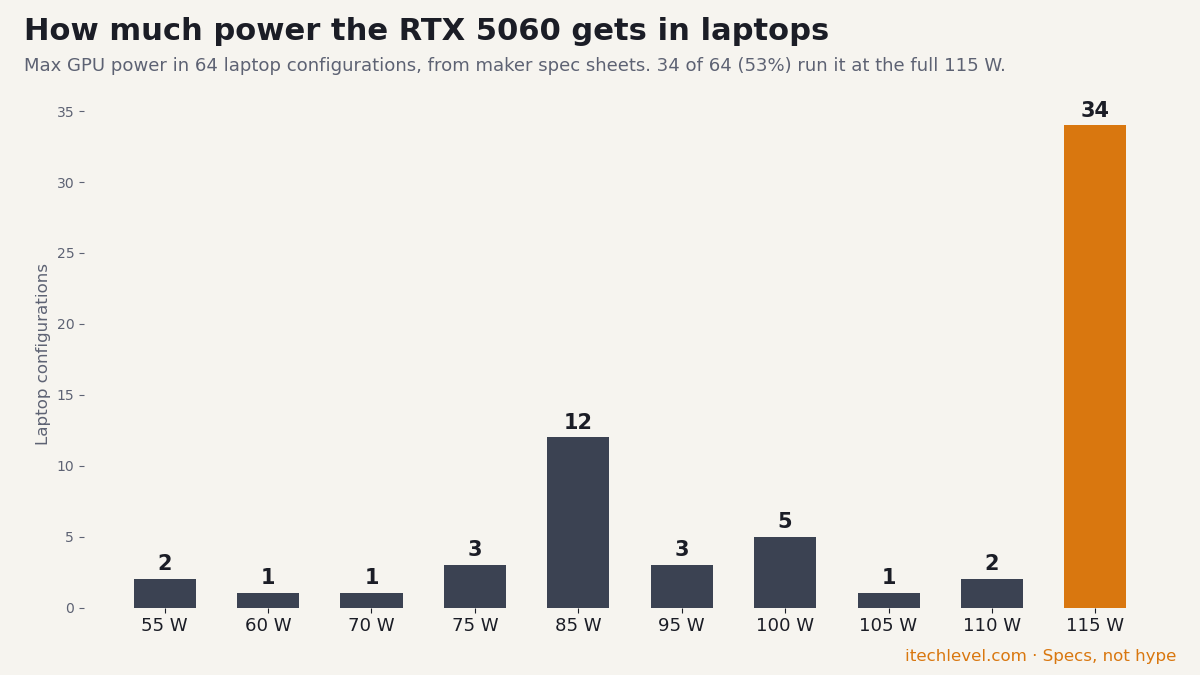
Bar chart of the maximum GPU power of the RTX 5060 in 64 laptop configurations: 34 run it at the full 115 W, the lowest at 55 W
Same GPU, different power: 34 of the 64 RTX 5060 laptop configurations in our laptop GPU power database run it at the full 115 W, and the lowest are rated at 55 W. Check the wattage before you buy.

Apple prices are Apple’s US starting prices. For the Windows laptops, the price depends heavily on the exact configuration, so we compare the specs you should get rather than a single number.

1. MacBook Air 13 (M5): best laptop for most people

The M5 MacBook Air (March 2026) is the safest laptop to buy on Black Friday if you don’t game. It now starts with 16GB of memory and 512GB of storage, weighs 2.7 lb, and Apple rates it for up to 18 hours of video streaming. Reviews from TechRadar, Tom’s Hardware and RTINGS are consistently positive. The trade-offs: there’s no fan, so it slows down under long heavy loads, and there’s no HDMI or SD slot.

Prices are up this year: Apple raised Mac prices on June 25, 2026, and the Air went up by $200 (MacRumors), so a Black Friday discount matters more than usual.

Black Friday tip: discounted M4 Airs will be everywhere. They’re still very good, but the base M4 model has only 256GB of storage, so compare like for like before you buy.

Check the MacBook Air 13 (M5) on Amazon →

Full MacBook Air 13 (M5) guide

On a tighter budget: the MacBook Neo is Apple’s cheapest laptop, with an A18 Pro chip, 8GB of memory and 256GB of storage. It lasted 13.5 hours in TechRadar‘s battery test and is enough for browsing, schoolwork and office apps, but not for photo or video work.

Check the MacBook Neo on Amazon →

2. MacBook Pro 14 (M5): best for photo and video work

The base 14-inch MacBook Pro now comes with 1TB of storage. You get the 1,000-nit XDR display, HDMI, an SD card slot and a fan, so long exports hold their speed. It’s the cheapest MacBook that suits regular 4K editing. For 8K or heavy multicam work, the M5 Pro and M5 Max models are covered in our best MacBook for video editing guide.

Check the MacBook Pro 14 (M5) on Amazon →

3. Dell XPS 14: best premium Windows laptop

The XPS 14 pairs a sharp 14.5-inch 3.2K OLED touchscreen (48–120Hz) with an Intel Core Ultra 7 255H, three Thunderbolt 4 ports, Wi-Fi 7 and a 70Wh battery. It suits photo work, heavy multitasking and anyone who wants a premium Windows machine. Skip it if you want to game (integrated Intel Arc graphics only) or want the lightest possible laptop: the OLED model weighs about 1.72 kg (3.79 lb).

Check the Dell XPS 14 on Amazon →

XPS 14 specs

4. Acer Aspire Go 15: best budget Windows laptop

For office work, study and streaming, the Aspire Go 15 has what matters: an 8-core Ryzen 7 7730U, 16GB of memory, a 512GB SSD and a 15.6-inch Full HD screen with a number pad. It isn’t for gaming (integrated Radeon graphics), and at about 1.8 kg (3.9 lb) it’s not one to carry all day.

Check the Acer Aspire Go 15 on Amazon →

Aspire Go 15 specs

5. Acer Chromebook 315: best for school and browsing

If most of your work happens in a browser, Google Docs or Classroom, the Chromebook 315 is a sensible low-cost pick: a 15.6-inch Full HD touchscreen, an Intel N100, 8GB of memory and up to 12 hours of battery. The catches: only 64GB of storage, and it can’t run Windows apps or PC games. For Lenovo Chromebooks and Windows laptops at a similar price, see the best Lenovo laptops under $500 or our best Chromebooks.

Check the Acer Chromebook 315 on Amazon →

Chromebook 315 specs

6. Lenovo LOQ 15 Gen 10: best budget gaming laptop

The LOQ 15 Gen 10 with an RTX 5060, a Ryzen 7 250 and 16GB of DDR5 is the most balanced gaming laptop you can usually get under $1,200. On Black Friday, check two things: that the listing really has the RTX 5060 (many cheaper versions use an RTX 5050), and the storage, since 512GB fills quickly with modern games. Our best gaming laptops under $1,200 guide compares it with the Nitro V 16, TUF A14 and Victus 16, and covers the best options under $1,000.

For more gaming laptops to watch and how to spot a real deal, see our Black Friday gaming laptop deals guide.

Check the Lenovo LOQ 15 on Amazon →

7. Lenovo Legion 5 Gen 10: best gaming value for 1440p

The 2026 Legion 5 (Gen 11) launched with an RTX 5060 at most (Lenovo has since added a 12GB RTX 5070 option to the Intel model), while last year’s Gen 10 goes up to an RTX 5070 with a 15.1-inch 2.5K 165Hz OLED. That makes the Gen 10 the one to watch this Black Friday: more GPU for 1440p, and it’s being cleared out now that Gen 11 is on sale. The differences between the two generations are in our Legion 5 Gen 11 vs Gen 10 guide.

Check the Legion 5i Gen 10 (RTX 5070) on Amazon →

8. ASUS ROG Zephyrus G14 (2025): best compact gaming laptop

The 2026 G14 has a brighter OLED, but reviews point to a big price jump: GamesRadar+ found the RTX 5070 Ti model roughly $1,000 more than the equivalent 2025 configuration. The 2025 G14 keeps the same 14-inch 3K 120Hz OLED and 1.5 kg aluminium body with RTX 5060 to RTX 5080 graphics, so a discounted 2025 model is the better Black Friday buy for most people. All three generations are compared in our Zephyrus G14 price guide.

Check Zephyrus G14 (2025) prices on Amazon →

How to tell a real Black Friday laptop deal

  • Match the exact configuration. The same laptop name can hide a slower GPU, less memory or a smaller SSD. Compare the model number, not the headline.
  • Check the price history. Price trackers such as Keepa or camelcamelcamel show whether a “deal” is lower than the price over the past few months, or just back to normal after a markup.
  • Know which generation you’re getting. Last year’s model at a big discount can be the better buy (the Legion 5 Gen 10 and the 2025 G14 are good examples), as long as you know it’s last year’s model.
  • Watch for reseller bundles. Some listings are “upgraded” by third-party sellers with extra memory, storage or docks. They can be fine, but the warranty may be split between the seller and the manufacturer.
  • Check the return window. Amazon usually extends returns for holiday purchases, but confirm it on the listing, especially when the seller isn’t Amazon.

Should you buy now or wait for Black Friday?

If you need a laptop now, Amazon’s Prime Big Deal Days (October 6–7, 2026) is the last big Amazon sale before Black Friday. If you can wait, Black Friday and Cyber Monday bring discounts from almost every retailer, not just Amazon, which gives you the widest choice, especially on last year’s models. Either way, decide which configuration you want before the sale starts, so you can tell a good price when you see one.

Frequently asked questions

When is Black Friday 2026?

Black Friday 2026 is Friday, November 27, the day after US Thanksgiving (November 26). Cyber Monday is November 30. Many retailers start their deals earlier in the week, so it’s worth checking from around November 20.

Is Black Friday a good time to buy a laptop?

Yes. Black Friday is one of the best times of the year to buy a laptop, especially last year’s models, which retailers discount to clear stock. Compare the exact configuration and the recent price history to make sure the deal is real.

Which MacBook should I buy on Black Friday?

The MacBook Air 13 with M5 is the best MacBook for most people: 16GB of memory, 512GB of storage and up to 18 hours of video streaming. Choose the 14-inch MacBook Pro with M5 if you edit photos or video, because it adds a fan, an XDR display, HDMI and an SD card slot. On a budget, the MacBook Neo covers browsing and schoolwork.

What is the best gaming laptop to buy on Black Friday 2026?

The Lenovo LOQ 15 Gen 10 with an RTX 5060 is the best budget pick. For more performance, look for discounts on last year’s Legion 5 Gen 10 with an RTX 5070 or the 2025 ASUS ROG Zephyrus G14, both of which have newer successors on sale.

Should I buy an older laptop model on Black Friday?

Often, yes. Last year’s models usually get the deepest discounts, and the difference from the new model can be small. The 2025 Zephyrus G14 costs much less than the 2026 model with a similar design, for example. Check the storage and memory, which new models often increase.

When is the best time of year to buy a laptop?

Black Friday and Cyber Monday in late November bring the widest discounts, followed by back-to-school sales from late July through early September and Amazon's Prime Day sales in July and October. New models usually arrive from January to spring, which is when last year's models drop the most. If your laptop has died, buy what you need now: waiting a few weeks for a sale rarely saves enough to matter.

Related guides

Best Laptops to Buy on Black Friday 2026 (and What to Wait For) Read More »

Are Gaming Laptops Worth It in 2026? An Honest Answer

A gaming laptop with a sleek design and colorful lighting

Short answer: gaming laptops are worth it in 2026 if you need to game in more than one place — and they’re a waste of money if you don’t. That’s the honest version most “are gaming laptops worth it” articles dance around. The real question isn’t whether gaming laptops are good (they are, and they’ve never been better); it’s whether you are the person a gaming laptop makes sense for.

How we put this together: this guide is built from manufacturer specs and from published reviews and tests, linked where we use them. It is not based on hands-on testing by iTech Level. See how we choose products.

This guide walks through exactly that: when a gaming laptop is the right call, when a desktop quietly wins, what you should actually spend, and which models are worth your money if you decide to buy. Jump to quick answers by situation if you’re short on time. No hype, no “it depends” cop-out without explaining what it depends on.

Is a gaming laptop worth it for you? Quick answers by situation

  • Student living in a dorm or shared space: yes, usually the right call — space is limited, the machine does double duty for coursework, and it moves home over breaks.
  • Working from home with a fixed desk setup: probably not — a desktop plus your existing work laptop delivers more gaming performance for the money.
  • Frequent traveller who games: yes, this is exactly the use case the category exists for.
  • Playing mainly esports titles (Valorant, CS2, League): you may not need a dedicated gaming laptop at all — a well-specified regular laptop handles these comfortably for less.
  • Chasing maximum settings at 1440p or 4K: a desktop, unless portability is non-negotiable; the laptop tier that manages this comfortably is expensive.

When a gaming laptop IS worth it

A gaming laptop earns its premium in specific situations. If two or more of these describe you, it’s likely the right choice:

  • You game in more than one place. Dorm and home, couch and desk, or you travel. Portability is the entire reason gaming laptops exist — if you never move your setup, you’re paying for a feature you won’t use.
  • You have limited space. A laptop replaces a tower, monitor, and peripherals with one closeable device. For small apartments or shared rooms, that consolidation is worth real money.
  • You need one device for gaming AND work/school. A modern gaming laptop is also a capable productivity and creative machine. If it pulls double duty, the cost is split across two jobs.
  • You value plug-and-play simplicity. No building, no cable management, no compatibility research. It works out of the box.

When a gaming laptop is NOT worth it

Just as honestly — here’s when you should skip it and buy a desktop (or a console) instead:

  • Your setup never moves. If the laptop will live permanently on one desk plugged into one monitor, a desktop gives you more performance per dollar and lasts longer (see are desktops better than laptops?). You’re paying a portability tax for nothing.
  • You want maximum performance per dollar. A desktop with the same-named GPU is faster (laptop GPUs run at lower power) and cheaper. Dollar for dollar, towers win on raw power.
  • You want to upgrade over time. Desktops let you swap the GPU, add storage, and upgrade the CPU for years. Most gaming laptops let you upgrade RAM and storage at best — the GPU is soldered. When it’s outdated, you replace the whole machine.
  • You only play lightweight or older games. If you’re playing indie titles, esports games (Valorant, CS2, League), or older catalog games, you may not need a dedicated gaming laptop at all — a regular laptop with decent integrated graphics can handle them.

Are gaming laptops good in 2026? The state of the art

Setting aside whether they’re worth your money for a moment — are gaming laptops actually good machines now? Honestly, yes, and more so than at any point previously. The gap that used to define the category has narrowed in three specific ways worth understanding before you buy.

The performance gap narrowed, but didn’t close. A modern RTX 50-series laptop GPU delivers genuinely strong 1080p and 1440p gaming. What changed most is the software: DLSS 4 multi-frame generation uses AI to insert additional frames, which stretches what mid-range laptop hardware can do far beyond what its raw silicon suggests. A laptop RTX 5060 in 2026 plays current titles at settings that would have required a much pricier machine two years ago. That said, a desktop card of the same name still wins — laptop GPUs run at lower power limits, so the name on the box never tells the whole story.

Thermals and build quality improved across the board. The cheap gaming laptops of a few years ago throttled badly under sustained load. Cooling design has genuinely improved, and mid-range machines now hold performance through long sessions far better than they used to. This remains the single biggest quality differentiator between two laptops with identical spec sheets — which is why sustained-load reviews matter more than opening benchmark numbers.

They became credible everyday computers. A 2026 gaming laptop is a capable machine for work, study, and creative software, not just games. That dual-purpose reality changes the value calculation substantially, because the cost gets split across two roles rather than charged entirely to gaming.

Are gaming laptops worth it yet? What changed, and what didn’t

If you’ve held off in previous years waiting for the category to mature, here’s the honest assessment of what the wait actually bought you.

What genuinely improved: current-generation graphics with AI frame generation, meaningfully better cooling, high-refresh and OLED displays becoming standard rather than premium, and battery life on non-gaming tasks that no longer feels like a compromise.

What has not changed, and won’t: the GPU is still soldered, so it still sets the machine’s expiry date at roughly three to five years of comfortable modern gaming. A desktop still delivers more performance per dollar and stays upgradeable for years. Gaming still drains the battery in one to two hours, and most laptops still throttle performance when unplugged. These are consequences of physics and engineering, not features waiting on a future generation — if they’re dealbreakers for you, waiting longer won’t fix them.

The 2026 wrinkle nobody expected: a global memory shortage has pushed component costs up, raising gaming laptop prices across the board this year. The practical effect is that the budget floor moved. Finding a capable current-generation machine under $1,000 has become difficult, and the realistic entry point now sits closer to $1,100. So in one narrow sense, waiting made things slightly worse rather than better — which is worth weighing if your plan is to keep waiting.

Are gaming laptops worth the money? Running the actual numbers

The clearest way to answer the money question is to compare what your budget buys in each direction, then decide which set of trade-offs matches your life.

  • Around $1,100–$1,400 buys a current-generation RTX 5060 gaming laptop that handles 1080p gaming at high settings, doubles as a work and study machine, and goes wherever you go. The same money spent on a desktop buys noticeably more raw performance, plus the ability to upgrade the graphics card in two or three years instead of replacing everything.
  • The portability premium is real and quantifiable. You’re paying roughly 20–30% more for equivalent-name hardware, and accepting lower sustained performance, in exchange for a machine that closes and travels. If you’ll genuinely use that portability, it’s money well spent. If the laptop will live permanently on one desk, you are paying that premium for nothing — this is the single most common way people waste money in this category.
  • The dual-purpose discount. If the machine replaces both a gaming device and a work or school computer, the effective cost drops sharply. For students especially, a single machine that handles coursework and games is often better value than a desktop plus a separate laptop.

Our honest rule: a gaming laptop is worth the money when portability or space constraints are real requirements rather than nice-to-haves, and when the machine will do more than one job. Outside those conditions, a desktop stretches the same budget considerably further.

The honest trade-offs nobody mentions

Even when a gaming laptop is the right call, go in with eyes open about what you’re accepting:

  • Performance per watt, not per name. An “RTX 5070” in a laptop is not the same as a desktop RTX 5070 — laptop GPUs run at lower power limits and deliver less performance. Always check reviews for the specific laptop’s real-world benchmarks, not just the GPU name on the box.
  • Thermals are the real differentiator. Two laptops with identical specs can perform very differently depending on cooling. A laptop that thermal-throttles loses performance under sustained load. This is why build quality matters more than the spec sheet.
  • Battery life and gaming don’t mix. Gaming drains a laptop battery in 1-2 hours, and most run at reduced performance unplugged. A gaming laptop is portable to locations, not portable to use untethered for long sessions.
  • The GPU is the expiry date. Because you can’t upgrade it, the GPU determines how long the laptop stays relevant — typically 3-5 years for modern gaming before you’re turning settings down.

How much should you actually spend?

Gaming laptop pricing maps roughly to what you can play. As of 2026, here’s the honest breakdown:

  • Under about $900 (on sale): RTX 5050 or older RTX 4050 laptops. Fine for esports and medium-to-high 1080p settings. Good deals mostly appear during sales; see the cheapest gaming laptops worth buying.
  • About $1,000–$1,200: RTX 5060 laptops, plus the odd RTX 5070 deal. High settings at 1080p in new games, and the best value for most buyers. See our best gaming laptops under $1,200.
  • About $1,200–$2,000: RTX 5070 laptops, often with better screens (QHD, OLED) and build quality. Full-power models cost well over $1,500 in October 2026. See the best RTX 5070 laptops.
  • $2,000 and up: RTX 5070 Ti and RTX 5080, premium chassis and top-tier displays. Worth it only if you need the performance or the best portable machine available. See the best RTX 5070 Ti and RTX 5080 laptops.

For most people, the $1,000–$2,000 range delivers the best value. Prices are higher than a year ago because memory has become much more expensive, so check the GPU’s wattage, not just its name, before you decide a laptop is good value: our laptop GPU power database lists it for over 200 configurations.

Are budget gaming laptops worth it?

Yes, if you play at 1080p and buy the right configuration. In 2026, “budget” realistically means about $1,000–$1,200 for an RTX 5060 laptop, or under $900 for an RTX 5050 on sale. Higher memory prices have pushed the floor up, so a capable current-generation gaming laptop well under $1,000 is now mostly a sale-time find.

A budget gaming laptop is worth it if:

  • You play at 1080p and are happy with High rather than Ultra settings. That’s what RTX 5050 and 5060 laptops are built for.
  • You want one machine for games and school or work, and need to carry it.
  • You’ll use DLSS. Every RTX 50-series laptop GPU, even the RTX 5050, supports DLSS 4 Multi Frame Generation, which raises frame rates in supported games.

It isn’t worth it if you want 1440p at high settings (8GB of video memory runs out sooner; look at the RTX 5070 tier), if the laptop will never leave your desk (a desktop gives more performance per dollar and can be upgraded), or if you only play esports and older games, which many regular laptops can handle.

The traps that make a cheap gaming laptop bad value:

  • Low GPU power. The same GPU name can run at very different wattages. MSI’s spec page limits the RTX 5060 in its Cyborg 15 to 55 W, while Acer’s GPU power list rates the RTX 5060 in the Nitro V 17 (ANV17-41) at 95 W, and the Nitro cost less when we checked on October 6.
  • The wrong GPU tier. In Notebookcheck’s comparison, the RTX 5060 scores about 21–22% higher than the RTX 5050 at the same power, so a small price gap between the two usually favors the 5060.
  • 8GB of memory. Treat 16GB as the minimum, ideally in two modules (dual-channel).
  • “Upgraded” third-party bundles that add RAM or storage at a large markup over the standard configuration.

If you can wait, Black Friday (November 27, 2026) is the most likely time to find a full-power RTX 5060 or a well-powered RTX 5070 near $1,000–$1,200. Our best gaming laptops under $1,200 lists what a good deal looks like.

Decided to buy? Our top pick under $1,200

In October 2026, the best gaming laptop under $1,200 was the Acer Nitro V 17 (ANV17-41): an RTX 5060 at 95 W, an AMD Ryzen 5 240, 16GB of memory and a 17.3-inch 1080p screen. It’s big and heavy (6.2 lb), and budget models have been selling out or rising in price quickly, so see our best gaming laptops under $1,200 for the current alternatives.

Check the Nitro V 17 (RTX 5060) on Amazon →

Which gaming laptops are actually worth buying?

If you’ve decided a gaming laptop is right for you, pick the price band first, then check the GPU’s wattage. Our current guides:

The bottom line

Are gaming laptops worth it? Yes — if you need to game in multiple places, have limited space, or want one machine for gaming and work. No — if your setup never moves, you want maximum performance per dollar, or you plan to upgrade components over time. A desktop wins on raw value and longevity; a gaming laptop wins on flexibility. Decide which one your life actually needs, set a realistic budget, and buy the best-built machine in that range rather than the one with the flashiest spec sheet.

Frequently asked questions

Are gaming laptops good?

Yes. 2026 gaming laptops with RTX 50-series graphics handle current games well at 1080p and 1440p, cooling is much better than a few years ago, and they double as capable work and study machines. The trade-offs are cost, a GPU you can’t upgrade, and short battery life while gaming.

Should I buy a gaming laptop or a desktop?

Buy a gaming laptop if you need to game in more than one place, have limited space, or want one machine for gaming and work or school. Buy a desktop if your setup never moves: it gives more performance per dollar and can be upgraded for years.

Are gaming laptops worth it for casual gamers?

For casual gamers who play lightweight or older titles, a dedicated gaming laptop is often overkill — a regular laptop with modern integrated graphics can handle esports and indie games. A gaming laptop becomes worth it when you want to play current AAA titles at good settings, or you need one machine that handles both gaming and demanding work.

Is a gaming laptop or desktop better value?

A desktop offers more performance per dollar and can be upgraded over time, making it the better pure-value choice for a setup that stays in one place. A gaming laptop costs more for the same-named GPU because of its portability and compact engineering — you’re paying for the ability to game anywhere. The “better value” depends entirely on whether you need to move your setup.

How long do gaming laptops last?

A well-maintained gaming laptop typically lasts 3-5 years for modern gaming before you’ll need to lower settings on new titles. The limiting factor is the GPU, which usually can’t be upgraded. RAM and storage can often be upgraded to extend usable life for everyday tasks beyond that window.

Are budget gaming laptops worth it?

Yes, if you play at 1080p and buy the right configuration: in 2026 that usually means an RTX 5060 laptop for about $1,000–$1,200, with the GPU at 85 W or more and 16GB of memory. Skip models that cut GPU power to 55–60 W, and look at the RTX 5070 tier if you want 1440p at high settings.

How much should I spend on a gaming laptop in 2026?

Most buyers get the best value between about $1,000 and $2,000. Around $1,000–$1,200 buys an RTX 5060 laptop for high settings at 1080p; $1,200–$2,000 gets an RTX 5070, with full-power models well over $1,500 in October 2026. Spending $2,000 or more only makes sense if you need RTX 5070 Ti or RTX 5080 performance or the best portable machine available.

Related reading

Are Gaming Laptops Worth It in 2026? An Honest Answer Read More »

Comparing Laptops: Find the Best Laptop for Your Needs

A laptop comparison chart showing various laptop features and specifications

When it comes to choosing the right laptop, it’s important to consider your needs and preferences. From performance and budget to features and design, there are many factors to consider when comparing laptops. Our comprehensive guide will help you make an informed decision and find the best laptop for your needs.

Understanding Your Laptop Needs: Performance, Budget, and Features

Before you start comparing laptops, it’s important to have a clear understanding of your needs. This includes your performance requirements, budget, and preferred features.

Choosing the Right Processor, Graphics Card, and Memory

When it comes to performance, the processor (CPU), graphics card (GPU), and memory (RAM) are some of the key components to consider. The processor is responsible for executing instructions and performing tasks, while the graphics card is responsible for rendering images and video. Memory, or RAM, is used to store data temporarily as the processor works on it.

For most general use and everyday tasks, a quad-core processor and 4-8GB of RAM should suffice. However, if you plan on using your laptop for more demanding tasks, such as gaming or video editing, you may want to consider a laptop with a more powerful processor and graphics card, as well as more memory. Some popular processor options for high-performance laptops include Intel’s Core i5, i7, and i9, as well as AMD’s Ryzen 5, 7, and 9.

Finding the Right Price Point for Your Budget

In addition to performance, it’s important to consider your budget when comparing laptops. Laptops can range in price from a few hundred dollars to several thousand dollars, depending on the features and performance. Determine your budget beforehand and look for laptops within that price range.

Keep in mind that you don’t always have to spend top dollar to get a good laptop. There are plenty of budget-friendly options that offer good performance and features for the price. However, if you need a laptop with higher-end specs, be prepared to pay a premium.

Determining Your Must-Have and Nice-to-Have Features

In addition to performance and budget, consider the features that are important to you when comparing laptops. Some common features to consider include:

  • Display size and resolution: Laptops come in a range of display sizes, from 11 inches to 17 inches and beyond. Consider the size and resolution that best fits your needs.
  • Storage: Laptops offer various storage options, including hard drive (HDD) and solid-state drive (SSD). SSDs are generally faster and more reliable, but they are also more expensive. Consider your storage needs and choose a laptop with the appropriate amount of storage.
  • Portability: If you plan on taking your laptop with you on the go, consider its weight and size. Lighter and smaller laptops are generally more portable, but they may also have less powerful components and fewer features.
  • Battery life: If you plan on using your laptop on the go, battery life is an important factor to consider. Look for laptops with long battery life, particularly if you plan on using your laptop for extended periods without access to an outlet.
  • Keyboard and touchpad: The keyboard and touchpad are important for typing and navigating on your laptop. Look for laptops with comfortable and responsive keyboards and touchpads.
  • Graphics: If you plan on using your laptop for gaming or other graphics-intensive tasks, look for a laptop with a dedicated graphics card.
  • Other features: Other features to consider include connectivity options (such as WiFi, Bluetooth, and ports), security features (such as a fingerprint reader), and software pre-installed on the laptop (such as a word processor or antivirus software).

By considering your performance needs, budget, and preferred features, you can narrow down your options and find the best laptop for your needs. With so many options available, it’s important to do your research and compare laptops before making a decision. Use our comprehensive guide to comparing laptops to find the perfect laptop for you.

Comparing Laptops: Find the Best Laptop for Your Needs Read More »

Get Your First Audible Book for Free with a 30-Day Trial!

Cheerful young Hispanic female in white tank top listening to music via headphones and reading book while sitting on chair in park

As busy individuals, it can be tough to find the time to sit down and read a physical book. But what if there was a way to consume your favorite books on the go, without having to sacrifice your busy schedule? Enter Audible – the world’s leading provider of audiobooks.

Discover the Convenience and Enjoyment of Audiobooks with Audible

With Audible, you can enjoy a wide selection of audiobooks across all genres, as well as a convenient listening experience that allows you to consume books anytime, anywhere. Whether you’re commuting to work, running errands, or working out at the gym, you can listen to your favorite books and make the most of your time.

Get Your First Audiobook for Free with a 30-Day Trial

And the best part? You can try Audible out for free with a 30-day trial. That’s right – you can get your first audiobook for free when you sign up for a free trial of Audible. This is the perfect opportunity to test out the service and see if it’s right for you.

So why wait? Don’t miss out on this amazing opportunity to discover the convenience and enjoyment of audiobooks with Audible. With a wide selection of audiobooks and a convenient listening experience, Audible is the perfect choice for busy individuals and avid readers alike. Sign up for a free trial today and get your first audiobook for free. Try it out now and see why Audible is the world’s leading provider of audiobooks.

See Also: Best Wireless Earbuds Under $150 (2026 Guide)

Get Your First Audible Book for Free with a 30-Day Trial! Read More »

Photo by Vitaly Gariev on Unsplash · Photo by Liubomyr Vovchak on Unsplash