iTech Level is reader-supported: we may earn a commission when you buy through our links, at no extra cost to you. As an Amazon Associate, iTech Level earns from qualifying purchases. Affiliate disclosure
Short answer: No. Xbox consoles don’t support Bluetooth audio, so Bluetooth headphones and earbuds, including Bose, Beats, AirPods, Sony and Galaxy Buds, can’t pair with an Xbox Series X|S or Xbox One. You still have options: plug headphones that have a cable into the controller’s 3.5 mm jack, use the Xbox app on your phone for party chat or Remote Play, or buy a headset that connects to the Xbox and to your phone over Bluetooth at the same time, like the Xbox Wireless Headset.
Check the Xbox Wireless Headset on Amazon →
How we put this together: this guide is based on Xbox Support documentation, Bose and Apple specifications, and published reviews (linked below). It is not based on hands-on testing by iTech Level. See how we choose products.
Why Bluetooth headphones don’t work on Xbox
Xbox consoles use Microsoft’s own wireless system, called Xbox Wireless, for controllers and headsets. Xbox Support says headsets connect either wirelessly with Xbox Wireless (Microsoft’s Xbox Wireless Headset) or to the controller with a 3.5 mm audio jack, and that the Xbox One “does not feature Bluetooth functionality” (Xbox Support). Microsoft’s page on Bluetooth for Xbox gaming only covers using Bluetooth “on Windows and mobile devices”, not on the console (Xbox Support). The Series X|S works the same way: there’s no menu for pairing Bluetooth headphones.
Some Xbox controllers have Bluetooth, but that’s for connecting the controller to a PC or phone, not for audio. And Microsoft’s December 2025 update added Bluetooth LE Audio to the Xbox Wireless Headset when it’s used with a Windows 11 PC, not Bluetooth headphones on the console (Xbox Wire).
5 ways to use your headphones with an Xbox anyway
| Method | Game sound | Mic for chat | Delay | Best for |
|---|---|---|---|---|
| 3.5 mm cable into the controller | Yes | Only if the cable has a mic (most headphone cables don’t) | None | Bose, Beats, Sony headphones that came with a cable |
| Xbox app party chat on your phone | No, stays on the TV | Yes, through the phone | n/a | Talking to friends while the game plays on the TV |
| Remote Play in the Xbox app | Yes, on your phone or tablet | Yes, through the phone | Streaming plus Bluetooth delay | Playing in another room, casual games |
| Your TV’s Bluetooth | Yes, if the TV supports Bluetooth headphones | No | Bluetooth delay, sometimes noticeable | Single-player games late at night |
| Bluetooth transmitter in the controller jack | Yes | Usually no | Added Bluetooth delay | Earbuds with no cable |
- Plug in a cable. Any headphones with a 3.5 mm cable work in the Xbox Wireless Controller’s headphone jack (Xbox Support), with no delay at all. The catch is chat: most headphone cables carry sound only, and the Xbox controller has no built-in mic, so your friends won’t hear you.
- Use the Xbox app for chat. Start or join a party in the Xbox app on your phone with your Bluetooth headphones connected to the phone (Xbox Support). This pairs well with a cable: game sound through the controller, voice through the app.
- Stream the game to your phone. Xbox Remote Play lets you play games installed on your console on an Android 6.0+ or iOS 15.1+ phone or tablet, or a Windows PC (Xbox). The sound then comes out of that device, so your Bluetooth headphones work, but the stream adds its own delay on top of Bluetooth’s.
- Use the TV. Many smart TVs can send audio to Bluetooth headphones. That covers game sound, but not chat, and you get the usual Bluetooth delay.
- Add a transmitter. A small Bluetooth transmitter that plugs into the controller’s 3.5 mm jack can send game sound to any Bluetooth headphones. Expect more delay and usually no mic. If you’d spend money on this, a headset made for Xbox is often the better buy.
Can you use Bose headphones on an Xbox?
Only with a cable. Bose over-ear headphones come with an analog cable (a 3.5 mm to 2.5 mm cable on the QuietComfort Ultra Headphones 2nd Gen, per Bose’s specifications). Plug the 3.5 mm end into the controller and you get game sound with no delay, but don’t count on the headphones’ microphones over the cable, so use the Xbox app for chat. The second-gen QC Ultra Headphones also play audio over USB-C, but Bose pitches that for computers and phones, not consoles. Bose earbuds, such as the QuietComfort Ultra Earbuds, have no cable option, so on an Xbox they’re limited to the phone workarounds above. More in are Bose headphones good for gaming?
Check the Bose QC Ultra Headphones (2nd Gen) on Amazon →
Can you use Beats on an Xbox?
Only some, and only wired. The Beats Studio Pro and Solo 4 have a 3.5 mm cable that plugs into the Xbox controller for game sound; Apple describes that cable for listening only, so there’s no mic (Apple). The Studio Pro even work on the cable with a flat battery. The newer Beats 360 have no headphone jack and their USB-C port is for charging only, and Beats earbuds such as the Powerbeats Pro 2 and Solo Buds are Bluetooth only, so none of those can play Xbox sound without a workaround. See are Beats good for gaming?
Check the Beats Studio Pro on Amazon →
AirPods, Sony and Galaxy Buds on Xbox
The same rule applies. AirPods, AirPods Pro, Galaxy Buds and Pixel Buds are Bluetooth only, so they need one of the phone workarounds. Over-ear models that ship with a 3.5 mm cable, such as Sony’s WH-1000XM line, work wired in the controller jack. The AirPods Max play audio over USB-C, but Apple describes that for iPhone, iPad and Mac, so on an Xbox they’re Bluetooth-only headphones too. Our AirPods gaming guide and Sony XM5 and XM6 gaming guide go into detail.
What about the ROG Xbox Ally?
The ROG Xbox Ally handhelds run Windows 11, so Bluetooth headphones pair with them like with any PC. The usual Windows catch applies: when a game or Discord turns on the headphones’ mic, Windows switches to a call-quality mode and game sound gets worse, so use the handheld’s own mic if you can. Our Bluetooth headphones for gaming guide explains the delay and mic trade-offs.
Headsets that do Xbox and Bluetooth at the same time
If you want one pair for the console and your phone, buy a headset that connects to the Xbox with its own wireless and to your phone over Bluetooth. You can play on the Xbox and take a call or listen to a podcast from your phone without switching.
| Pick | Best for | Xbox connection | Phone connection | Buy |
|---|---|---|---|---|
| Xbox Wireless Headset (2024) | Simplest setup, official | Xbox Wireless, built in (no dongle) | Bluetooth, at the same time | Check price |
| SteelSeries Arctis Nova 7X Gen 2 | Battery life, works on PlayStation and PC too | USB dongle | Bluetooth, mixed in at the same time | Check price |
| SteelSeries Arctis GameBuds (Xbox version) | Earbuds instead of a headset | 2.4 GHz USB-C dongle | Bluetooth 5.3 | Check price |
Microsoft says its Xbox Wireless Headset pairs with the console like a controller and can connect over Bluetooth to another device at the same time, for example to play music from your phone while you game (Xbox Support). The Arctis Nova 7X Gen 2 uses a USB dongle that also works with PlayStation, PC and Switch, and mixes in your phone over Bluetooth. If you’d rather wear earbuds, the Xbox version of the Arctis GameBuds uses a 2.4 GHz dongle for the console and Bluetooth 5.3 for your phone (buy the Xbox version: the PlayStation one won’t connect wirelessly to an Xbox). Our best Xbox headsets guide compares more options.
Check the SteelSeries Arctis Nova 7X Gen 2 on Amazon →
Specs from the makers, side by side
Every figure below comes from the manufacturer’s own spec page, taken from our earbuds and headphones spec database. “Not stated” means the maker doesn’t publish it, not that the feature is missing.
| Model | Battery | Weight | Codecs | Connection | Maker doesn’t state |
|---|---|---|---|---|---|
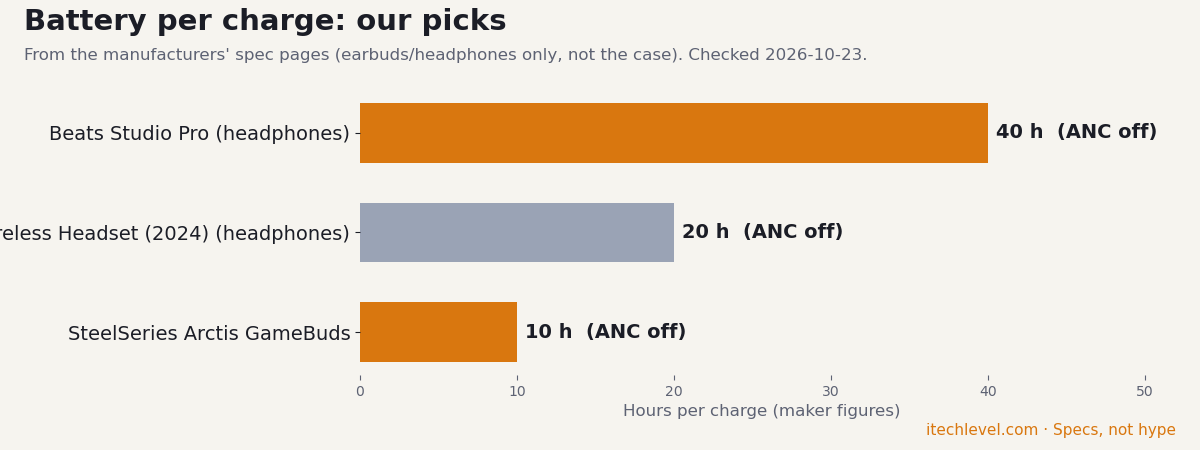
| Microsoft Xbox Wireless Headset (2024) | ANC off: 20 h | 320 g | SBC | Xbox Wireless + Bluetooth + USB-C; Bluetooth 5.3 | latency figure |
| Bose QuietComfort Ultra Headphones (2nd Gen) | ANC on: 30 (23 with Immersive Audio) | 264 (0.583 lb) | Not stated | Bluetooth + wired (audio cable; USB-C); Bluetooth 5.4 | codecs, multipoint, latency, water rating |
| Beats Studio Pro | ANC on: 24 h ANC off: 40 h | 260 g | Not stated | Bluetooth (Class 1) + USB-C lossless audio | Bluetooth version, codecs, latency, multipoint, water rating |
| SteelSeries Arctis Nova 7X Wireless Gen 2 | 50+ h | Not stated | Not stated | 2.4 GHz USB-C dongle + Bluetooth (simultaneous) | Bluetooth version, weight, latency (page truncated for mic/weight) |
| SteelSeries Arctis GameBuds | ANC off: 10 h with case: 40 (2.4 GHz, noise control off) | Not stated | Not stated | 2.4 GHz USB-C dongle + Bluetooth; Bluetooth 5.3 | weight, case weight, latency, battery with ANC on |
Our verdict
You can’t connect Bluetooth headphones to an Xbox directly. If your Bose, Beats or Sony headphones came with a 3.5 mm cable, plug them into the controller for lag-free game sound and use the Xbox app on your phone for chat. Bluetooth-only earbuds like AirPods, Galaxy Buds and Beats earbuds are stuck with phone workarounds such as Remote Play. If you play on Xbox often and want one wireless pair for the console and your phone, get a headset with both Xbox wireless and Bluetooth, such as the Xbox Wireless Headset.
Frequently asked questions
Can you connect Bluetooth headphones to an Xbox Series X|S?
No. Xbox consoles don’t support Bluetooth audio. Headsets connect with Microsoft’s Xbox Wireless, a USB dongle, or a 3.5 mm cable in the controller.
Can you use Bose headphones on an Xbox?
Only wired. Plug the Bose analog cable into the Xbox controller’s 3.5 mm jack for game sound. The headphones’ mic isn’t expected to work over the cable, so use the Xbox app on your phone for chat.
Can you use Beats on an Xbox?
The Beats Studio Pro and Solo 4 work with their 3.5 mm cable in the controller, for sound only. The Beats 360 and all Beats earbuds are Bluetooth only, so they can’t connect to an Xbox.
Can you use AirPods on an Xbox?
Not directly. You can connect AirPods to your phone and join party chat in the Xbox app, or stream your games to the phone with Xbox Remote Play, which adds delay.
Does the Xbox Wireless Headset have Bluetooth?
Yes. It connects to the console with Xbox Wireless and can connect to a phone or PC over Bluetooth at the same time, so you can hear both.