Gaming Laptops

Best RTX 5090 Laptops (2026): 5 Picks, and Is It Worth It Over the RTX 5080?

Close-up of a laptop keyboard

Short answer: the best RTX 5090 laptop is the ASUS ROG Strix SCAR 16 (2025): a full-power 175 W RTX 5090, a 240 Hz Mini-LED screen and an 88.4% Notebookcheck score. Before you buy, know what the extra money gets you. The RTX 5090 is only modestly faster than an RTX 5080 in games. Its real advantage is 24GB of video memory, which matters for 4K, local AI and 3D work. And check the wattage: some “RTX 5090” laptops run it at 130 W.

Check the ROG Strix SCAR 16 (RTX 5090) on Amazon →

How we put this together: this guide is based on manufacturers’ specifications, our laptop GPU power database and published reviews from Notebookcheck, Laptop Mag and Tom’s Hardware (linked below). It is not based on hands-on testing by iTech Level. Prices change often.

Best RTX 5090 laptops compared

LaptopBest forRTX 5090 max powerScreenBuy
ASUS ROG Strix SCAR 16 (2025)Best RTX 5090 laptop175 W16″ 2.5K Mini-LED, 240 HzCheck price
ASUS ROG Strix SCAR 18 (2025)Biggest screen175 W18″ 2.5K Mini-LED, 240 HzCheck price
MSI Raider 16 Max HX (2026)Best OLED, newest CPU175 W16″ QHD+ OLED, 240 HzCheck price
Lenovo Legion Pro 7i Gen 10Best-reviewed chassis175 W16″ 2.5K OLED, 240 HzCheck price
Razer Blade 16 (2026)Thinnest RTX 5090 laptop165 W (Razer spec)16″ 2.5K OLED, 240 HzCheck price

GPU power figures (including Dynamic Boost) from each maker’s spec sheet, collected in our GPU power database.

RTX 5090 or RTX 5080: is it worth it?

  • Video memory is the big difference: the laptop RTX 5090 has 24GB of GDDR7 and 10,496 CUDA cores; the RTX 5080 has 16GB and 7,680 cores (NVIDIA). Both top out at the same 175 W (150 W plus 25 W Dynamic Boost), so the 5090 has more hardware but the same power to feed it (Notebookcheck).
  • Games: a modest gain. Notebookcheck found the 5090’s advantage over the RTX 5080 “isn’t huge, especially in the laptop’s native WQHD resolution”, and recommends the RTX 5080 version of the Strix SCAR 16 unless you can use the extra memory (Notebookcheck). In Laptop Mag’s comparison of a Razer Blade 16 (RTX 5090) and an Aorus Master 16 (RTX 5080), the 5090 laptop won only 22 of 30 tests, partly because the thinner Blade can’t cool it as well (Laptop Mag).
  • Price: a big jump. Full-power RTX 5090 laptops cost well over $4,000. The best RTX 5080 laptop in our RTX 5070 Ti and 5080 guide, the Legion Pro 7i Gen 10, has sold for well under $3,000.
  • Who should buy the 5090: people who play at 4K on an external monitor, run local AI models that need more than 16GB of video memory (see our best laptop for running local LLMs), or render 3D and edit high-resolution video. For gaming on the laptop’s own 1440p screen, an RTX 5080 laptop is the better value.

Not every RTX 5090 is the same: 130 W to 175 W

Of the 16 RTX 5090 configurations in our GPU power database, 13 run it at the full 175 W, among them the Strix SCAR 16 and 18, Acer’s Predator Helios 16 AI and 18 AI, Gigabyte’s AORUS Master 16 and 18, the Legion Pro 7i Gen 10, MSI’s Raider and Titan, and the Razer Blade 18 (2026). The thinner models run it lower: the Razer Blade 16 (2026) at 165 W, the MSI Stealth 18 HX at 150 W and the ASUS ROG Zephyrus G16 (2025) at 130 W. That’s a 45 W gap for the same name on the box. Thin is fine if portability matters to you, but don’t pay full-power prices expecting full-power performance.

The best RTX 5090 laptops in 2026

1. ASUS ROG Strix SCAR 16 (2025): best RTX 5090 laptop

The Strix SCAR 16 pairs a 175 W RTX 5090 with an Intel Core Ultra 9 275HX and a 240 Hz Mini-LED screen. Notebookcheck rated it 88.4%, calling it “Asus’ fastest 16-incher”, and found “no loss of performance” compared with the 18-inch SCAR 18 (Notebookcheck). The 32GB/1TB model (G635LX-DS96) was the cheapest full-power RTX 5090 laptop we found. A 2TB version (G635LX-XS97) costs more.

Good to know: Notebookcheck noted the Mini-LED screen is the main thing the SCAR 16 adds over the cheaper Strix G16, at about $550 more for comparable specs.

Check the ROG Strix SCAR 16 on Amazon →

2. ASUS ROG Strix SCAR 18 (2025): best 18-inch RTX 5090 laptop

Same 175 W RTX 5090 and Core Ultra 9 275HX, with an 18-inch 2.5K 240 Hz Mini-LED screen. Since Notebookcheck found the SCAR 16 matches its gaming performance, choose the 18 only for the bigger screen, and accept the extra size and weight. The 32GB/2TB model is the G835LX-XS97.

Check the ROG Strix SCAR 18 on Amazon →

3. MSI Raider 16 Max HX (2026): best OLED screen

MSI’s 2026 Raider 16 Max HX moves to Intel’s newer Core Ultra 9 290HX Plus and runs the RTX 5090 at 175 W “Maximum Graphics Power with Dynamic Boost” (MSI). Tom’s Hardware (May 2026) praised its gaming performance, “vibrant OLED display” and longer-than-expected battery life, but found the chassis “plasticky” and missed a mechanical keyboard and faster storage. Its RTX 5090 review unit was priced well over $4,000 (Tom’s Hardware). Check the seller before you buy.

Check the MSI Raider 16 Max HX on Amazon →

4. Lenovo Legion Pro 7i Gen 10: best-reviewed chassis

Lenovo’s PSREF lists the RTX 5090 in the Legion Pro 7i Gen 10 at 175 W (Lenovo PSREF). It’s the same chassis that earned 88% from Notebookcheck in its RTX 5080 version, with a 240 Hz OLED that supports DisplayHDR 1000 and G-Sync (see our RTX 5080 guide). The catch is price: check Lenovo’s own store and Best Buy, where it’s often cheaper.

Check the Legion Pro 7i (RTX 5090) on Amazon →

5. Razer Blade 16 (2026): thinnest RTX 5090 laptop

The Blade 16 fits an RTX 5090 into a slim aluminium body, and Razer specs it at 165 W. Notebookcheck’s test asked whether a “0.7 Inch Laptop” can cool a 160 W RTX 5090 (Notebookcheck), and TechRadar’s verdict sums up the reviews: “Cost effective? No, but the Razer Blade 16 (2026) might just be the best gaming laptop I’ve ever tested” (TechRadar). Buy it if thinness and build quality matter more than value.

Check the Razer Blade 16 (2026) on Amazon →

Check the Razer Blade 16 at Razer.com →

Also worth a look: HP’s OMEN Max 16 with an RTX 5090 and Core Ultra 9 290HX Plus costs well over $4,000, but HP doesn’t publish a GPU power figure for it, so we can’t confirm it runs the 5090 at full power.

Our verdict

If you’ve decided you need an RTX 5090, buy the ASUS ROG Strix SCAR 16: full 175 W, a bright Mini-LED screen and the lowest price we found from Amazon itself. Choose the SCAR 18 for a bigger screen, the MSI Raider 16 Max HX for an OLED, or the Razer Blade 16 if you want the thinnest machine and can live with less power. If you mainly game on the laptop’s own screen, though, an RTX 5080 laptop gets you most of the performance for far less; see our best RTX 5070 Ti and 5080 laptops.

Frequently asked questions

What is the best RTX 5090 laptop?

The ASUS ROG Strix SCAR 16 (2025): it runs the RTX 5090 at the full 175 W, has a 240 Hz Mini-LED screen, scored 88.4% at Notebookcheck.

Is an RTX 5090 laptop worth it over an RTX 5080?

For gaming on the laptop’s own 1440p screen, usually not: Notebookcheck found the 5090’s lead over the 5080 isn’t huge. It’s worth it if you need 24GB of video memory for 4K gaming, local AI models or 3D and video work.

What wattage should an RTX 5090 laptop have?

175 W (150 W plus 25 W Dynamic Boost) is full power. Most big 16- and 18-inch models run it at 175 W, while thinner laptops run it at 165 W, 150 W or as low as 130 W in the 2025 Zephyrus G16.

How much VRAM does the RTX 5090 laptop GPU have?

24GB of GDDR7, compared with 16GB on the laptop RTX 5080 and 12GB on the RTX 5070 Ti.

How much does an RTX 5090 laptop cost?

In October 2026, full-power RTX 5090 laptops cost well over $4,000, and premium or thin models $5,000 or more.

Related guides

Best RTX 5090 Laptops (2026): 5 Picks, and Is It Worth It Over the RTX 5080? Read More »

Best Laptops for Battlefield 6 and Call of Duty: Modern Warfare 4 (2026)

Gaming laptop next to a game controller

Battlefield 6 and Call of Duty: Modern Warfare 4 (out October 23, 2026) ask for about the same hardware: EA and Activision both recommend a desktop RTX 3060 Ti with 8GB of video memory, and both refuse to start without Secure Boot and TPM 2.0. A current RTX 5060 or RTX 5070 laptop handles 1080p play. The best value right now is the Acer Nitro V 17 (RTX 5060), with a 17.3-inch screen. For high settings at 1440p, step up to an RTX 5070 Ti laptop such as the MSI Vector 16 HX AI.

Check the Acer Nitro V 17 (RTX 5060) on Amazon →

How we put this together: this guide is based on EA’s and Activision’s official PC requirements, Notebookcheck’s Battlefield 6 laptop benchmarks, manufacturers’ specifications and retailer listings checked on October 12–13, 2026. It is not based on hands-on testing by iTech Level. Prices change often. See how we choose products.

Battlefield 6 and Modern Warfare 4 system requirements

TierGraphics (desktop cards)ProcessorMemory
Battlefield 6 minimum (1080p, 30 FPS, Low)RTX 2060, RX 5600 XT, Arc A380 (6GB)Core i5-8400, Ryzen 5 260016GB dual channel
Battlefield 6 recommended (1440p 60 FPS High, or 1080p 80+ FPS Low)RTX 3060 Ti, RX 6700 XT, Arc B580 (8GB)Core i7-10700, Ryzen 7 3700X16GB dual channel
Battlefield 6 Ultra (4K 60 FPS Ultra, or 1440p 144 FPS Medium)RTX 4080, RX 7900 XTX (16GB)Core i9-12900, Ryzen 7 7800X3D32GB dual channel
Modern Warfare 4 minimumGTX 970/1060, RX 470, Arc A580 (3GB)Core i5-6600, Ryzen 5 14008GB
Modern Warfare 4 recommended (90 FPS multiplayer, High)RTX 3060 Ti, RX 6600 XT, Arc B580 (8GB)Core i7-8700K, Ryzen 5 360016GB
Modern Warfare 4 ray tracing (High ray tracing, 4K upscaled)RTX 5070 Ti, RX 9070 XT (16GB)Core i7-10700K, Ryzen 7 3700X32GB

Battlefield 6 needs 90GB on an SSD for the recommended tier (EA); Modern Warfare 4 needs 115GB and makes an SSD mandatory (Call of Duty, via Worthplaying). Together that’s over 200GB, so a 512GB laptop fills up fast.

The anti-cheat rules matter more than the specs. EA requires TPM 2.0, Secure Boot, and HVCI and VBS capability “across all specifications” for its Javelin anti-cheat, and Activision says “TPM 2.0 and Secure Boot are required” for Modern Warfare 4. Every new Windows 11 laptop supports these, but if you’ve ever switched Secure Boot off in the BIOS (to install Linux, for example), switch it back on. It also means neither game runs on a Mac, including through Parallels, or on a Chromebook.

How laptop GPUs run Battlefield 6

Desktop graphics cards in the requirements don’t map neatly onto laptop chips, so measured results help more. Notebookcheck benchmarked Battlefield 6 on laptops at launch (Notebookcheck, October 2025). Average frames per second:

Laptop GPU (test laptop)1080p Low1080p High1080p Overkill1440p Overkill
RTX 3060 (Legion 5 Pro, 2022)94684527
RTX 5070 (Lenovo LOQ 17, 115 W)1411117851
RTX 5080 (Tuxedo Stellaris 16)21417312888
RTX 5090 (Legion 9)181160146109

Three things stand out. An RTX 5070 laptop runs Battlefield 6 at over 100 FPS on High at 1080p, so the cheapest current gaming laptops handle it well. At 1440p on the top preset it drops to about 51 FPS, and Notebookcheck saw “extreme frame rate fluctuations” there because the 5070’s 8GB of video memory was full; it recommends at least an RTX 5070 Ti with 12GB for 60+ FPS at 1440p Overkill. And these figures come from a campaign mission, so busy multiplayer matches can run lower and lean harder on the processor. (The 5080 beating the 5090 at 1080p Low is a processor limit, not a typo.)

What matters in a Battlefield 6 or Call of Duty laptop

  • GPU power, not just the GPU name. The same RTX 5070 runs at anything from 60 W to 115 W depending on the laptop. Check the model in our laptop GPU power database before you buy.
  • A screen of 144Hz or faster. Activision’s recommended tier targets 90 FPS, and an RTX 5070 laptop runs Battlefield 6 above 100 FPS at 1080p High. A 60Hz screen would waste that.
  • 16GB of memory in two sticks. EA specifies “dual channel” memory for every Battlefield 6 tier. Most gaming laptops ship with two sticks, but some budget models use one; it’s worth checking.
  • 1TB of storage, or room to add it. The two games alone take more than 200GB.

Best laptops for Battlefield 6 and Call of Duty compared

LaptopBest forScreenKey specsBuy
Acer Nitro V 17 (RTX 5060)Best value, 1080p17.3″ 1080p IPS, 165–180HzRyzen 5 240, RTX 5060 (95 W), 16GB, 512GBCheck price
ASUS ROG Strix G16 (2025, RTX 5060)Faster processor for big matches16″ FHD+, 165HzCore i7-14650HX, RTX 5060 (115 W), 16GB, 1TBCheck price
MSI Vector 16 HX AI (RTX 5070 Ti)1440p at high settings16″ (check the listing)Core Ultra 7 255HX, RTX 5070 Ti (140 W), 12GB VRAMCheck price

The best laptops for Battlefield 6 and Modern Warfare 4

1. Acer Nitro V 17 (RTX 5060): best value

The Nitro V 17 is the cheapest laptop we’d buy for these two games. Its RTX 5060 runs at 95 W (Acer’s official GPU power list), and in Notebookcheck‘s first tests a 95 W RTX 5060 was “virtually on a par” with an 85 W RTX 5070. Expect lower frame rates than the 115 W RTX 5070 in the table above, so use DLSS and sensible settings at 1080p. You also get a Ryzen 5 240, 16GB of DDR5 and a 17.3-inch 1080p screen (Amazon’s listing says 180Hz in one place and 165Hz in another). The weak spot is the 512GB SSD: the two games alone would fill half of it, so budget for a second drive. Good to know: our previous pick, the Acer Nitro V 16 with an RTX 5070, no longer fits the budget. It’s the faster choice if it drops back into the budget.

Check the Acer Nitro V 17 on Amazon →

2. ASUS ROG Strix G16 (2025, RTX 5060): best for big multiplayer matches

Large multiplayer battles load the processor much more than a campaign mission, and EA’s recommended tier asks for an eight-core Core i7-10700. The Strix G16 (G615JMR) has a 16-core Core i7-14650HX, the strongest processor of our three picks, plus a full-power 115 W RTX 5060, which Notebookcheck found close to the RTX 5070 at similar power. It also comes with a 1TB SSD and a 165Hz screen.

Check the ROG Strix G16 on Amazon →

3. MSI Vector 16 HX AI (RTX 5070 Ti): best for 1440p

If you want high settings on a 1440p screen, Notebookcheck’s advice is an RTX 5070 Ti with 12GB of video memory. The Vector 16 HX AI pairs one, running at 140 W in Notebookcheck’s review of this Core Ultra 7 255HX configuration (Notebookcheck), in a 16-inch body. Check the listing’s specs and seller before you buy.

Check the MSI Vector 16 HX AI on Amazon →

For Modern Warfare 4 with ray tracing: Activision’s ray tracing tier asks for a card with 16GB of video memory. Laptop RTX 5070 Ti chips have 12GB, so you’d need an RTX 5080 or 5090 laptop. See our best RTX 5070 Ti and 5080 laptops.

Our verdict

For Battlefield 6 and Modern Warfare 4 at 1080p, the Acer Nitro V 17 with an RTX 5060 is the best value ($1,199.99 list). Pay more for the ASUS ROG Strix G16 if you want a faster processor, a full-power GPU and a 1TB SSD, or for the MSI Vector 16 HX AI if you play at 1440p. Whatever you buy, make sure Secure Boot and TPM 2.0 are switched on, or neither game will start.

Frequently asked questions

What is the best laptop for Battlefield 6?

For 1080p on a budget, the Acer Nitro V 17 with an RTX 5060. For more frames, choose an RTX 5070 laptop: Notebookcheck measured one at 111 FPS on High at 1080p. For 1440p, choose an RTX 5070 Ti laptop such as the MSI Vector 16 HX AI.

Can a laptop run Call of Duty: Modern Warfare 4?

Yes. Activision’s recommended spec for 90 FPS on High is a desktop RTX 3060 Ti with 8GB of video memory, 16GB of RAM and 115GB on an SSD, which current RTX 5060 and RTX 5070 gaming laptops meet.

Do Battlefield 6 and Modern Warfare 4 need Secure Boot?

Yes. Both require TPM 2.0 and Secure Boot on PC for their anti-cheat, and Battlefield 6 also requires HVCI and VBS capability. New Windows 11 laptops support all of them.

Can I play Battlefield 6 or Call of Duty on a MacBook?

Not natively. Both games are Windows-only on PC and require Secure Boot for anti-cheat, so they don’t run in Parallels either. Use a Windows gaming laptop or a console.

Is 8GB of video memory enough for Battlefield 6?

At 1080p, yes. At 1440p on the highest preset, Notebookcheck found the 8GB RTX 5070 laptop at its memory limit, with large frame rate swings, and recommends a 12GB RTX 5070 Ti or better.

Related guides

Best Laptops for Battlefield 6 and Call of Duty: Modern Warfare 4 (2026) Read More »

Best Laptop for Marvel Rivals (2026): 3 Picks and Requirements

Gaming laptop setup with RGB lighting

Marvel Rivals is heavier than Valorant or League of Legends: NetEase recommends a desktop RTX 2060 (Super) and 16GB of memory, and team fights full of effects push frame rates down. The best value laptop for it right now is the Acer Nitro V 17 (RTX 5060): a fast 17.3-inch screen, and its RTX 5060 supports the DLSS 4 Multi Frame Generation that Marvel Rivals added. An RTX 5050 laptop like the Nitro V 15 is the cheapest way to play, at lower settings.

Check the Acer Nitro V 17 (RTX 5060) on Amazon →

How we put this together: this guide is based on NetEase’s official system requirements on Steam, NVIDIA’s DLSS announcements, manufacturers’ specifications and retailer listings checked on October 10 and 12, 2026. It is not based on hands-on testing by iTech Level. Prices change often. See how we choose products.

Marvel Rivals system requirements

NetEase’s tierProcessorGraphics (desktop cards)Memory
MinimumIntel Core i5-6600K, AMD Ryzen 5 1600XGTX 1060, RX 580, Arc A38016GB
RecommendedIntel Core i5-10400, AMD Ryzen 5 5600XRTX 2060 (Super), RX 5700 XT, Arc A75016GB

Both tiers need 64-bit Windows 10 (1909 or newer), DirectX 12 and 70GB of storage, and NetEase recommends installing the game on an SSD (Steam). Note that even the minimum asks for 16GB of memory, so skip 8GB laptops. The PC version is Windows-only, so a MacBook or Chromebook won’t run it; it’s also on PS5 and Xbox Series X|S.

DLSS helps a lot here. Marvel Rivals supports NVIDIA DLSS Super Resolution, Frame Generation and Reflex, and added DLSS 4 Multi Frame Generation for RTX 50-series cards (NVIDIA). That gives current RTX 50-series laptops a real advantage over older or AMD-graphics models. For ranked play, keep Reflex on; frame generation raises the frame counter but doesn’t lower input lag, so competitive players often lower settings instead.

What matters in a Marvel Rivals laptop

  • An RTX 50-series GPU at decent power. NetEase’s recommended desktop RTX 2060 Super came out in 2019; a current RTX 5060 or 5070 laptop chip with 8GB of video memory is the comfortable choice, and the RTX 5050 is the budget option. Check the wattage in our laptop GPU power database: the same RTX 5060 runs at 55 to 115 W depending on the laptop.
  • A 144Hz or faster screen. In a fast hero shooter, a 60Hz panel throws away frames your laptop can draw. 165–180Hz is common on budget gaming laptops.
  • 16GB of memory, in two sticks. NetEase asks for 16GB even at minimum.
  • An SSD with room to spare. The game needs 70GB, and seasonal updates add more.

Best laptops for Marvel Rivals compared

LaptopBest forScreenKey specsBuy
Acer Nitro V 17 (RTX 5060)Best value17.3″ 1080p IPS, 165–180HzRyzen 5 240, RTX 5060 (95 W), 16GB, 512GBCheck price
Acer Nitro V 15 (RTX 5050)Cheapest15.6″ 1080p IPS, 165HzCore i5/i7 H-series, RTX 5050 (75 W), 16GBCheck price
Lenovo Legion Pro 5i Gen 10 (240Hz IPS)Competitive players16″ 2560×1600 IPS, 240HzCore Ultra 7/9 HX, RTX 5060 or 5070 (115 W)Check price

The best laptops for Marvel Rivals in 2026

1. Acer Nitro V 17 (RTX 5060): best value

The Nitro V 17 is the best value for Marvel Rivals right now, and it’s often discounted. Its RTX 5060 runs at 95 W (Acer’s official GPU power list), and in Notebookcheck‘s first tests a 95 W RTX 5060 was “virtually on a par” with an 85 W RTX 5070. That’s well above NetEase’s recommended card, and it supports DLSS 4 Multi Frame Generation in Marvel Rivals. You also get a Ryzen 5 240, 16GB of DDR5, a 512GB SSD and a 17.3-inch 1080p screen (Amazon’s listing says 180Hz in one place and 165Hz in another). At 6.2 lb, it’s a laptop for a desk more than a backpack. Good to know: our previous pick, the Acer Nitro V 16 with an RTX 5070, no longer fits the budget. It’s the faster choice if it drops back into the budget.

Check the Nitro V 17 (RTX 5060) on Amazon →

2. Acer Nitro V 15 (RTX 5050): cheapest way to play

An RTX 5050 laptop runs Marvel Rivals at 1080p with medium to high settings; South African retailer Evetech reported a steady 75 FPS at High on an RTX 5050 laptop in its own test (Evetech), and DLSS raises that further. The Nitro V 15’s 165Hz screen is the fastest at this price. Acer’s US model (ANV15-52) has an Intel Core i7-13620H, 16GB of memory and a 512GB SSD (Acer). Its RTX 5050 runs at 75 W, below the 100–115 W of pricier models (see our cheapest gaming laptops). Good to know: Acer also sells Nitro V 15 versions with older RTX 2050, 3050 and 4050 graphics, so check that the listing says RTX 5050.

See Nitro V 15 (RTX 5050) listings on Amazon →

3. Lenovo Legion Pro 5i Gen 10 (240Hz IPS): for competitive players

If you play ranked, a 240Hz screen and a full-power GPU are worth paying for. Lenovo sells the Legion Pro 5i Gen 10 with either a 16-inch 2560×1600 IPS screen at 240Hz or an OLED at 165Hz, and with an RTX 5060 or RTX 5070 running at a full 115 W (Lenovo PSREF). For Marvel Rivals, the RTX 5070 with the 240Hz IPS panel is the one to get. Good to know: 240Hz gaming laptops mostly cost $2,000 or more, and some listings add extra memory at a markup, so check the refresh rate and seller on each listing.

See Legion Pro 5i Gen 10 listings on Amazon →

Laptops to skip for Marvel Rivals

  • 8GB laptops: NetEase asks for 16GB even at minimum.
  • Laptops without a dedicated NVIDIA or AMD GPU: most integrated graphics fall short of the GTX 1060 minimum in a game this busy.
  • Very low-power RTX laptops: MSI’s Cyborg 15 and 17 B2RW run the RTX 5060 at just 55 W; check the wattage before you buy.
  • MacBooks and Chromebooks: the PC version is Windows-only.

Our verdict

For most Marvel Rivals players, the Acer Nitro V 17 (RTX 5060) is the best buy: a fast 17.3-inch screen, DLSS 4 support and plenty of power for the money. The Nitro V 15 with an RTX 5050 is the cheaper way in at lower settings. If you’re climbing the ranked ladder, pay for a 240Hz screen and a full-power GPU such as the Legion Pro 5i Gen 10’s. For hearing enemy ultimates and footsteps, see our best headphones for footsteps.

Frequently asked questions

What laptop do I need for Marvel Rivals?

NetEase’s minimum is an Intel Core i5-6600K or Ryzen 5 1600X, a GTX 1060-class GPU and 16GB of memory on 64-bit Windows 10; the recommended tier is a Core i5-10400 or Ryzen 5 5600X with an RTX 2060 (Super). A current RTX 5060 or 5070 gaming laptop with 16GB is a comfortable choice.

Is an RTX 5050 laptop good for Marvel Rivals?

Yes, at 1080p with medium to high settings, especially with DLSS turned on. For high settings at 144Hz or more, an RTX 5060 or 5070 laptop is the better choice.

Does Marvel Rivals support DLSS?

Yes. It supports DLSS Super Resolution, Frame Generation and Reflex, and added DLSS 4 Multi Frame Generation for RTX 50-series GPUs, according to NVIDIA.

Can you play Marvel Rivals on a MacBook?

No. The PC version requires 64-bit Windows 10 or newer. Marvel Rivals is also available on PS5 and Xbox Series X|S.

How much storage does Marvel Rivals need?

70GB, and NetEase recommends an SSD. Updates add more over time, so a 1TB drive or a second SSD is worth it if you play several big games.

Related guides

Best Laptop for Marvel Rivals (2026): 3 Picks and Requirements Read More »

Best RTX 5070 Ti and RTX 5080 Laptops (2026): 6 Picks, With GPU Wattage Checked

Gaming laptop running a first-person shooter

The best RTX 5080 laptop is the Lenovo Legion Pro 7i Gen 10: a full-power 175 W RTX 5080, a 240 Hz OLED and top review scores. For less money, the RTX 5070 Ti is the sweet spot: the Lenovo Legion Pro 5i Gen 10 and ASUS ROG Strix G16 run it at the full 140 W, and the MSI Vector 16 HX AI is often discounted. Whatever you buy, check the GPU wattage: some RTX 5080 laptops run it at just 115 W.

Planning to stream too? An RTX card’s built-in NVENC encoder handles the stream without slowing your game; see our best laptops for streaming.

Check the Lenovo Legion Pro 7i Gen 10 on Amazon →

How we put this together: this guide is based on manufacturers’ specifications, our laptop GPU power database and published lab reviews from Notebookcheck and PC Gamer (linked below). It is not based on hands-on testing by iTech Level. Prices change often, and laptop prices have risen in 2026; the figures below are list or recent sale prices with dates.

Best RTX 5070 Ti and RTX 5080 laptops compared

LaptopBest forGPU and max powerScreenReview scoreBuy
Lenovo Legion Pro 7i Gen 10Best RTX 5080 laptopRTX 5080, 175 W16″ 2.5K OLED, 240 Hz88% (Notebookcheck)Check price
ASUS ROG Strix G16 (2025)RTX 5080 or 5070 Ti, matte screenRTX 5080 175 W / 5070 Ti 140 W16″ 2.5K IPS, 240 Hz87% (Notebookcheck)Check price
Lenovo Legion Pro 5i Gen 10Best RTX 5070 Ti laptopRTX 5070 Ti, 140 W16″ 2.5K OLEDSee our RTX 5070 guideCheck price
Acer Predator Helios Neo 16 AIBright screen for lessRTX 5070 Ti, 140 W16″ 2.5K IPS81/100 (PC Gamer)Check price
MSI Vector 16 HX AIRTX 5070 Ti dealRTX 5070 Ti16″ 1200p or 1600p, 240 Hz84% (Notebookcheck)Check price
ASUS ROG Zephyrus G14 (2025)Most portableRTX 5080 or 5070 Ti, up to 120 W14″ 3K OLED, 120 HzSee our G14 guideCheck price

GPU power figures (including Dynamic Boost) from each maker’s spec sheet, collected in our GPU power database.

RTX 5070 Ti or RTX 5080?

  • Video memory: the laptop RTX 5070 Ti has 12GB and the RTX 5080 16GB. Both are comfortable at 1440p today; 16GB gives more room for the highest texture settings in future games.
  • Power: in the laptops in our database, the RTX 5070 Ti runs at 115 to 140 W and the RTX 5080 at 115 to 175 W. Full-power models (140 W and 175 W) are the ones to buy if performance is the point.
  • Who needs which: the RTX 5070 Ti is the better value for 1440p gaming. Notebookcheck found the RTX 5080 “very suitable” for native 1440p and noted that last year’s RTX 4080 laptop isn’t far behind it, so an RTX 5080 mainly makes sense if you’re coming from an older GPU or want the most headroom (Notebookcheck).
  • Coming from an RTX 5070? In the Legion Pro 5, Notebookcheck measured the RTX 5070 Ti up to 25% faster in games for roughly €500–700 more. Our best RTX 5070 laptops guide covers the cheaper tier.

The 115 W RTX 5080 trap

The same GPU name can mean very different performance. In our database, 12 RTX 5080 configurations run at up to 175 W, but the Acer Predator Helios Neo 16S AI (2026) and Gigabyte’s Gaming A16 PRO and A18 PRO run it at 115 W, and the 14-inch Zephyrus G14 at 120 W. That’s a 55 to 60 W gap for the same “RTX 5080” on the box. Thin laptops trade power for size, which is fine if portability matters to you, but don’t pay full-power prices for a limited GPU. Look up the exact model in our GPU power database before you buy.

The best RTX 5070 Ti and RTX 5080 laptops in 2026

1. Lenovo Legion Pro 7i Gen 10: best RTX 5080 laptop

The Legion Pro 7i is the RTX 5080 laptop to beat. Notebookcheck rates it 88% and calls the Gen 10 the most refined model in the series, praising a 240 Hz OLED that also supports DisplayHDR 1000 and G-Sync, which few OLED laptops manage. It runs the RTX 5080 at the full 175 W next to an Intel Core Ultra 9 275HX, and PC Gamer calls it the best high-performance gaming laptop it has tested.

Good to know: Lenovo made it thicker than before to fit stronger cooling, and it comes with a 400 W power brick, so it’s a desk machine first.

Check the Legion Pro 7i on Amazon →

2. ASUS ROG Strix G16 (2025): best for a matte screen, in RTX 5080 or 5070 Ti

The Strix G16 runs both GPUs at full power: up to 175 W for the RTX 5080 and 140 W for the RTX 5070 Ti, according to ASUS’s official power list. Notebookcheck rates the RTX 5080 version 87%, with a fast Core Ultra 9 275HX, a matte 240 Hz IPS screen without PWM flicker, and very good image quality, though without HDR. Notebookcheck found the Legion Pro 7i slightly faster with a better OLED screen, but a comparable configuration cost about €300 more.

Good to know: the case is all plastic, and the Mini-LED screen and RTX 5090 are reserved for the pricier Strix SCAR 16.

Thinking about stepping up? The RTX 5090 is only modestly faster than the RTX 5080 in games; its 24GB of video memory is the real difference (see our best RTX 5090 laptops).

Check the Strix G16 on Amazon →

3. Lenovo Legion Pro 5i Gen 10: best RTX 5070 Ti laptop

Our favorite RTX 5070 laptop is also a strong RTX 5070 Ti pick: Lenovo’s spec sheet rates the 5070 Ti version at 140 W, the full power for this GPU, alongside a 16-inch 2.5K OLED. In Notebookcheck’s testing of the Legion Pro 5, the RTX 5070 Ti was up to 25% faster in games than the RTX 5070, and it adds 12GB of video memory. See our best RTX 5070 laptops guide for the full review roundup of this chassis.

Good to know: the 5070 Ti version cost roughly €500–700 more than the RTX 5070 version in Notebookcheck’s comparison, so compare the two prices before you upgrade.

Check the Legion Pro 5i on Amazon →

4. Acer Predator Helios Neo 16 AI: brightest screen for the money

PC Gamer scored the RTX 5070 Ti version 81/100 and called it “a relative bargain among today’s top-end gaming laptops”, with solid performance and exceptional screen brightness, when reviewed. Acer’s GPU power list rates its RTX 5070 Ti at the full 140 W, and the 2026 version (PHN16-I71) also comes with a 175 W RTX 5080.

Good to know: PC Gamer found it runs hot and has almost no battery life. Don’t confuse it with the slimmer Helios Neo 16S AI, which runs its RTX 5070 Ti and RTX 5080 at 115 W.

Check the Helios Neo 16 AI on Amazon →

5. MSI Vector 16 HX AI: best RTX 5070 Ti deal

The Vector is the RTX 5070 Ti laptop that keeps turning up on sale. Notebookcheck rates it 84%, praising its sharp 2560×1600 240 Hz screen and two Thunderbolt 5 ports, and PC Gamer found a 1200p version on sale in October 2025, calling it cheaper than most RTX 5070 laptops.

Good to know: the tested configuration had only 16GB of memory and a 512GB SSD. MSI also sells a similar Vector A16 with an AMD Ryzen 9 8940HX, so check the model code.

Check the Vector 16 HX AI on Amazon →

6. ASUS ROG Zephyrus G14 (2025): most portable

If you want an RTX 5070 Ti or RTX 5080 you can carry every day, the 14-inch Zephyrus G14 pairs them with a 3K 120 Hz OLED and a Ryzen AI 9 HX 370 in a compact body. ASUS rates both GPUs at up to 120 W here, well below the 140 W and 175 W of the 16-inch picks, so you’re paying for size rather than speed. The 2026 model is brighter but expensive: GamesRadar+ notes its RTX 5070 Ti version costs far more, so the discounted 2025 model is the better buy. Our Zephyrus G14 price guide compares both.

Good to know: at 120 W, the G14’s RTX 5080 gains less over its RTX 5070 Ti than the price gap suggests.

Check the Zephyrus G14 on Amazon →

Black Friday 2026: prices are higher this year

Memory shortages have pushed laptop prices up in 2026. In June, Tom’s Hardware noted that RAM had risen about 400% in price since the previous Black Friday, and that an RTX 5070 Ti MSI Vector deal at $1,499 was still $200 above its Black Friday 2025 price. So don’t expect last year’s prices on November 27. Instead:

  • Use these yardsticks: about $1,500 for a good RTX 5070 Ti laptop and about $2,600 for a full-power RTX 5080 laptop have been genuine deals in 2025–2026.
  • Check the GPU wattage in our database: a “deal” on a 115 W RTX 5080 gets less GPU power than a full 140 W RTX 5070 Ti, so compare reviews before paying extra for the name.
  • Check memory and storage: 16GB and 512GB are common in cheaper configurations; 32GB and 1TB age better.

Our verdict

The Lenovo Legion Pro 7i Gen 10 is the best RTX 5080 laptop, with a full 175 W GPU and a superb OLED. For most gamers, an RTX 5070 Ti laptop is the better value: the Legion Pro 5i Gen 10 and ROG Strix G16 run it at full power, the Helios Neo 16 AI adds a very bright screen, and the MSI Vector 16 HX AI is the one to watch for deals. Choose the Zephyrus G14 only if portability matters more than speed. Not sure you need this much power? Our best gaming laptops under $1,200 covers cheaper options, and are gaming laptops worth it in 2026 weighs a laptop against a desktop.

Frequently asked questions

What is the best RTX 5080 laptop?

The Lenovo Legion Pro 7i Gen 10. It runs the RTX 5080 at the full 175 W, has a 240 Hz OLED with DisplayHDR 1000, scored 88% at Notebookcheck, and PC Gamer calls it the best high-performance gaming laptop it has tested.

Is the RTX 5080 laptop worth it over the RTX 5070 Ti?

For most people, no. The RTX 5070 Ti handles 1440p gaming well for much less money. The RTX 5080 adds 16GB of video memory and more headroom, which makes most sense at full 175 W power and if you’re upgrading from an older GPU.

What wattage should an RTX 5080 laptop have?

Up to 175 W including Dynamic Boost is full power, and most 16- and 18-inch RTX 5080 laptops in our database reach it. Thinner models run it lower, from 115 to 165 W, which costs performance.

How much should an RTX 5070 Ti laptop cost?

Good RTX 5070 Ti laptops have sold for about $1,500 on sale, such as the MSI Vector 16 HX AI. Laptop prices rose in 2026 because of memory costs, so treat $1,500 as a strong deal rather than a normal price.

How much VRAM do the RTX 5070 Ti and RTX 5080 laptop GPUs have?

The laptop RTX 5070 Ti has 12GB of GDDR7 and the laptop RTX 5080 has 16GB.

Related guides

Best RTX 5070 Ti and RTX 5080 Laptops (2026): 6 Picks, With GPU Wattage Checked Read More »

RTX 50 Laptop GPU Power (TGP) Database: 239 Configurations Compared (2026)

Close-up of computer cooling fans and heat pipes

Two laptops with the same RTX GPU can run it at very different power levels, and that changes performance. This database lists the maximum GPU power (TGP) for 239 RTX 50-series laptop configurations across 114 models from ASUS, Acer, Gigabyte, Lenovo, MSI and Razer, taken from the manufacturers’ own spec sheets. Most RTX 5060 and RTX 5070 laptops here are rated at up to 115 W, but thin models such as the ASUS Zephyrus G14 and Lenovo Yoga Pro 9 stop at 100 W, budget Acer Nitro V and Gigabyte models run the RTX 5070 at 75 to 95 W, and the RTX 5080 ranges from 115 W to 175 W depending on the laptop.

How we put this together: every figure comes from a manufacturer source (the official GPU power lists from ASUS and Acer, Lenovo’s PSREF spec sheets, and Razer’s, MSI’s and Gigabyte’s product pages), linked in each row. It is not based on hands-on testing by iTech Level. Last updated October 7, 2026. Dell and HP don’t publish GPU-only power figures, so they aren’t included; see the methodology and update log below. Free to reuse with a link to this page (CC BY 4.0); download the data as CSV.

What is TGP? TGP (total graphics power) is the power budget a laptop maker gives the graphics chip, in watts. The same GPU name, such as RTX 5070, can be set anywhere from about 60 W to 115 W in the laptops below, and more power usually means higher frame rates. “Max GPU power” includes Dynamic Boost, extra power borrowed from the processor.

On this page: Power range by GPU · The database · What the data shows · How much TGP matters · How to check before you buy · Methodology · FAQ

GPU power range by GPU

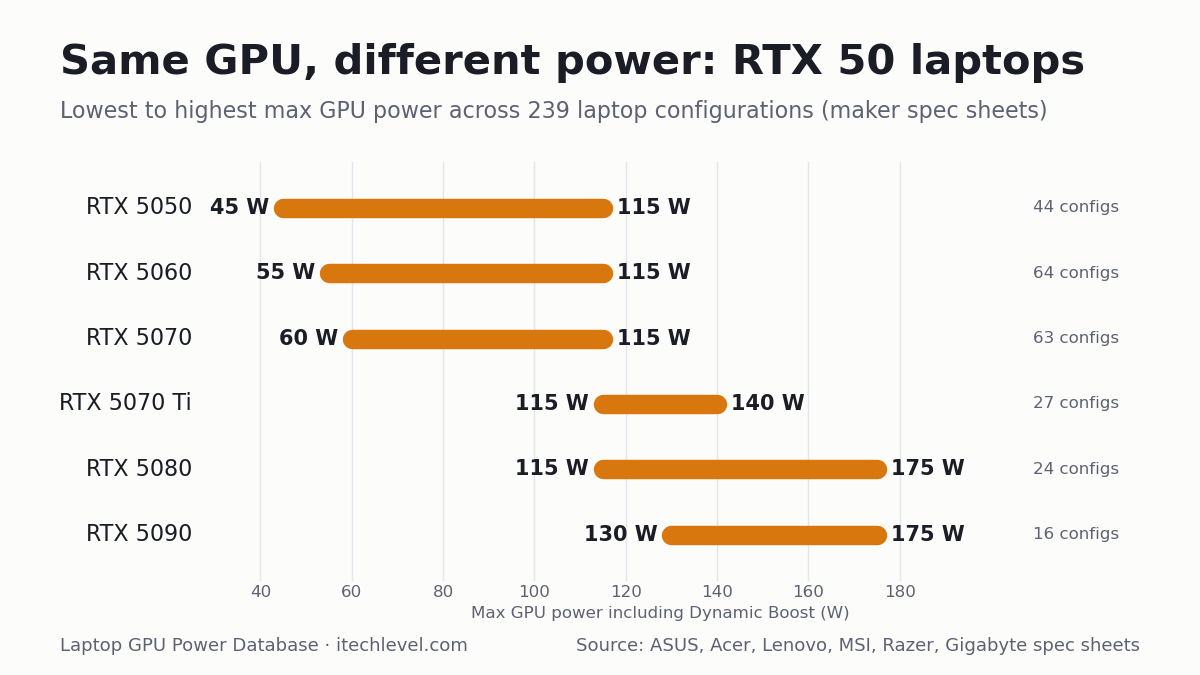
GPULowest max powerHighest max powerGapConfigurations
RTX 505045 W115 W70 W44
RTX 506055 W115 W60 W64
RTX 507060 W115 W55 W63
RTX 5070 Ti115 W140 W25 W28
RTX 5080115 W175 W60 W24
RTX 5090130 W175 W45 W16

Ranges cover the laptops in this database only; some laptops outside it may go lower. See our best RTX 5070 laptops for full-power picks.

Chart of RTX 50 laptop GPU power ranges: RTX 5050 45-115 W, RTX 5060 55-115 W, RTX 5070 60-115 W, RTX 5070 Ti 115-140 W, RTX 5080 115-175 W, RTX 5090 130-175 W
Lowest to highest maximum GPU power for each RTX 50 laptop GPU across the 239 configurations below. Free to reuse with a link to this page (CC BY 4.0).

The database

Filter by GPU or brand, search for a model, or click a column heading to sort. “Max GPU power” includes Dynamic Boost where the manufacturer states it. A figure marked * is one “up to” number the maker gives for the whole model, not for each GPU.

LaptopModel codeGPUVideo memoryMax GPU power ▾Base + Dynamic BoostSource
ASUS ROG Strix G16/G18 (2025)G615JH G615LG G614FH G614PH G814PHRTX 50508GB115 W100 W + 15 WASUS official TGP list
ASUS TUF Gaming A16 (2025)FA608JHRTX 50508GB115 W100 W + 15 WASUS official TGP list
ASUS TUF Gaming A18 (2025)FA808UHRTX 50508GB115 W100 W + 15 WASUS official TGP list
ASUS TUF Gaming F16 (2025)FX608-TBDRTX 50508GB115 W100 W + 15 WASUS official TGP list
Acer Nitro 16 AI (2025)AN16-61RTX 50508GB115 W100 W + 15 WAcer official GPU power list
Acer Nitro 16S AI (2025)AN16S-61RTX 50508GB115 W100 W + 15 WAcer official GPU power list
Acer Nitro 18 AI (2025)AN18-61RTX 50508GB115 W100 W + 15 WAcer official GPU power list
Acer Predator Helios Neo 16 (2026)PHN16-I31RTX 50508GB115 W100 W + 15 WAcer official GPU power list
Lenovo LOQ 15 Gen 11 (AMD, 2026)15AHP11RTX 50508GB115 W—Lenovo PSREF spec sheet
Lenovo LOQ 17 Gen 10 (Intel, 2025)17IRX10RTX 50508GB115 W—Lenovo PSREF spec sheet
Lenovo Legion 5 15 Gen 10 (AMD, 2025)15AHP10RTX 50508GB115 W—Lenovo PSREF spec sheet
Lenovo Legion 5 15 Gen 10 (Intel, 2025)15IAX10RTX 50508GB115 W—Lenovo PSREF spec sheet
Lenovo Legion 5 15 Gen 10 (Intel, 2025)15IRX10RTX 50508GB115 W—Lenovo PSREF spec sheet
Lenovo Legion Pro 5 16 Gen 10 (AMD, 2025)16ADR10RTX 50508GB115 W—Lenovo PSREF spec sheet
Lenovo Legion Pro 5 16 Gen 10 (Intel, 2025)16IRX10RTX 50508GB115 W—Lenovo PSREF spec sheet
MSI Katana 15 HXC14WXRTX 50508GB115 W—MSI spec page
ASUS TUF Gaming A14 (2025)FA401KH FA401UHRTX 50508GB110 W90 W + 15 WASUS official TGP list
ASUS ROG Zephyrus G14 (2025)GA403UHRTX 50508GB100 W75 W + 15 WASUS official TGP list
ASUS ROG Zephyrus G16 (2025)GA605KHRTX 50508GB100 W85 W + 15 WASUS official TGP list
Lenovo LOQ 15 Gen 10 (AMD, 2025)15AHP10RTX 50508GB100 W—Lenovo PSREF spec sheet
Lenovo LOQ 15 Gen 10 (Intel, 2025)15IRX10RTX 50508GB100 W—Lenovo PSREF spec sheet
Lenovo Yoga Pro 9 16 Gen 10 (Intel, 2025)16IAH10RTX 50508GB100 W—Lenovo PSREF spec sheet
MSI Cyborg 15 MAXC2WXRTX 50508GB100 W—MSI spec page
Acer Nitro V 16 (2025)ANV16-72RTX 50508GB95 W80 W + 15 WAcer official GPU power list
Acer Nitro V 16 AI (2025)ANV16-61/42RTX 50508GB95 W80 W + 15 WAcer official GPU power list
Acer Nitro V 17 AI (2025)ANV17-61/41RTX 50508GB95 W80 W + 15 WAcer official GPU power list
Acer Nitro V 16 AI (2026)ANV16-I51RTX 50508GB85 W70 W + 15 WAcer official GPU power list
Acer Nitro V 16 AI (2026)ANV16-A71RTX 50508GB85 W70 W + 15 WAcer official GPU power list
Acer Nitro V 16 AI (2026)ANV16-A31RTX 50508GB85 W70 W + 15 WAcer official GPU power list
Acer Nitro V 16S (2025)ANV16S-71RTX 50508GB85 W70 W + 15 WAcer official GPU power list
Acer Nitro V 16S AI (2025)ANV16S-61/41RTX 50508GB85 W70 W + 15 WAcer official GPU power list
GIGABYTE AERO X16EG64HRTX 50508GBup to 85 W*—Gigabyte product page
GIGABYTE AERO X16EG61HRTX 50508GBup to 85 W*—Gigabyte product page
GIGABYTE Gaming A16GA65HRTX 50508GBup to 85 W*—Gigabyte product page
GIGABYTE Gaming A16GA63HRTX 50508GBup to 85 W*—Gigabyte product page
GIGABYTE Gaming A16GA6HRTX 50508GBup to 85 W*—Gigabyte product page
GIGABYTE Gaming A18GA83HRTX 50508GBup to 85 W*—Gigabyte product page
Acer Nitro V 15 (2025)ANV15-52RTX 50508GB75 W60 W + 15 WAcer official GPU power list
Acer Nitro V 15 (2026)ANV15-A31RTX 50508GB75 W60 W + 15 WAcer official GPU power list
Acer Nitro V 16 (2026)ANV16-I31RTX 50508GB75 W60 W + 15 WAcer official GPU power list
MSI Cyborg 15C13WXRTX 50508GB70 W—MSI spec page
Acer Nitro V 14 AI (2025)AN14-62RTX 50508GB60 W50 W + 10 WAcer official GPU power list
MSI Cyborg 15B2RWRTX 50508GB45 W—MSI spec page
MSI Cyborg 17B2RWRTX 50508GB45 W—MSI spec page
ASUS ROG Strix G16/G18 (2025)G615LM G815LM G615JM G615JM G815JM G614FM G814FM G614PM G814PMRTX 50608GB115 W100 W + 15 WASUS official TGP list
ASUS TUF Gaming A16 (2025)FA608WM FA608PMRTX 50608GB115 W100 W + 15 WASUS official TGP list
ASUS TUF Gaming A18 (2025)FA808UMRTX 50608GB115 W100 W + 15 WASUS official TGP list
ASUS TUF Gaming F16 (2025)FX608LM FX608JPRTX 50608GB115 W100 W + 15 WASUS official TGP list
Acer Nitro 16 AI (2025)AN16-61RTX 50608GB115 W100 W + 15 WAcer official GPU power list
Acer Nitro 16S AI (2025)AN16S-61RTX 50608GB115 W100 W + 15 WAcer official GPU power list
Acer Nitro 18 AI (2025)AN18-61RTX 50608GB115 W100 W + 15 WAcer official GPU power list
Acer Predator Helios Neo 14 AI (2025)PHN14-71RTX 50608GB115 W100 W + 15 WAcer official GPU power list
Acer Predator Helios Neo 16 (2026)PHN16-I31RTX 50608GB115 W100 W + 15 WAcer official GPU power list
Acer Predator Helios Neo 16 AI (2025)PHN16-73RTX 50608GB115 W100 W + 15 WAcer official GPU power list
Acer Predator Helios Neo 16 AI (2026)PHN16-I71RTX 50608GB115 W100 W + 15 WAcer official GPU power list
Acer Predator Helios Neo 16S AI (2025)PHN16S-71RTX 50608GB115 W100 W + 15 WAcer official GPU power list
Acer Predator Helios Neo 16S AI (2026)PHN16S-I51RTX 50608GB115 W100 W + 15 WAcer official GPU power list
Acer Predator Helios Neo 18 AI (2025)PHN18-72RTX 50608GB115 W100 W + 15 WAcer official GPU power list
Acer Predator Helios Neo 18 AI (2026)PHN18-I71RTX 50608GB115 W100 W + 15 WAcer official GPU power list
GIGABYTE Gaming A16GA6EHRTX 50608GBup to 115 W*—Gigabyte product page
Lenovo LOQ 15 Gen 11 (AMD, 2026)15AHP11RTX 50608GB115 W—Lenovo PSREF spec sheet
Lenovo LOQ 17 Gen 10 (Intel, 2025)17IRX10RTX 50608GB115 W—Lenovo PSREF spec sheet
Lenovo Legion 5 15 Gen 10 (AMD, 2025)15AHP10RTX 50608GB115 W—Lenovo PSREF spec sheet
Lenovo Legion 5 15 Gen 10 (Intel, 2025)15IAX10RTX 50608GB115 W—Lenovo PSREF spec sheet
Lenovo Legion 5 15 Gen 10 (Intel, 2025)15IRX10RTX 50608GB115 W—Lenovo PSREF spec sheet
Lenovo Legion 5 15 Gen 11 (Intel, 2026)15IAX11RTX 50608GB115 W—Lenovo PSREF spec sheet
Lenovo Legion 7 16 Gen 10 (Intel, 2025)16IAX10RTX 50608GB115 W—Lenovo PSREF spec sheet
Lenovo Legion Pro 5 16 Gen 10 (AMD, 2025)16ADR10RTX 50608GB115 W—Lenovo PSREF spec sheet
Lenovo Legion Pro 5 16 Gen 10 (AMD, 2025)16AFR10RTX 50608GB115 W—Lenovo PSREF spec sheet
Lenovo Legion Pro 5 16 Gen 10 (Intel, 2025)16IAX10RTX 50608GB115 W—Lenovo PSREF spec sheet
Lenovo Legion Pro 5 16 Gen 10 (Intel, 2025)16IRX10RTX 50608GB115 W—Lenovo PSREF spec sheet
MSI Crosshair 16 HXE14WXRTX 50608GB115 W—MSI spec page
MSI Crosshair 16 Max HXE2WXRTX 50608GB115 W—MSI spec page
MSI Crosshair A16 HXE8WXRTX 50608GB115 W—MSI spec page
MSI Katana 15 HXC14WXRTX 50608GB115 W—MSI spec page
MSI Stealth 16 AI PlusB3WXRTX 50608GB115 W—MSI spec page
Razer Blade 14 (2025)—RTX 50608GBup to 115 W*—Razer product page
Razer Blade 16 (2026)—RTX 50608GBup to 115 W*—Razer product page
ASUS ROG Zephyrus G16 (2025)GU605CMRTX 50608GB110 W90 W + 15 WASUS official TGP list
ASUS TUF Gaming A14 (2025)FA401KM FA401UMRTX 50608GB110 W90 W + 15 WASUS official TGP list
ASUS ROG Zephyrus G16 (2025)GA605KMRTX 50608GB105 W90 W + 15 WASUS official TGP list
ASUS ROG Zephyrus G14 (2025)GA403WM GA403UMRTX 50608GB100 W75 W + 15 WASUS official TGP list
Lenovo LOQ 15 Gen 10 (AMD, 2025)15AHP10RTX 50608GB100 W—Lenovo PSREF spec sheet
Lenovo LOQ 15 Gen 10 (Intel, 2025)15IRX10RTX 50608GB100 W—Lenovo PSREF spec sheet
Lenovo Yoga Pro 9 16 Gen 10 (Intel, 2025)16IAH10RTX 50608GB100 W—Lenovo PSREF spec sheet
MSI Cyborg 15 MAXC2WXRTX 50608GB100 W—MSI spec page
Acer Nitro V 16 (2025)ANV16-72RTX 50608GB95 W80 W + 15 WAcer official GPU power list
Acer Nitro V 16 AI (2025)ANV16-61/42RTX 50608GB95 W80 W + 15 WAcer official GPU power list
Acer Nitro V 17 AI (2025)ANV17-61/41RTX 50608GB95 W80 W + 15 WAcer official GPU power list
Acer Nitro V 16 AI (2026)ANV16-I51RTX 50608GB85 W70 W + 15 WAcer official GPU power list
Acer Nitro V 16 AI (2026)ANV16-A71RTX 50608GB85 W70 W + 15 WAcer official GPU power list
Acer Nitro V 16 AI (2026)ANV16-A31RTX 50608GB85 W70 W + 15 WAcer official GPU power list
Acer Nitro V 16S (2025)ANV16S-71RTX 50608GB85 W70 W + 15 WAcer official GPU power list
Acer Nitro V 16S AI (2025)ANV16S-61/41RTX 50608GB85 W70 W + 15 WAcer official GPU power list
Acer Nitro V 16S AI (2026)ANV16S-I51RTX 50608GB85 W70 W + 15 WAcer official GPU power list
GIGABYTE AERO X16EG64HRTX 50608GBup to 85 W*—Gigabyte product page
GIGABYTE AERO X16EG61HRTX 50608GBup to 85 W*—Gigabyte product page
GIGABYTE Gaming A16GA65HRTX 50608GBup to 85 W*—Gigabyte product page
GIGABYTE Gaming A16GA63HRTX 50608GBup to 85 W*—Gigabyte product page
GIGABYTE Gaming A16GA6HRTX 50608GBup to 85 W*—Gigabyte product page
GIGABYTE Gaming A18GA83HRTX 50608GBup to 85 W*—Gigabyte product page
Acer Nitro V 15 (2025)ANV15-52RTX 50608GB75 W60 W + 15 WAcer official GPU power list
Acer Nitro V 15 (2026)ANV15-A31RTX 50608GB75 W60 W + 15 WAcer official GPU power list
Acer Nitro V 16 (2026)ANV16-I31RTX 50608GB75 W60 W + 15 WAcer official GPU power list
MSI Cyborg 15C2WXRTX 50608GB70 W—MSI spec page
Acer Nitro V 14 AI (2025)AN14-62RTX 50608GB60 W50 W + 10 WAcer official GPU power list
MSI Cyborg 15B2RWRTX 50608GB55 W—MSI spec page
MSI Cyborg 17B2RWRTX 50608GB55 W—MSI spec page
ASUS ROG Strix G16/G18 (2025)G615LP G615JP G815LP G614FP G814FP G814PPRTX 50708GB or 12GB115 W100 W + 15 WASUS official TGP list
ASUS TUF Gaming A16 (2025)FA608UP FA608PPRTX 50708GB or 12GB115 W100 W + 15 WASUS official TGP list
ASUS TUF Gaming A18 (2025)FA808UPRTX 50708GB or 12GB115 W100 W + 15 WASUS official TGP list
ASUS TUF Gaming F16 (2025)FX608LP FX608JPRTX 50708GB or 12GB115 W100 W + 15 WASUS official TGP list
Acer Nitro 16 (2026)AN16-A91RTX 50708GB or 12GB115 W100 W + 15 WAcer official GPU power list
Acer Nitro 16 AI (2025)AN16-61RTX 50708GB or 12GB115 W100 W + 15 WAcer official GPU power list
Acer Nitro 16S AI (2025)AN16S-61RTX 50708GB or 12GB115 W100 W + 15 WAcer official GPU power list
Acer Nitro 18 AI (2025)AN18-61RTX 50708GB or 12GB115 W100 W + 15 WAcer official GPU power list
Acer Predator Helios Neo 14 AI (2025)PHN14-71RTX 50708GB or 12GB115 W100 W + 15 WAcer official GPU power list
Acer Predator Helios Neo 16 (2026)PHN16-I31RTX 50708GB or 12GB115 W100 W + 15 WAcer official GPU power list
Acer Predator Helios Neo 16 AI (2025)PHN16-73RTX 50708GB or 12GB115 W100 W + 15 WAcer official GPU power list
Acer Predator Helios Neo 16 AI (2026)PHN16-I71RTX 50708GB or 12GB115 W100 W + 15 WAcer official GPU power list
Acer Predator Helios Neo 16S AI (2025)PHN16S-71RTX 50708GB or 12GB115 W100 W + 15 WAcer official GPU power list
Acer Predator Helios Neo 16S AI (2026)PHN16S-I71RTX 50708GB or 12GB115 W100 W + 15 WAcer official GPU power list
Acer Predator Helios Neo 16S AI (2026)PHN16S-I51RTX 50708GB or 12GB115 W100 W + 15 WAcer official GPU power list
Acer Predator Helios Neo 18 AI (2025)PHN18-72RTX 50708GB or 12GB115 W100 W + 15 WAcer official GPU power list
Acer Predator Helios Neo 18 AI (2026)PHN18-I71RTX 50708GB or 12GB115 W100 W + 15 WAcer official GPU power list
AORUS Elite 16AE6HRTX 50708GB115 W—Gigabyte spec page
GIGABYTE Gaming A16GA6EHRTX 50708GBup to 115 W*—Gigabyte product page
Lenovo LOQ 15 Gen 10 (Intel, 2025)15IRX10RTX 50708GB or 12GB115 W—Lenovo PSREF spec sheet
Lenovo LOQ 15 Gen 11 (AMD, 2026)15AHP11RTX 50708GB115 W—Lenovo PSREF spec sheet
Lenovo LOQ 17 Gen 10 (Intel, 2025)17IRX10RTX 50708GB or 12GB115 W—Lenovo PSREF spec sheet
Lenovo Legion 5 15 Gen 10 (Intel, 2025)15IAX10RTX 50708GB115 W—Lenovo PSREF spec sheet
Lenovo Legion 5 15 Gen 10 (Intel, 2025)15IRX10RTX 50708GB115 W—Lenovo PSREF spec sheet
Lenovo Legion 5 15 Gen 11 (Intel, 2026)15IAX11RTX 507012GB115 W—Lenovo PSREF spec sheet
Lenovo Legion 7 16 Gen 10 (Intel, 2025)16IAX10RTX 50708GB or 12GB115 W—Lenovo PSREF spec sheet
Lenovo Legion Pro 5 16 Gen 10 (AMD, 2025)16ADR10RTX 50708GB or 12GB115 W—Lenovo PSREF spec sheet
Lenovo Legion Pro 5 16 Gen 10 (AMD, 2025)16AFR10RTX 50708GB or 12GB115 W—Lenovo PSREF spec sheet
Lenovo Legion Pro 5 16 Gen 10 (Intel, 2025)16IAX10RTX 50708GB or 12GB115 W—Lenovo PSREF spec sheet
Lenovo Legion Pro 5 16 Gen 10 (Intel, 2025)16IRX10RTX 50708GB or 12GB115 W—Lenovo PSREF spec sheet
MSI Crosshair 16 HXE14WXRTX 50708GB115 W—MSI spec page
MSI Crosshair 16 Max HXE2WXRTX 50708GB115 W—MSI spec page
MSI Crosshair A16 HXE8WXRTX 50708GB115 W—MSI spec page
MSI Crosshair A16 HX MLG EditionE8WXRTX 50708GB115 W—MSI spec page
MSI Katana 15 HXC14WXRTX 50708GB115 W—MSI spec page
MSI Raider 16 HXB2WXRTX 50708GB115 W—MSI spec page
MSI Stealth 16 AI PlusB3WXRTX 50708GB115 W—MSI spec page
Razer Blade 14 (2025)—RTX 50708GBup to 115 W*—Razer product page
Razer Blade 16 (2026)—RTX 50708GB or 12GBup to 115 W*—Razer product page
ASUS ROG Zephyrus G16 (2025)GU605CPRTX 50708GB or 12GB110 W90 W + 15 WASUS official TGP list
Acer Predator Triton 14 AI (2025)PT14-52TRTX 50708GB or 12GB110 W95 W + 15 WAcer official GPU power list
ASUS ROG Zephyrus G16 (2025)GA605KPRTX 50708GB or 12GB105 W90 W + 15 WASUS official TGP list
ASUS ROG Zephyrus G14 (2025)GA403WP GA403UPRTX 50708GB or 12GB100 W75 W + 15 WASUS official TGP list
Lenovo Yoga Pro 9 16 Gen 10 (Intel, 2025)16IAH10RTX 50708GB100 W—Lenovo PSREF spec sheet
MSI Cyborg 15 MAXC2WXRTX 50708GB100 W—MSI spec page
Acer Nitro V 16 (2025)ANV16-72RTX 50708GB or 12GB95 W80 W + 15 WAcer official GPU power list
Acer Nitro V 16 AI (2025)ANV16-61/42RTX 50708GB or 12GB95 W80 W + 15 WAcer official GPU power list
Acer Nitro V 17 AI (2025)ANV17-61/41RTX 50708GB or 12GB95 W80 W + 15 WAcer official GPU power list
Acer Nitro V 16 AI (2026)ANV16-I51RTX 50708GB or 12GB85 W70 W + 15 WAcer official GPU power list
Acer Nitro V 16 AI (2026)ANV16-A71RTX 50708GB or 12GB85 W70 W + 15 WAcer official GPU power list
Acer Nitro V 16 AI (2026)ANV16-A31RTX 50708GB or 12GB85 W70 W + 15 WAcer official GPU power list
Acer Nitro V 16S (2025)ANV16S-71RTX 50708GB or 12GB85 W70 W + 15 WAcer official GPU power list
Acer Nitro V 16S AI (2025)ANV16S-61/41RTX 50708GB or 12GB85 W70 W + 15 WAcer official GPU power list
Acer Nitro V 16S AI (2026)ANV16S-I51RTX 50708GB or 12GB85 W70 W + 15 WAcer official GPU power list
GIGABYTE AERO X16EG64HRTX 50708GBup to 85 W*—Gigabyte product page
GIGABYTE AERO X16EG61HRTX 50708GBup to 85 W*—Gigabyte product page
GIGABYTE Gaming A16GA63HRTX 50708GBup to 85 W*—Gigabyte product page
GIGABYTE Gaming A16GA6HRTX 50708GBup to 85 W*—Gigabyte product page
GIGABYTE Gaming A18GA83HRTX 50708GBup to 85 W*—Gigabyte product page
Acer Nitro V 15 (2026)ANV15-A31RTX 50708GB or 12GB75 W60 W + 15 WAcer official GPU power list
Acer Nitro V 16 (2026)ANV16-I31RTX 50708GB or 12GB75 W60 W + 15 WAcer official GPU power list
MSI Cyborg 15B2RWRTX 50708GB60 W—MSI spec page
MSI Cyborg 17B2RWRTX 50708GB60 W—MSI spec page
ASUS ROG Strix G16/G18 (2025)G615LR G815LR G614FR G614PRRTX 5070 Ti12GB140 W115 W + 25 WASUS official TGP list
ASUS ROG Strix SCAR 16/18 (2025)G635LR G835LRRTX 5070 Ti12GB140 W115 W + 25 WASUS official TGP list
Acer Nitro 16 (2026)AN16-A91RTX 5070 Ti12GB140 W115 W + 25 WAcer official GPU power list
Acer Predator Helios 16 AI (2025)PH16-73RTX 5070 Ti12GB140 W115 W + 25 WAcer official GPU power list
Acer Predator Helios Neo 16 AI (2025)PHN16-73RTX 5070 Ti12GB140 W115 W + 25 WAcer official GPU power list
Acer Predator Helios Neo 16 AI (2026)PHN16-I71RTX 5070 Ti12GB140 W115 W + 25 WAcer official GPU power list
Acer Predator Helios Neo 18 AI (2025)PHN18-72RTX 5070 Ti12GB140 W115 W + 25 WAcer official GPU power list
Acer Predator Helios Neo 18 AI (2026)PHN18-I71RTX 5070 Ti12GB140 W115 W + 25 WAcer official GPU power list
AORUS Master 16AM6JRTX 5070 Ti12GB140 W—Gigabyte spec page
AORUS Master 16AM6HRTX 5070 Ti12GB140 W—Gigabyte spec page
Lenovo Legion Pro 5 16 Gen 10 (Intel, 2025)16IAX10HRTX 5070 Ti12GB140 W—Lenovo PSREF spec sheet
Lenovo Legion Pro 7 16 Gen 10 (AMD, 2025)16AFR10HRTX 5070 Ti12GB140 W—Lenovo PSREF spec sheet
Lenovo Legion Pro 7 16 Gen 10 (Intel, 2025)16IAX10HRTX 5070 Ti12GB140 W—Lenovo PSREF spec sheet
MSI Raider 16 HXB2WXRTX 5070 Ti12GB140 W—MSI spec page
MSI Raider 16 Max HXB2WXRTX 5070 Ti12GB140 W—MSI spec page
MSI Raider 18 HXA2WXRTX 5070 Ti12GB140 W—MSI spec page
MSI Stealth 18 HXA2WXRTX 5070 Ti12GB140 W—MSI spec page
ASUS ROG Zephyrus G16 (2025)GU605CRRTX 5070 Ti12GB125 W95 W + 20 WASUS official TGP list
MSI Stealth 16 AI PlusB3WXRTX 5070 Ti12GB125 W—MSI spec page
ASUS ROG Zephyrus G14 (2025)GA403WRRTX 5070 Ti12GB120 W85 W + 25 WASUS official TGP list
Acer Nitro 16 AI (2025)AN16-61RTX 5070 Ti12GB115 W100 W + 15 WAcer official GPU power list
Acer Nitro 16S AI (2025)AN16S-61RTX 5070 Ti12GB115 W100 W + 15 WAcer official GPU power list
Acer Nitro 18 AI (2025)AN18-61RTX 5070 Ti12GB115 W100 W + 15 WAcer official GPU power list
Acer Predator Helios Neo 16S AI (2025)PHN16S-71RTX 5070 Ti12GB115 W100 W + 15 WAcer official GPU power list
Acer Predator Helios Neo 16S AI (2026)PHN16S-I71RTX 5070 Ti12GB115 W100 W + 15 WAcer official GPU power list
GIGABYTE Gaming A16 PROGA6DHRTX 5070 Ti12GBup to 115 W*—Gigabyte product page
GIGABYTE Gaming A18 PROGA8JRTX 5070 Ti12GBup to 115 W*—Gigabyte product page
Razer Blade 18 (2026)—RTX 5070 Ti12GBNot stated—Razer product page
ASUS ROG Strix G16/G18 (2025)G615LW G815LWRTX 508016GB175 W150 W + 25 WASUS official TGP list
ASUS ROG Strix SCAR 16/18 (2025)G635LW G835LWRTX 508016GB175 W150 W + 25 WASUS official TGP list
Acer Predator Helios 18 AI (2025)PH18-73RTX 508016GB175 W150 W + 25 WAcer official GPU power list
Acer Predator Helios 18 AI (2026)PH18-I71RTX 508016GB175 W150 W + 25 WAcer official GPU power list
Acer Predator Helios Neo 16 AI (2026)PHN16-I71RTX 508016GB175 W150 W + 25 WAcer official GPU power list
Acer Predator Helios Neo 18 AI (2026)PHN18-I71RTX 508016GB175 W150 W + 25 WAcer official GPU power list
AORUS Master 16AM6JRTX 508016GB175 W—Gigabyte spec page
AORUS Master 16AM6HRTX 508016GB175 W—Gigabyte spec page
AORUS Master 18AM8HRTX 508016GB175 W—Gigabyte spec page
Lenovo Legion Pro 7 16 Gen 10 (AMD, 2025)16AFR10HRTX 508016GB175 W—Lenovo PSREF spec sheet
Lenovo Legion Pro 7 16 Gen 10 (Intel, 2025)16IAX10HRTX 508016GB175 W—Lenovo PSREF spec sheet
MSI Raider 16 HXB2WXRTX 508016GB175 W—MSI spec page
MSI Raider 16 Max HXB2WXRTX 508016GB175 W—MSI spec page
MSI Raider 18 HXA2WXRTX 508016GB175 W—MSI spec page
MSI Raider 18 Max HXA2WXRTX 508016GB175 W—MSI spec page
MSI Raider A16 HXB8WXRTX 508016GB175 W—MSI spec page
Razer Blade 16 (2026)—RTX 508016GBup to 165 W*—Razer product page
MSI Stealth 18 HXA2WXRTX 508016GB150 W—MSI spec page
ASUS ROG Zephyrus G16 (2025)GU605CWRTX 508016GB130 W100 W + 20 WASUS official TGP list
MSI Stealth 16 AI PlusB3WXRTX 508016GB125 W—MSI spec page
ASUS ROG Zephyrus G14 (2025)GA403WWRTX 508016GB120 W85 W + 25 WASUS official TGP list
Acer Predator Helios Neo 16S AI (2026)PHN16S-I71RTX 508016GB115 W100 W + 15 WAcer official GPU power list
GIGABYTE Gaming A16 PROGA6DHRTX 508016GBup to 115 W*—Gigabyte product page
GIGABYTE Gaming A18 PROGA8JRTX 508016GBup to 115 W*—Gigabyte product page
ASUS ROG Strix SCAR 16/18 (2025)G635LX G835LXRTX 509024GB175 W150 W + 25 WASUS official TGP list
Acer Predator Helios 16 AI (2025)PH16-73RTX 509024GB175 W150 W + 25 WAcer official GPU power list
Acer Predator Helios 18 AI (2025)PH18-73RTX 509024GB175 W150 W + 25 WAcer official GPU power list
Acer Predator Helios 18 AI (2026)PH18-I71RTX 509024GB175 W150 W + 25 WAcer official GPU power list
AORUS Master 16AM6JRTX 509024GB175 W—Gigabyte spec page
AORUS Master 16AM6HRTX 509024GB175 W—Gigabyte spec page
AORUS Master 18AM8HRTX 509024GB175 W—Gigabyte spec page
Lenovo Legion Pro 7 16 Gen 10 (Intel, 2025)16IAX10HRTX 509024GB175 W—Lenovo PSREF spec sheet
MSI Raider 16 Max HXB2WXRTX 509024GB175 W—MSI spec page
MSI Raider 18 HXA2WXRTX 509024GB175 W—MSI spec page
MSI Titan 18 HXA2WXRTX 509024GB175 W—MSI spec page
MSI Titan 18 HX Dragon Edition Draco EpicA2WXRTX 509024GB175 W—MSI spec page
Razer Blade 18 (2026)—RTX 509024GBup to 175 W*—Razer product page
Razer Blade 16 (2026)—RTX 509024GBup to 165 W*—Razer product page
MSI Stealth 18 HXA2WXRTX 509024GB150 W—MSI spec page
ASUS ROG Zephyrus G16 (2025)GU605CXRTX 509024GB130 W100 W + 20 WASUS official TGP list

Download the full database (CSV): free to reuse with a link to this page (CC BY 4.0).

What the data shows

Key numbers (October 2026)

  • 103 of 238 RTX 50 laptop configurations (43%) run their GPU below the top wattage the same GPU gets in another laptop.
  • The same GPU name can differ by up to 70 W: RTX 5050 45–115 W, RTX 5060 55–115 W, RTX 5070 60–115 W, RTX 5080 115–175 W.
  • 61 of 171 RTX 5050, 5060 and 5070 configurations are rated under 100 W.
  • Average share of the top wattage, by brand: Razer 98%, Lenovo 98%, ASUS 94%, MSI 88%, Acer 87%, Gigabyte 83%.

Based on the 238 of 239 listed configurations with a stated wattage, from 6 brands; each figure comes from the maker’s own spec sheet or GPU power list (see Methodology).

  • Thin laptops trade power for size. The 14-inch ASUS Zephyrus G14 runs the RTX 5070 at up to 100 W, against 115 W in the cheaper ASUS TUF Gaming A16 and F16. Acer’s 14-inch Nitro V 14 AI runs its RTX 5050 and RTX 5060 at 60 W.
  • Budget laptops split in two. ASUS’s TUF Gaming A16, F16 and A18 and Lenovo’s LOQ 17 run the RTX 5050, 5060 and 5070 at up to 115 W, the same as pricier models. Acer’s Nitro V range runs them at 60 to 95 W, and Gigabyte rates most of its Gaming A16 and A18 models and the AERO X16 at up to 85 W. MSI’s Cyborg range has the widest spread: the Cyborg 15 and 17 B2RW run the RTX 5050, 5060 and 5070 at just 45, 55 and 60 W, the lowest figures in the database, the Cyborg 15 C13WX and C2WX at 70 W, and the Cyborg 15 MAX at 100 W. All 18 RTX 5070 configurations below 100 W in the database are Acer Nitro V, Gigabyte or MSI Cyborg models.
  • Newer isn’t always more powerful. Acer’s 2026 Nitro V models are rated lower than the 2025 ones: the RTX 5070 in the Nitro V 16 drops from 95 W (ANV16-72) to 75 W (ANV16-I31), and in the Nitro V 16 AI from 95 W to 85 W.
  • Check the exact model code. Lenovo’s 2025 LOQ 15 (15IRX10 and 15AHP10) runs the RTX 5050 and 5060 at 100 W, though the Intel 15IRX10’s RTX 5070 option gets 115 W, while the 2026 LOQ 15AHP11 runs all three at 115 W.
  • Creator laptops are tuned for quiet. Lenovo’s Yoga Pro 9 caps the RTX 5050, 5060 and 5070 at 100 W.
  • The RTX 5080 varies most. Sixteen configurations run it at up to 175 W, including MSI’s Raider and Titan models, the AORUS Master 16 and the Acer Predator Helios Neo 16 AI. MSI’s thinner Stealth 18 HX gets 150 W, its Stealth 16 AI+ 125 W, the Zephyrus G14 120 W, and Acer’s slim Predator Helios Neo 16S AI and Gigabyte’s Gaming A16 PRO and A18 PRO 115 W: a 60 W gap for the same GPU name.
  • Same chip, more memory. Lenovo lists 8GB and 12GB versions of the RTX 5070 in several Legion and LOQ models, both at 115 W. Nvidia added the 12GB RTX 5070 laptop GPU in April 2026 (Notebookcheck).

Watch: same GPU, different power, in 5 minutes

Prefer video? Our 5-minute walkthrough shows what these numbers mean in practice, using the database as it stood on October 8, 2026 (239 configurations). The table above is the up-to-date version.

Video by iTech Level. Watch on YouTube.

What is TGP, and how much does it matter?

TGP (total graphics power) is the power budget a laptop maker gives the graphics chip. Nvidia lets makers set it within a range for each GPU and add Dynamic Boost, which shifts extra power from the processor to the GPU when the processor isn’t busy. For example, the RTX 5070 laptop GPU can be configured up to 100 W plus Dynamic Boost, and the RTX 5070 Ti between 60 and 115 W plus up to 25 W of Dynamic Boost (Notebookcheck).

More power generally means higher frame rates, especially at 1440p, but the gain shrinks as you go up, and cooling matters too. A 10–15 W difference is modest; a heavily limited GPU is a bigger deal. In Notebookcheck’s first tests, an 85 W RTX 5070 was only slightly ahead of the previous RTX 4070 laptop GPU. Lower power isn’t all bad: it usually means a quieter, cooler and lighter laptop.

How to check a laptop’s GPU power before you buy

  • Look up the exact model code (for example 16IRX10 or GA403UP), not just the series name. Different versions of the same laptop can have different power limits.
  • Use the manufacturer’s spec sheet: ASUS and Acer publish complete GPU power lists, and Lenovo’s PSREF sheets are just as detailed; Razer, MSI and Gigabyte list it on product pages. Dell doesn’t publish it, and HP lists only total platform power (CPU and GPU combined), which isn’t the same thing.
  • Retail listings rarely show it. If a listing doesn’t mention TGP or “maximum graphics power”, check the model code here or on the maker’s site.
  • On a laptop you own, the NVIDIA Control Panel’s System Information panel shows the GPU’s maximum graphics power.

Methodology and update log

  • Sources: ASUS’s “complete list of GeForce GPU power specifications for 2025 ROG and TUF Gaming laptops”; Acer’s “Predator and Nitro Gaming Laptop GPU Power Specifications” (2025 and 2026 models); Lenovo PSREF spec sheets for 2025–2026 Legion, LOQ and Yoga Pro models; Razer, MSI and Gigabyte US product and spec pages. Each row links to its source.
  • What “max GPU power” means: the highest GPU power the maker states, including Dynamic Boost. ASUS also publishes base TGP and Dynamic Boost separately, shown in their own column. Where ASUS lists different figures for Turbo and Manual modes, we use the higher, Manual-mode figure. Acer’s figures are with Turbo Mode on, and Acer also lists base TGP and Dynamic Boost.
  • Model-wide figures (*): for some Gigabyte laptops the only official figure is one “up to X W Max TGP” for the whole model. We show it for each GPU option and mark it with *; the lower GPU options may run below it.
  • Video memory: taken from the source where stated; otherwise Nvidia’s standard for that GPU. The RTX 5070 exists with 8GB or 12GB.
  • Not stated: where a maker gives one figure for a group of GPUs that can’t apply to all of them (Razer Blade 18’s RTX 5070 Ti), we leave it blank rather than guess.
  • Coverage: MSI states GPU power on the US spec pages of 17 of its 38 current RTX 50 models. For the Cyborg 15 and 17 B2RW, sold in the US, the figures come from MSI’s global spec pages, since the US pages list none. The rest show only the GPU (or total CPU+GPU power), so they aren’t included. ASUS hasn’t published a 2026 list yet. Dell/Alienware and HP aren’t included because they don’t publish GPU-only power figures (we checked Dell’s owner’s manuals and store pages, and HP’s spec sheets and product pages).
  • October 4, 2026: first version: 207 configurations across 98 models from ASUS, Acer, Lenovo, Gigabyte/AORUS, Razer and MSI.
  • October 5, 2026: added MSI’s US lineup (35 configurations from 17 models, including the Cyborg, Crosshair, Raider, Stealth and Titan ranges), for 233 configurations across 112 models.
  • October 6, 2026: added MSI’s Cyborg 15 and Cyborg 17 B2RW (+6 configurations), which run the RTX 5060 at 55 W, for 239 configurations across 114 models.
  • October 7, 2026: added a CSV download (CC BY 4.0), a sort menu, a shorter mobile view and a TGP definition. No data changes.

Spotted an error or a missing laptop? Let us know, ideally with a link to the manufacturer’s spec sheet.

Cite or reuse this data

The database is free to use under CC BY 4.0: quote it, chart it or build on it, with a link to this page. Suggested citation: “Laptop GPU power database, iTech Level, October 2026, https://itechlevel.com/laptop-gpu-power-database/”. Download the full table as CSV. Journalists and creators: if you need a specific cut of the data, ask us.

Frequently asked questions

What is TGP on a gaming laptop?

TGP (total graphics power) is how much power the laptop maker lets the graphics chip use. The same GPU name, such as RTX 5070, can run at different power levels in different laptops, and more power usually means higher frame rates.

Which laptops run the RTX 5070 at full power?

In our database, most RTX 5070 laptops from Lenovo (Legion and LOQ), the ASUS TUF and ROG Strix models, the Razer Blade 14 and 16, Acer's Predator Helios Neo and Nitro 16 models, and the AORUS Elite 16 are rated at up to 115 W including Dynamic Boost. The ASUS Zephyrus G14 and Lenovo Yoga Pro 9 are rated at up to 100 W, Acer's Nitro V and several Gigabyte models at 75 to 95 W, and MSI's Cyborg 15 and 17 B2RW at just 60 W.

Is a lower-wattage GPU much slower?

It depends on the gap. A 10 to 15 W difference is modest, while a heavily limited GPU, such as an 85 W RTX 5070 in some budget laptops, can be noticeably slower than a full-power one, especially at higher resolutions. Lower power also means less heat and noise.

What is Dynamic Boost?

Dynamic Boost lets the laptop shift extra power from the processor to the GPU when the processor isn't busy, typically 15 to 25 W. Maximum figures in our table include it where the manufacturer states it.

How can I check my laptop's GPU power?

Before buying, check the manufacturer's spec sheet or this database. On an NVIDIA laptop you own, the System Information panel in the NVIDIA Control Panel lists the GPU's maximum graphics power.

What is the RTX 5060 laptop TGP?

It depends on the laptop: NVIDIA lets each maker set it. Across the 64 RTX 5060 configurations in our database, maximum GPU power ranges from 55 W to 115 W, including Dynamic Boost where the maker states it. 115 W is the highest any RTX 5060 laptop in the table is rated for.

What is the RTX 5070 laptop TGP?

Across the 63 RTX 5070 configurations in our database, maximum GPU power ranges from 60 W to 115 W, including Dynamic Boost where the maker states it. Most Lenovo, ASUS TUF and ROG Strix, Razer and Acer Predator models run it at 115 W.

What is the RTX 5050 laptop TGP?

Across the 44 RTX 5050 configurations in our database, maximum GPU power ranges from 45 W to 115 W, including Dynamic Boost where the maker states it. That 70 W gap is the widest of any RTX 50 laptop GPU, so check the exact model before you buy.

Related guides

RTX 50 Laptop GPU Power (TGP) Database: 239 Configurations Compared (2026) Read More »