iTech Level is reader-supported: we may earn a commission when you buy through our links, at no extra cost to you. As an Amazon Associate, iTech Level earns from qualifying purchases. Affiliate disclosure
Yes. Pixel Buds work with Samsung Galaxy phones: they pair over Bluetooth like any earbuds, and the free Pixel Buds app from the Play Store gives you most of the settings, including noise cancelling, touch controls, multipoint and Find Hub. A few features are Pixel-only, though. Google lists the low-latency gaming mode and Bluetooth Super Wideband calls as needing a Pixel 8 or newer, and Clear Calling needs a Pixel 7 or newer. If you mostly game or want Samsung’s own extras, Galaxy Buds 4 Pro fit a Samsung phone better.
Check the Pixel Buds Pro 2 on Amazon →
How we put this together: this guide is based on Google’s and Samsung’s own product and support pages and published reviews (linked below). It is not based on hands-on testing by iTech Level. See how we choose products.
How to set up Pixel Buds on a Samsung phone
Google says the Pixel Buds Pro 2 pair with “any Bluetooth 4.0+ device”, and that full access to their features needs a Google Account, a phone running Android 6.0 or newer and an internet connection (Google Store). Any recent Galaxy phone meets that. On a Pixel the settings are built into the phone; on other Android phones, Google tells you to install the Pixel Buds app from the Google Play Store and change your settings there (Google Pixel Buds Help).
- Install the Pixel Buds app from the Play Store on your Galaxy phone.
- Open the charging case near the phone with the Buds inside. Google Fast Pair usually shows a pop-up to connect; if it doesn’t, pair them in Settings > Connections > Bluetooth.
- Open the Pixel Buds app to set noise cancelling, touch controls and the other settings below.
What works on Samsung and what’s Pixel-only
| Feature | On a Galaxy phone | Source |
|---|---|---|
| Music, calls, noise cancelling, transparency | Yes | Standard Bluetooth + Pixel Buds app |
| Custom touch controls and settings | Yes, in the Pixel Buds app | Google Pixel Buds Help |
| Multipoint (2 devices at once) | Yes (Pixel Buds Pro 2, Pro and 2a) | Google Pixel Buds Help |
| Audio switch between your Android devices | Yes, on Android 8+ with Google Play services and the same Google account | Google Pixel Buds Help |
| Find Hub (find lost Buds) | Yes, on Android 9+ with location on | Google Pixel Buds Help |
| Low-latency gaming mode | No, needs a Pixel 8 or newer on Android 14+ | Google Pixel Buds Help |
| Bluetooth Super Wideband (clearer calls) | No, needs a Pixel 8 or newer on Android 14+ | Google Store, Pixel Buds Help |
| Clear Calling | No, needs a Pixel 7 or newer | Google Store |
Google’s Pixel Buds comparison lists both the low-latency gaming mode and Bluetooth Super Wideband as working “with Pixel 8 and newer and Android 14 and newer” (Google Pixel Buds Help), and the Pro 2 spec sheet marks Clear Calling as requiring a Pixel 7 or newer (Google Store). Multipoint works with “laptops, tablets, TVs, and Android and iOS phones”, and audio switch moves between Android 8+ devices signed in to the same Google account (Google Pixel Buds Help), so a Galaxy phone and a Galaxy Tab can share one pair.
Sound quality on a Samsung phone
Pixel Buds don’t depend on a Pixel for sound. The Pro 2 use the standard SBC and AAC Bluetooth codecs and have added LC3 and Auracast support (SoundGuys); there’s no LDAC or aptX on either model. What you give up is Samsung’s own high-resolution mode: Samsung’s 24-bit/96 kHz UHQ audio uses the Samsung Seamless Codec, which only works with Galaxy Buds on compatible Galaxy phones and tablets (Samsung). For most people on Spotify or YouTube, that difference is small.
Pixel Buds Pro 2 vs Pixel Buds 2a on a Samsung phone
Pixel Buds Pro 2: the better pick for noise cancelling
The Pro 2 have Google’s Tensor A1 chip, Bluetooth 5.4, noise cancelling with Silent Seal 2.0, Conversation Detection and up to 8 hours per charge with noise cancelling on (Google Store). On a Samsung phone you lose the Pixel-only call and gaming features above, but the noise cancelling, fit and battery are the same.
Check the Pixel Buds Pro 2 on Amazon →
Pixel Buds 2a: the budget option
The 2a share the Tensor A1 chip and Bluetooth 5.4, with noise cancelling (Silent Seal 1.5) and up to 7 hours per charge with it on (Google Store). They don’t have the gaming mode on any phone, so a Samsung owner gives up less by choosing them.
Check the Pixel Buds 2a on Amazon →
Pixel Buds or Galaxy Buds for a Samsung phone?
If you already own Pixel Buds, keep using them with your Galaxy phone. If you’re buying new for a Samsung phone, Galaxy Buds unlock the extras that only work between Samsung products: Gaming mode in the Galaxy Wearable app, which “adjusts the audio delay” on a Samsung phone or tablet (Samsung), Auto Switch between Galaxy devices, and the 24-bit UHQ mode on compatible phones. Our best earbuds for Samsung Galaxy guide covers them.
| Pick | Best for | Samsung extras | Buy |
|---|---|---|---|
| Galaxy Buds 4 Pro | The best earbuds for a Galaxy phone | Gaming mode, Auto Switch, 24-bit UHQ on compatible phones | Check price |
| Galaxy Buds 3 FE | Galaxy features for less | Gaming mode and Galaxy Wearable settings | Check price |
| Pixel Buds Pro 2 | If you might switch to a Pixel later | None; Pixel-only features unlock on a Pixel 8 or newer | Check price |
Check the Galaxy Buds 4 Pro on Amazon →
Specs from the makers, side by side
Every figure below comes from the manufacturer’s own spec page, taken from our earbuds and headphones spec database. “Not stated” means the maker doesn’t publish it, not that the feature is missing.
| Model | Battery | Weight | Codecs | Connection | Maker doesn’t state |
|---|---|---|---|---|---|
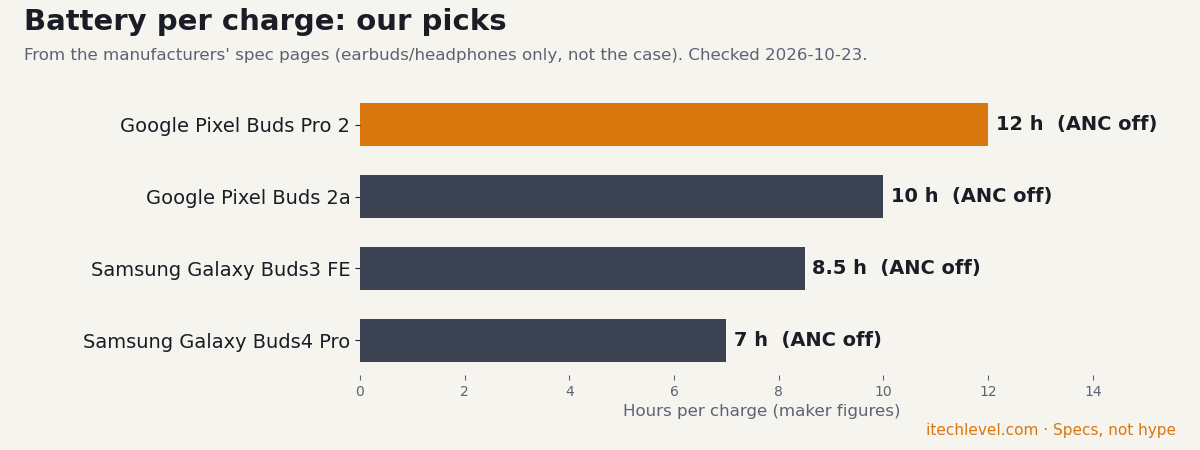
| Samsung Galaxy Buds4 Pro | ANC on: 6 h ANC off: 7 h with case: 26 (ANC on) / 30 (ANC off) | Not stated | Not stated | Bluetooth 6.1 | weight, codecs, latency, multipoint |
| Google Pixel Buds Pro 2 | ANC on: 8 h ANC off: 12 h with case: 30 (ANC on) / 48 (ANC off) | 4.7 g | Not stated | Bluetooth 5.4 | codecs, multipoint, latency |
| Google Pixel Buds 2a | ANC on: 7 h ANC off: 10 h with case: 20 (ANC on) / 27 (ANC off) | 4.7 g | Not stated | Bluetooth 5.4 | codecs, multipoint, latency |
| Samsung Galaxy Buds3 FE | ANC on: 6 h ANC off: 8.5 h with case: 24 (ANC on) / 30 (ANC off) | 5 g | SSC, AAC, SBC | Bluetooth 5.4 | latency, multipoint |
Our verdict
Pixel Buds work well with Samsung phones. Install the Pixel Buds app and you get noise cancelling, custom controls, multipoint and Find Hub. You lose the Pixel-only extras: the low-latency gaming mode, Super Wideband and Clear Calling. If you already own them, there’s no reason to replace them. If you’re buying for a Galaxy phone and care about mobile gaming or Samsung’s own features, the Galaxy Buds 4 Pro or Buds 3 FE are the better match.
Frequently asked questions
Do Pixel Buds work with Samsung phones?
Yes. They pair over Bluetooth with any Galaxy phone, and the Pixel Buds app from the Play Store gives you noise cancelling, touch-control settings, multipoint and Find Hub. A few features, like the gaming mode, need a Pixel.
Do I need an app for Pixel Buds on a Samsung phone?
For basic listening, no. To change settings such as noise cancelling and touch controls, install the Google Pixel Buds app from the Play Store, as Google recommends for non-Pixel Android phones.
What Pixel Buds features don’t work on Samsung?
The low-latency gaming mode and Bluetooth Super Wideband need a Pixel 8 or newer on Android 14 or later, and Clear Calling needs a Pixel 7 or newer.
Do Pixel Buds sound worse on a Samsung phone?
No. They use standard Bluetooth codecs (SBC and AAC, plus LC3 on the Pro 2), so the sound is the same. You just can’t use Samsung’s 24-bit UHQ mode, which only works with Galaxy Buds.
Should I get Pixel Buds or Galaxy Buds for a Samsung phone?
Galaxy Buds, if you’re buying new: they add Gaming mode, Auto Switch between Galaxy devices and 24-bit UHQ on compatible phones. Pixel Buds are still a good choice if you own them or may switch to a Pixel.
Get the Spec Check
One email every Monday: the spec trap of the week, a deal check before you buy, and the new guides. Plus our free GPU wattage cheat sheet.
One email a week, unsubscribe any time. How we use your email.