iTech Level is reader-supported: we may earn a commission when you buy through our links, at no extra cost to you. As an Amazon Associate, iTech Level earns from qualifying purchases. Affiliate disclosure
The best laptop for streaming on Twitch or YouTube is an NVIDIA RTX gaming laptop, because its built-in NVENC encoder handles the stream so your game keeps running smoothly. For streaming new games at high settings, the Lenovo Legion Pro 5i with an RTX 5070 Ti is the sweet spot, with an Ethernet port for a stable connection. On a budget, the Lenovo LOQ 15 (RTX 5060) has the same latest-generation encoder for much less. Add a USB microphone: it matters more to viewers than an extra few frames.
Check the Legion Pro 5i (RTX 5070 Ti) on Amazon →
How we put this together: this guide is based on NVIDIA’s and OBS’s documentation, manufacturers’ specifications and published reviews (linked below). It is not based on hands-on testing by iTech Level. See how we choose products.
What makes a laptop good for streaming
- A hardware encoder. NVIDIA describes NVENC as “a physical section of our GPUs that is dedicated to encoding only,” so the game and other programs keep running normally, unlike encoding on the CPU with x264, which can cause stutter. NVIDIA recommends NVENC H.264 for Twitch and NVENC AV1 for YouTube on RTX 40 and 50 series cards, and says AV1 on RTX 50 series is about 43% more efficient than H.264 (NVIDIA).
- A strong graphics card for the game itself. Streaming and playing on one laptop means the game gets the rest of the GPU, so buy for the games you play.
- Ethernet. A wired connection is steadier than Wi-Fi for a long live stream. NVIDIA suggests setting your bitrate to about 75% of your available upload speed.
- Good audio and video. Laptop webcams and microphones are basic, so most streamers add a USB mic and webcam. On RTX laptops, the free NVIDIA Broadcast app can remove background noise and blur or replace your background (NVIDIA).
OBS Studio, the popular free streaming app, supports Windows 10 and 11, macOS 13 and newer, and Linux (OBS).
Best laptops for streaming compared
| Laptop | Best for | Graphics (power) | Key extras | Buy |
|---|---|---|---|---|
| Lenovo Legion Pro 5i Gen 10 (RTX 5070 Ti) | Best for most streamers | RTX 5070 Ti (140 W) | 2.5K OLED, Ethernet, Thunderbolt 4 | Check price |
| Lenovo Legion Pro 7i Gen 10 (RTX 5080) | Demanding games at high settings | RTX 5080 (175 W) | 240Hz OLED | Check price |
| Lenovo LOQ 15 Gen 10 (RTX 5060) | Best on a budget | RTX 5060 | Ryzen 7 250, 16GB | Check price |
| Apple MacBook Pro 14 (M5 Pro) | Mac streamers and creators | Apple M5 Pro | HDMI, SD slot, long battery | Check price |
The best laptops for streaming in 2026
1. Lenovo Legion Pro 5i Gen 10 (RTX 5070 Ti): best for most streamers
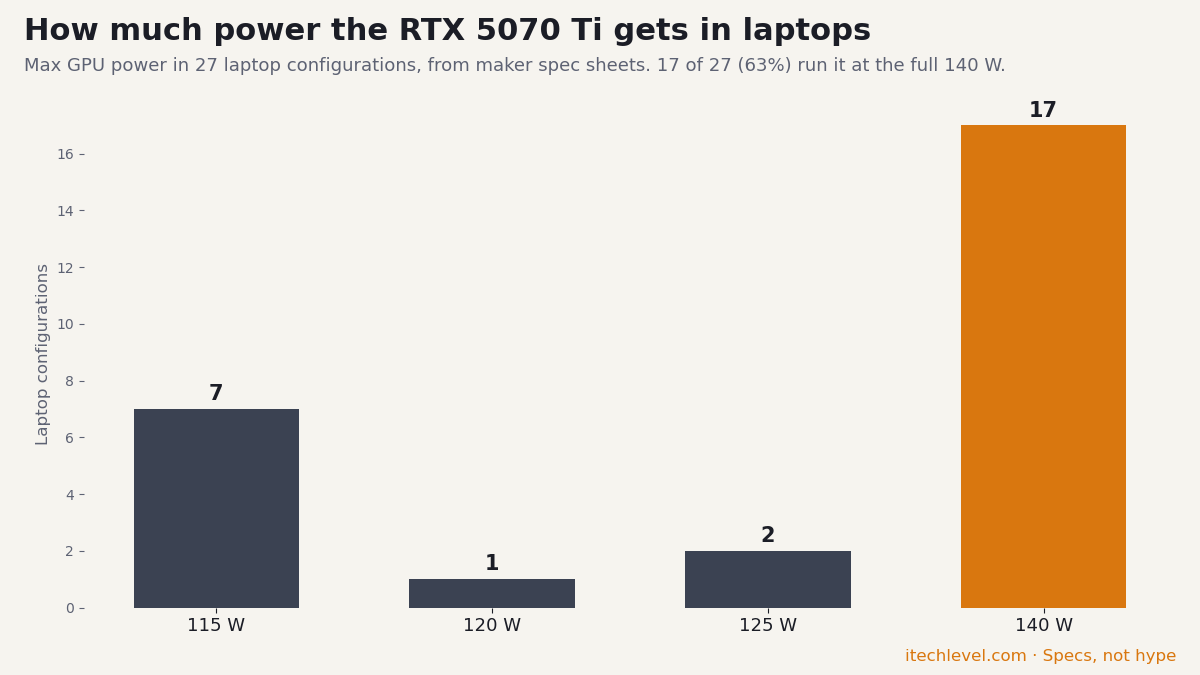
The RTX 5070 Ti runs at the full 140 W in the Legion Pro 5i, with 12GB of video memory and NVIDIA’s latest NVENC encoder, alongside a 16-inch 2.5K OLED screen. Ports include Ethernet, Thunderbolt 4 and HDMI, so you can wire up a stable connection, a capture card or a second monitor for your chat and OBS. In Notebookcheck’s testing of this chassis, the 5070 Ti was up to 25% faster in games than the RTX 5070. See our best RTX 5070 Ti and 5080 laptops. Good to know: at about 2.3 kg it’s a desk laptop.
Check the Legion Pro 5i (RTX 5070 Ti) on Amazon →
For that second screen, a portable monitor travels with the laptop: UPERFECT’s GR16CQ is a 16-inch 2560×1600 display at 240Hz that weighs 1.6 lb and connects over USB-C or mini HDMI. We found no independent lab tests of it, so this is based on the maker’s specs.
Check the UPERFECT GR16CQ (16-inch, 240Hz) at UPERFECT →
2. Lenovo Legion Pro 7i Gen 10 (RTX 5080): for demanding games
If you stream the newest games at high settings, the extra power helps the game keep its frame rate while you broadcast. The Legion Pro 7i runs its RTX 5080 (16GB) at the full 175 W next to an Intel Core Ultra 9 275HX, with a 240 Hz OLED screen; Notebookcheck rates it 88% (Notebookcheck). Good to know: it needs a 400 W power brick, so it’s firmly a desk machine.
Check the Legion Pro 7i on Amazon →
3. Lenovo LOQ 15 Gen 10 (RTX 5060): best on a budget
Budget RTX 50 series laptops have the same generation of NVENC encoder as the expensive ones, so stream quality doesn’t drop with the price; what you give up is game performance. The LOQ 15 Gen 10 with an RTX 5060, a Ryzen 7 250 and 16GB of DDR5 is our top pick in the gaming laptops under $1,200 guide, and it’s a good fit for streaming esports titles like Valorant or Fortnite. Good to know: turn game settings down a notch while streaming newer games.
Check the LOQ 15 (RTX 5060) on Amazon →
4. Apple MacBook Pro 14 (M5 Pro): for Mac streamers and creators
If you stream creative work, podcasts or “just chatting” rather than PC games, a MacBook Pro is quiet, has a bright XDR display, HDMI and an SD card slot, and lasts far longer on battery than a gaming laptop. OBS Studio runs on macOS 13 and newer. Good to know: far fewer games run on Mac, and NVIDIA Broadcast is Windows and RTX only. Our MacBook guide compares the models.
Check the MacBook Pro 14 (M5 Pro) on Amazon →
OBS settings to start with on an RTX laptop
- Encoder: NVIDIA NVENC H.264 for Twitch; NVENC AV1 for YouTube.
- Rate control: CBR.
- Preset: P6: Slower (Better Quality).
- Keyframe interval: 2.
- Bitrate: about 75% of your upload speed.
These are NVIDIA’s recommendations from its broadcasting guide; adjust from there for your connection and game.
Our verdict
For streaming games, buy an NVIDIA RTX laptop so the NVENC encoder can handle the stream. The Legion Pro 5i with an RTX 5070 Ti is the best balance of power, ports and price; the Legion Pro 7i with an RTX 5080 is for demanding games at high settings; and the LOQ 15 with an RTX 5060 streams just as cleanly for less. If you stream creative work on a Mac, the MacBook Pro M5 Pro is the quiet option. Whatever you buy, put money aside for a USB microphone.
Frequently asked questions
What is the best laptop for streaming?
An NVIDIA RTX gaming laptop, such as the Lenovo Legion Pro 5i with an RTX 5070 Ti. Its NVENC encoder handles the stream separately from the game, and it has Ethernet for a stable connection.
Can you stream on a gaming laptop?
Yes. RTX gaming laptops include NVIDIA’s NVENC encoder, a dedicated part of the GPU that encodes the stream so your game and other apps keep running normally.
What OBS settings should I use on an RTX laptop?
NVIDIA recommends NVENC H.264 for Twitch or NVENC AV1 for YouTube, CBR rate control, the P6 preset, a keyframe interval of 2, and a bitrate of about 75% of your upload speed.
Do I need an expensive laptop to stream?
No. Budget RTX 50 series laptops like the LOQ 15 with an RTX 5060 have the same generation of NVENC encoder as pricier models. You need more graphics power only to play demanding games at high settings while streaming.
Can you stream from a MacBook?
Yes. OBS Studio supports macOS 13 and newer, and a MacBook Pro works well for creative, podcast and chat streams. It’s a weaker choice for streaming PC games, since far fewer run on Mac.