iTech Level is reader-supported: we may earn a commission when you buy through our links, at no extra cost to you. As an Amazon Associate, iTech Level earns from qualifying purchases. Affiliate disclosure
Counter-Strike 2 is light on graphics but hungry for frame rate, and most pros play it at low resolutions, so the processor and the screen matter more than the graphics card. The best value laptop for CS2 is the 2026 Lenovo LOQ 15: an 8-core Ryzen 7 250, a full-power RTX 5060 and a 165Hz screen. For the most frames, the ASUS ROG Strix G16 adds a 16-core Intel HX processor. Whatever you buy, plan to plug in a 240Hz monitor at home if you play seriously.
Check the Lenovo LOQ 15 (RTX 5060) on Amazon →
How we put this together: this guide is based on Valve’s requirements on Steam, PCGamingWiki’s documentation of CS2’s settings, ProSettings.net’s data on the settings of 946 professional players, manufacturers’ specifications and retailer listings checked on October 12, 2026. It is not based on hands-on testing by iTech Level. Prices change often. See how we choose products.
CS2 system requirements
Valve’s minimum requirements on Steam are low: Windows 10, a processor with four threads (an Intel Core i5-750 or better), 8GB of memory, a DirectX 11 graphics card with 1GB of video memory, and 85GB of storage. Valve doesn’t list a recommended tier. CS2 runs on Windows and Linux, but not on macOS, so MacBooks are out.
Those numbers get the game running, not running well. Competitive players want frame rates well above their screen’s refresh rate, and CS2 allows it: gameplay is capped at 400 FPS by default, and the fps_max console command raises that to 1,000 or removes the cap (PCGamingWiki). The only built-in upscaling is FSR 1, so DLSS doesn’t help here either.
What pros play at, and why it matters for your laptop
ProSettings.net tracks the settings of 946 professional CS2 players. Only 13% of them play at 1920×1080; most use a lower, squarer 4:3 resolution, usually stretched to fill the screen (ProSettings.net, October 2026):
| Resolution | Share of pros | Pixels per frame, vs a 1920×1200 laptop screen |
|---|---|---|
| 1280×960 (4:3) | 53% | 1.23 million (53%) |
| 1024×768 (4:3) | 15% | 0.79 million (34%) |
| 1920×1080 (16:9) | 13% | 2.07 million (90%) |
| 1280×1024 (5:4) | 6% | 1.31 million (57%) |
| 1152×864 (4:3) | 5% | 1.00 million (43%) |
The pixel comparison is our own arithmetic: most gaming laptops now have 1920×1200 screens (2.30 million pixels). At the most popular pro resolution, the graphics card draws about half as many pixels per frame. That’s why a mid-range RTX 5060 is plenty for CS2, and why the processor, which has to prepare every one of those hundreds of frames a second, decides how high your frame rate goes. If you play at your screen’s native resolution instead, a faster GPU starts to matter again.
What matters in a CS2 laptop
- A fast processor. At low resolutions, CS2 frame rates depend heavily on the CPU. Intel’s HX chips and AMD’s 8-core Ryzen chips are the ones to look for.
- A high-refresh screen. ProSettings recommends at least a 240Hz monitor for serious players. Most affordable gaming laptops have 144–180Hz screens; 240Hz laptop screens are mostly on pricier models.
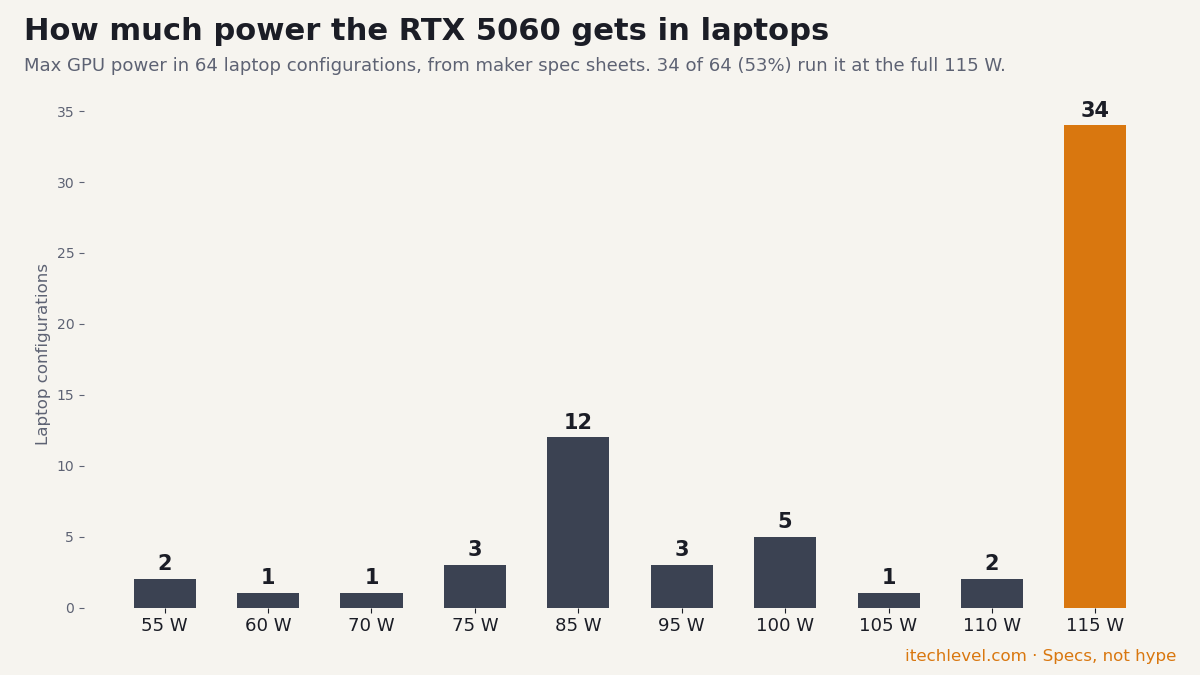
- An RTX 5050 or 5060 is enough. You don’t need an RTX 5070 for CS2 unless you also play heavier games. Do check the wattage in our laptop GPU power database.
- 16GB of memory in two sticks. Dual-channel memory helps CPU-limited games like CS2.
- Plug in to play. On battery, gaming laptops cut processor and GPU power, and frame rates drop.
Best laptops for CS2 compared
| Laptop | Best for | Processor | Screen | Buy |
|---|---|---|---|---|
| Lenovo LOQ 15 (15AHP11, 2026) | Best value | Ryzen 7 250 (8 cores), RTX 5060 at 115 W | 15.3″ 1200p, 165Hz | Check price |
| ASUS ROG Strix G16 (2025) | Most CPU power | Core i7-14650HX (16 cores), RTX 5060 at 115 W | 16″ 1200p, 165Hz | Check price |
| Lenovo Legion Pro 5i Gen 10 (240Hz IPS) | 240Hz built in | Core Ultra 7/9 HX, RTX 5060 or 5070 at 115 W | 16″ 2560×1600, 240Hz | Check price |
The best laptops for CS2 in 2026
1. Lenovo LOQ 15 (2026): best value
The 2026 LOQ 15 gets the CS2 priorities right for the money. Its AMD Ryzen 7 250 has 8 cores, and Lenovo’s spec sheet lists the RTX 5060 at a full 115 W, far more graphics power than CS2 needs. The 15.3-inch 1920×1200 screen runs at 165Hz, and the whole laptop weighs 4.6 lb, light enough to carry to a LAN.
Good to know: it ships with a single 16GB memory stick. Add a matching second stick for dual-channel memory, which is one of the cheapest frame-rate upgrades in a CPU-limited game like CS2.
Check the Lenovo LOQ 15 (RTX 5060) on Amazon →
2. ASUS ROG Strix G16 (2025): most CPU power
If you want the highest frame rates, the processor is where to spend, and the Strix G16 (G615JMR) has the strongest one here: a 16-core Intel Core i7-14650HX. It pairs that with an RTX 5060 at the full 115 W (100 W plus 15 W of Dynamic Boost, from ASUS’s official list), 16GB of DDR5, a 1TB SSD and a 16-inch 1920×1200 screen at 165Hz.
Good to know: HX processors use a lot of power, so expect short battery life. It’s a laptop to play plugged in, which is how you should play CS2 anyway.
Check the ROG Strix G16 (RTX 5060) on Amazon →
3. Lenovo Legion Pro 5i Gen 10 (240Hz IPS): a 240Hz screen built in
If you’ll play CS2 mostly on the laptop’s own screen, a 240Hz panel is worth having. Lenovo sells the Legion Pro 5i Gen 10 with a 16-inch 2560×1600 IPS screen at 240Hz (or a 165Hz OLED), Intel Core Ultra HX processors and an RTX 5060 or 5070 at a full 115 W (Lenovo PSREF). Choose the 240Hz IPS version; the OLED’s 165Hz is the slower panel for CS2.
Good to know: 240Hz gaming laptops mostly cost $2,000 or more, and some listings add extra memory at a markup. Check the refresh rate and the seller on each listing. A 240Hz monitor plus one of the cheaper picks above usually costs less.
See Legion Pro 5i Gen 10 listings on Amazon →
Going the monitor route? UPERFECT’s GR16CQ is a portable 16-inch 2560×1600 monitor at 240Hz. It weighs 1.6 lb and connects over USB-C or mini HDMI, so it can travel with the laptop to LAN nights. We found no independent lab tests of it, so this is based on the maker’s specs.
Check the UPERFECT GR16CQ (16-inch, 240Hz) at UPERFECT →
Cheaper options and laptops to skip
- Cheaper: the Acer Nitro V 17 with a 95 W RTX 5060 costs less. It runs CS2 well, but its 6-core Ryzen 5 240 is the weakest processor here. See our best gaming laptops under $1,200 and cheapest gaming laptops.
- Skip: laptops with 8GB of memory or a single-channel stick you can’t add to, and very low-power RTX models such as MSI’s Cyborg 15 and 17 B2RW (RTX 5060 at 55 W).
- Skip: MacBooks, since CS2 has no macOS version.
Lag a faster laptop won’t fix
In an online shooter like Counter-Strike 2, high ping or packet loss feels like lag even at 240 frames per second, and no graphics chip fixes it. Start with the free fixes: plug in an Ethernet cable (or sit closer to the router) and pick the nearest server region. If your ping is still high because of the route your connection takes to the game’s servers, a game booster can help: GearUP sends game traffic over its own network routes to cut ping and packet loss. It’s a paid subscription with a 7-day money-back guarantee, so you can compare it against your own ping before you commit. We haven’t measured it ourselves.
Our verdict
For CS2, buy the processor and the screen, not the graphics card. The 2026 Lenovo LOQ 15 is the best value, with an 8-core Ryzen, a full-power RTX 5060 and a 165Hz screen. The ASUS ROG Strix G16’s 16-core HX processor gives the most frames. If you want 240Hz built in, look for the Legion Pro 5i Gen 10 with the 240Hz IPS screen, or add a 240Hz monitor at home. To hear footsteps clearly, pair it with good headphones: see our best headphones for footsteps.
Frequently asked questions
What laptop do I need for CS2?
Valve’s minimum is a four-thread processor, 8GB of memory and a DirectX 11 graphics card with 1GB of video memory. For smooth competitive play, look for an 8-core or HX processor, 16GB of memory in two sticks, an RTX 5050 or 5060, and a 144Hz or faster screen.
Is CS2 CPU or GPU heavy?
At the low resolutions most competitive players use, CS2 leans on the processor. ProSettings.net found that 53% of 946 pros play at 1280×960, about half the pixels of a 1920×1200 laptop screen, which leaves the graphics card with less work.
Is an RTX 5050 laptop good for CS2?
Yes. CS2 is light on graphics, so an RTX 5050 laptop runs it at high frame rates, especially at lower resolutions. A faster processor will usually help more than a faster GPU.
Do I need a 240Hz laptop for CS2?
Not to play, but competitive players benefit. ProSettings.net recommends at least a 240Hz monitor for serious play. Most affordable laptops have 144–180Hz screens, so a 240Hz external monitor is often the cheaper upgrade.
Can you play CS2 on a MacBook?
No. CS2 is available on Windows and Linux only; Valve doesn’t offer a macOS version.