iTech Level is reader-supported: we may earn a commission when you buy through our links, at no extra cost to you. As an Amazon Associate, iTech Level earns from qualifying purchases. Affiliate disclosure
For Blender, the graphics chip matters more than anything else, because Cycles renders on the GPU. In Blender’s own benchmark database, a laptop RTX 5070 renders about 2.3 times faster than a MacBook Air M5, and an RTX 5090 laptop more than 4.5 times faster. Our pick for most Blender users is the ASUS ROG Strix G16 (2025) with an RTX 5070. Step up to an RTX 5080 laptop if your scenes need more than 8GB of video memory. On a Mac, only the MacBook Pro with M5 Max plays in the same league.
Check the ROG Strix G16 (RTX 5070) on Amazon →
How we put this together: the rendering scores below come from Blender Open Data, Blender’s public benchmark database, read on October 9, 2026. Laptop specs come from manufacturers and our laptop GPU power database. It is not based on hands-on testing by iTech Level.
Blender render scores for laptop GPUs and Apple chips
Blender Open Data collects results from the Blender Benchmark, which renders a set of Cycles scenes and reports a score: higher is faster. The table shows the median score per chip in Blender 4.5, using OptiX for NVIDIA GPUs and Metal for Apple chips, with the number of results behind each median (Blender Open Data).
| Chip | Median score (Blender 4.5) | Results | Video memory | vs MacBook Air M5 |
|---|---|---|---|---|
| RTX 5090 Laptop | 7,891 | 153 | 24GB | 4.6x |
| Apple M5 Max (40-core GPU) | 7,065 | 4 | Shared, up to 128GB | 4.1x |
| RTX 5080 Laptop | 6,517 | 250 | 16GB | 3.8x |
| Apple M4 Max (40-core GPU) | 5,267 | 124 | Shared | 3.0x |
| RTX 5070 Ti Laptop | 4,970 | 216 | 12GB | 2.9x |
| RTX 5070 Laptop | 4,014 | 231 | 8GB | 2.3x |
| Apple M5 Pro (20-core GPU) | 3,673 | 3 | Shared | 2.1x |
| RTX 5060 Laptop | 3,494 | 302 | 8GB | 2.0x |
| RTX 5050 Laptop | 2,963 | 145 | 8GB | 1.7x |
| Apple M4 Pro (20-core GPU) | 2,568 | 123 | Shared | 1.5x |
| Apple M5 (10-core GPU, MacBook Air) | 1,734 | 33 | Shared | 1.0x |
Scores read October 9, 2026. “vs MacBook Air M5” is our calculation from the medians. Video memory figures for NVIDIA are the laptop GPUs’ standard sizes; Apple chips share memory between CPU and GPU.
Three things to read from this. First, laptop GPU medians mix every power level, so a full-power RTX 5070 will score above its median and a low-power one below it; check the wattage in our GPU power database. Second, the M5 Max and M5 Pro medians rest on only a handful of results so far, so treat them as early numbers; the newer Blender 5.0 data, with even fewer results, shows a similar order. Third, each step up in the RTX line gives a big jump: the RTX 5070 Ti is about 24% faster than the RTX 5070, and the RTX 5080 about 31% faster than the 5070 Ti.
What Blender actually needs
- Memory: Blender recommends 32GB of RAM (8GB minimum) and a GPU with 8GB of video memory (Blender). Many laptops ship with 16GB, so check that the RAM can be upgraded.
- Video memory decides how big a scene can be. When a GPU render runs out of VRAM, it fails or slows down badly. 8GB is fine for learning and small scenes; heavy scenes with lots of textures, simulations or high-poly assets are where 12GB, 16GB or 24GB pay off. Apple’s shared memory is the exception: an M5 Max can use most of its large memory pool for the GPU.
- Mac requirements: Blender 5.0 and later need an Apple silicon Mac on macOS 13 or later; Intel Macs are limited to Blender 4.5 LTS (Blender).
- Screen and keyboard: a 16-inch screen and a numeric keypad (for 3D view shortcuts) make modeling easier; otherwise turn on Blender’s “Emulate Numpad” setting.
The best laptops for Blender
1. ASUS ROG Strix G16 (2025), RTX 5070: best for most Blender users
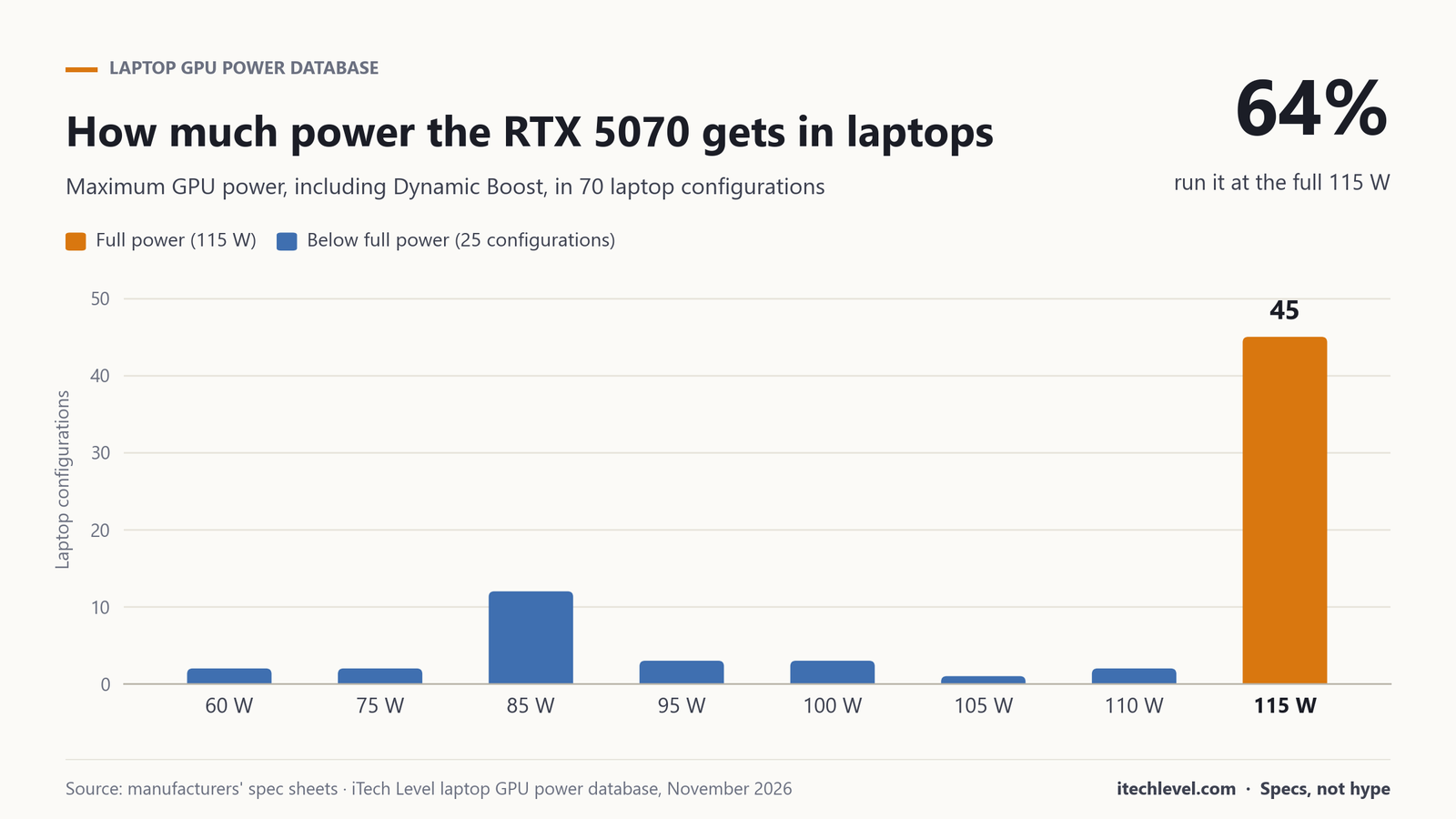
The RTX 5070 gives you a median Blender score of about 4,000, more than double a MacBook Air M5, at a mid-range price. The Strix G16 version we’d buy has an RTX 5070, a Ryzen 9 9955HX, 16GB of RAM and a 1TB SSD (G614FP-TB94). ASUS runs its RTX 5070 at the full 115 W (ASUS) and adds a MUX switch with Advanced Optimus (ASUS). Plan to upgrade to 32GB of RAM, as Blender recommends. Its limit is the RTX 5070’s 8GB of video memory, so it’s best for learning, modeling and medium-size renders.
Check the ROG Strix G16 (RTX 5070) on Amazon →
2. An RTX 5080 laptop: best for big scenes on Windows
The RTX 5080’s 16GB of video memory is the step that matters most for serious Blender work, and its median score of 6,517 is about 60% above the RTX 5070. Our favorite is the Lenovo Legion Pro 7i Gen 10, which runs it at the full 175 W; see our best RTX 5070 Ti and 5080 laptops for current options and prices. The RTX 5070 Ti (12GB, median 4,970) is the in-between choice if the 5080 is too expensive.
Check the Legion Pro 7i (RTX 5080) on Amazon →
3. MacBook Pro 16 with M5 Max: best Mac for Blender
Apple’s M5 Max with a 40-core GPU has an early median of 7,065 on Metal, between the RTX 5080 and RTX 5090 laptops, though from only four results so far. Its big advantage is memory: the GPU draws on the Mac’s shared memory, so a configuration with 48GB or more can hold scenes that would overflow a 16GB graphics card. It also runs far quieter than a gaming laptop. The 16-inch model with the 40-core M5 Max, 48GB and 2TB is the most expensive option here. The M5 Pro (median 3,673) is a cheaper but much slower option, roughly RTX 5060 level.
Check the MacBook Pro 16 (M5 Max) on Amazon →
4. ASUS ROG Strix SCAR 16, RTX 5090: fastest laptop for Blender
The RTX 5090 laptop GPU tops Blender Open Data’s laptop results with a median of 7,891, and its 24GB of video memory handles the heaviest scenes. Blender is one of the few uses where the RTX 5090’s extra memory clearly earns its price. The Strix SCAR 16 runs it at the full 175 W. Our best RTX 5090 laptops guide compares the alternatives.
Check the ROG Strix SCAR 16 (RTX 5090) on Amazon →
5. On a tight budget: Acer Nitro V 16S AI, RTX 5070
For students learning Blender, a budget RTX 5060 or 5070 laptop such as the Acer Nitro V 16S AI is enough. It runs the GPU at 85 W rather than the full 115 W (Acer), so expect renders a bit below the RTX 5070 median, but still well ahead of any MacBook Air. Add RAM when you can. See our best RTX 5070 laptops for the full comparison.
Check the Acer Nitro V 16S AI on Amazon →
Our verdict
Buy for the GPU. For most people learning or working in Blender, an RTX 5070 laptop such as the ASUS ROG Strix G16 is the sweet spot, with 32GB of RAM added. If your scenes are heavy, the jump to an RTX 5080’s 16GB of video memory matters more than any CPU upgrade. On a Mac, skip the MacBook Air for Cycles work and go for an M5 Max, whose large shared memory is its real strength. And if budget is no object, the RTX 5090 is the fastest laptop chip in Blender’s database.
Frequently asked questions
What is the best laptop for Blender?
For most users, an RTX 5070 laptop such as the ASUS ROG Strix G16 (2025). Its RTX 5070 has a median Blender Open Data score of about 4,000. For heavy scenes, an RTX 5080 laptop with 16GB of video memory is the better choice.
Is a MacBook good for Blender?
A MacBook Pro with M5 Max is, with an early median Blender score of 7,065 and large shared memory. A MacBook Air M5 is fine for learning and modeling, but its median of 1,734 makes it much slower at Cycles rendering than an RTX 5070 laptop.
How much RAM do you need for Blender?
Blender recommends 32GB of RAM, with 8GB as the minimum. It also recommends a graphics card with 8GB of video memory; heavy scenes benefit from 12GB to 24GB.
Is the RTX 5090 worth it for Blender?
For heavy scenes, it can be: it has the highest laptop median in Blender Open Data (7,891) and 24GB of video memory, which lets large scenes render on the GPU. For learning and small projects, an RTX 5070 or 5080 laptop is much better value.
Does Blender use the GPU or the CPU?
Both, but Cycles rendering is far faster on a supported GPU: NVIDIA cards with OptiX, or Apple silicon with Metal. That’s why the graphics chip matters more than the processor when you choose a laptop for Blender.
Get the Spec Check
One email every Monday: the spec trap of the week, a deal check before you buy, and the new guides. Plus our free GPU wattage cheat sheet.
One email a week, unsubscribe any time. How we use your email.